
10 Best Cnc For Beginners in 2026
This post contains affiliate links. As an Amazon Associate, we earn from qualifying purchases.
We chose the Makera Carvera Air Desktop CNC as the best overall for beginners because it includes a true 4th-axis rotary kit for cylindrical projects and automates complex tasks like tool changing. For a powerful value pick, consider the Genmitsu 4040-PRO MAX, while the MAKERA CARVERA Z1 is ideal for easy, guided learning.
Choosing your first CNC router can feel overwhelming with so many specs and a steep learning curve. Your real decision hinges on how much automation you want versus how much you want to learn the fundamentals, and how much dedicated bench space you can commit.
This guide is based on researching specifications, manufacturer data, expert round-ups, and patterns in owner feedback. We’ll help you understand the key trade-offs between these ten machines so you can start making with confidence.
Top 10 CNC Machines For Beginners in the Market
Certain content that appears on this site comes from Amazon. This content is provided "as is" and is subject to change or removal at any time.
The Best CNC Machines For Beginners, Reviewed
Makera Carvera Air Desktop CNC
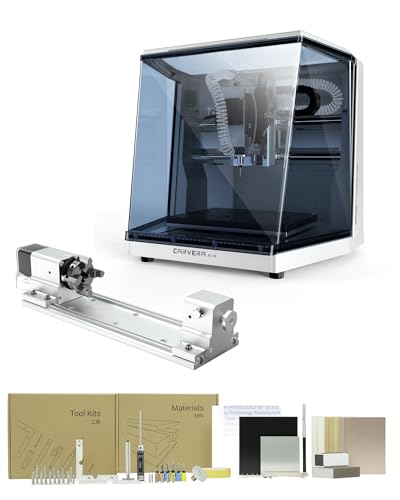
What We Like
- Includes a true 4th-axis rotary kit for cylindrical work
- Automatic tool changer switches tools in 10 seconds
- Auto-probing and leveling for precise calibration
- Closed-loop spindle control for high accuracy
Trade-offs
- Enclosed desktop form factor limits workpiece size
- No physical dimensions or weight provided for planning
- Requires learning integrated CAM software for full use
The inclusion of a true 4th-axis rotary module for simultaneous machining is what sets this desktop CNC apart, letting beginners tackle complex cylindrical carvings and 3D shapes right out of the box. This machine is a smart pick for the newcomer ready to grow, as its automatic tool changer, probing, and leveling automate the fussy setup tasks that often frustrate first-timers. The cross-platform software and WiFi control mean you can run a job from a tablet in the shop, which streamlines the workflow significantly.
The trade-off for this automation and enclosed safety is a compact, desktop-sized work area. You won’t be milling large sign panels here. For a beginner focused on larger, flat projects, the Genmitsu 4040-PRO MAX offers a bigger working area and a powerful spindle. However, it lacks the Carvera Air’s automated tool management and its out-of-the-box 4th axis capability.
Product photos
Genmitsu 4040-PRO MAX CNC Router
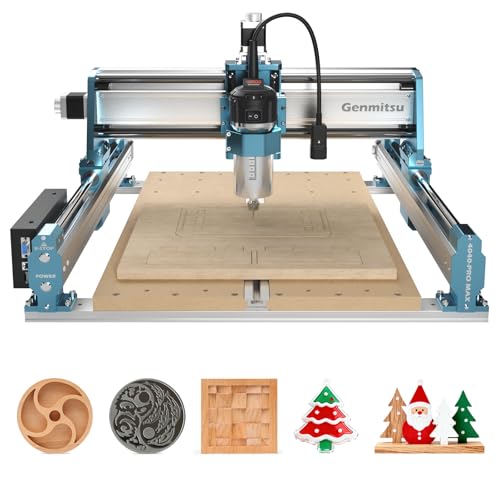
What We Like
- 710W spindle provides superior cutting power
- Reinforced spoilboard with T-track for versatile clamping
- Wireless control support via optional module
- Upgradeable with Y-axis extension and 4th-axis kits
Trade-offs
- 3-inch Z-axis depth limits material thickness
- Optional Wi-Fi module requires separate purchase
The 710W digital display spindle provides the power for wood and metal engraving operations. Its 16 by 16 inch work area is built on modified linear rails and a lead screw, which research mentions reduces vibration for more stable motion during fast work. This combination creates a platform for efficient production, and the included reinforced spoilboard with a T-track offers versatile clamping options from the start.
With a Z-axis travel of just over 3 inches, the machine is not designed for deep carving in thick material. Its design philosophy centers on being a foundational platform. The mainboard supports wireless control with an optional module, and it is compatible with numerous upgradeable accessories like a Y-axis extension and a 4th-axis rotary module, allowing the machine to be tailored to evolving needs.
MAKERA CARVERA Z1 Cnc
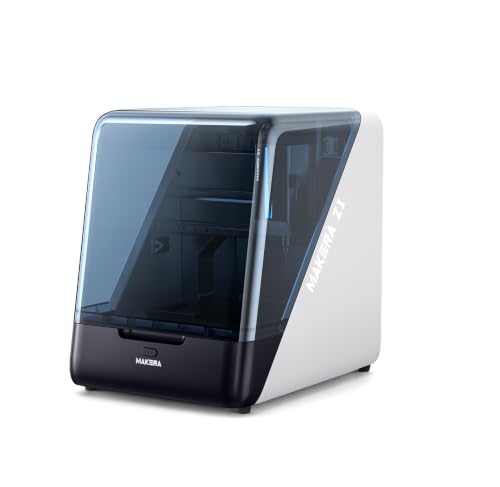
What We Like
- Enclosed design with dust management for a cleaner workspace
- Integrated camera allows monitoring cuts in real time
- Works with Makera CAM/app and tutorials for guided learning
- Handles soft metals like aluminum for versatile projects
Trade-offs
- Weighs 39.7 pounds, requiring a sturdy, dedicated bench space
- Desktop size limits project scale compared to larger machines
The Makera Carvera Z1 is built to skip the complex setup that frustrates most new CNC users. Its enclosed design and integrated dust management mean you can run it on a workbench without covering everything in chips, while the built-in camera lets you watch the job without opening the door. This focus on a clean, visible process, paired with the guided Makera CAM software and project library, is why it’s the pick for anyone who wants to start making actual parts, not just wrestling with software and machine calibration. It turns the initial learning phase from a trial-and-error grind into a structured, productive experience.
You trade some raw work area for that beginner-friendly ecosystem. The ±0.05mm machining accuracy and ability to cut aluminum are perfectly capable for prototypes, models, and custom parts, but the machine’s compact footprint means you won’t be tackling large panels. If your ambition quickly outgrows the desktop size, the natural next step within the same ecosystem would be a model like the Makera Carvera Air. For a beginner, however, the Z1’s real strength is giving you a capable, contained system that builds confidence from the first cut.
Product photos
Genmitsu 3018-PRO CNC Router Kit
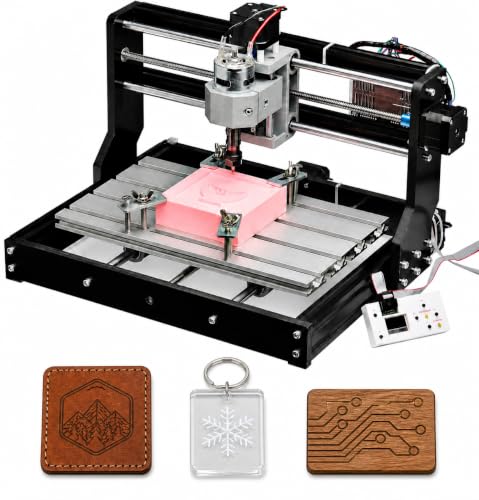
What We Like
- Complete starter kit with offline controller
- Compact size fits on a desktop
- Works with wood, plastic, and soft aluminum
- Large online GRBL community for support
Trade-offs
- 45 mm Z-axis limits material thickness
It carves wood, acrylic, and even soft aluminum, giving you room to experiment. The included offline controller means you can run a job without a computer tethered, which simplifies the setup. For someone just figuring out G-code and feed rates, that approachable flexibility is the whole point.
You trade size for simplicity here. The 45-millimeter Z-axis travel means you’re working with thinner stock, and the maximum speed of 78 inches per minute won’t win any contests. It’s a learner’s platform. When your projects require a larger footprint, you would move to a machine with greater dimensions, like the Genmitsu 4040-PRO MAX. But as a first step into CNC, this kit gets you making chips with minimal fuss.
SainSmart Genmitsu 4040-PRO MAX CNC
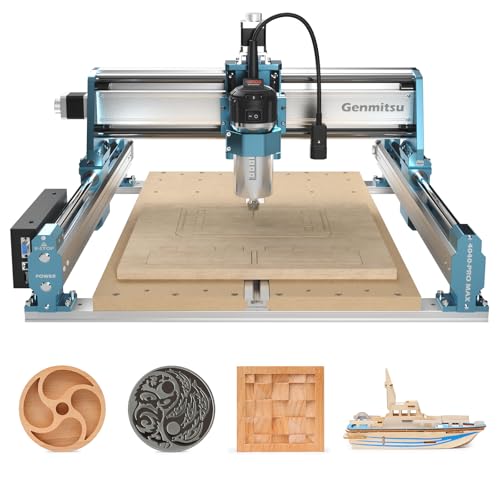
What We Like
- High 100mm pass height for tall stock
- Powerful 710W spindle for demanding cuts
- Reinforced spoilboard prevents sagging
- T-track integrated for versatile clamping
Trade-offs
- At 52.9 lb, it's a substantial bench-top unit
- Enhanced structure focuses on Z-height, not X-Y expanse
A 100mm pass height is the standout feature here. It lets you tackle thicker blocks of wood, dense foam, or carved blanks that shorter machines simply can’t reach. This makes the 4040-PRO MAX a fit for beginners whose projects involve tall materials, like sign carving or custom knobs. They also benefit from the stability provided by its linear guideways and reinforced bed to make clean, deep cuts.
You trade a larger working surface for that vertical capacity, so it’s not the pick for sprawling flat engraving. Compared to something like the more compact Genmitsu 3018-PRO, this machine gives up portability for a more rigid frame and a spindle with enough grunt to maintain precision when you’re pushing that extra height.
Lunyee 3018 PRO MAX CNC Machine
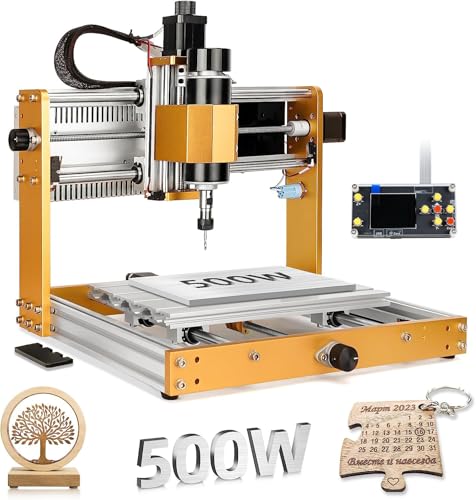
What We Like
- All-metal frame for long-term durability
- 80mm Z-axis travel for thicker workpieces
- Comprehensive safety system with limit switches
Trade-offs
- 28.7 lb weight demands a sturdy, permanent bench
- 300mm x 180mm bed limits project size significantly
A 500W spindle in a machine this size means you can confidently tackle harder materials like aluminum, not just wood and plastic. That all-metal construction is the real foundation here, it eliminates the flex and wobble you get with plastic parts, so your cuts stay accurate even when you push it. For a beginner wanting to learn real CNC fundamentals on a solid platform that won’t feel like a toy, this compact build is a strong starting point. It’s for the hobbyist who values a rigid machine for precise small parts over a large working area.
You will feel the size constraint quickly if your projects grow beyond small plaques or PCB boards. The work area is genuinely compact. When you’re ready to step up in scale, a model like the Genmitsu 4040-PRO MAX offers nearly double the working area and a more powerful spindle. That upgrade also demands more space and a higher budget. For now, the Lunyee gets you into the game with a capable, secure machine that teaches you the ropes on a durable frame.
WolfPawn 4040-PRO CNC Router Machine

What We Like
- Comes as a complete, ready-to-use kit with all necessary tools
- GRBL control via USB is widely supported and beginner-friendly
- Hybrid V-wheel and linear rail design offers solid entry-level stability
- 500W spindle with 52mm/65mm clamps allows for future upgrades
Trade-offs
- Z-axis travel is limited to 2.9 inches, restricting material thickness
A 15.7-inch square work area and a complete accessory kit mean you can unbox this machine and be making chips the same afternoon, without hunting for extra parts. That full package is precisely why it stands out for a beginner. The pre-wired components and straightforward GRBL control with Candle software remove major technical hurdles, letting you focus on learning the craft instead of assembling a puzzle of components. It’s the CNC you buy when you want a single purchase to get you started.
This desktop CNC router arrives as a complete kit with pre-wired parts and a full accessory set, so you can assemble it and start a project without hunting for extra components. Its 500-watt spindle and GRBL control platform work for cutting materials like metal and acrylic. The machine’s structure uses a 2GT belt and V-wheel system on the X and Y axes, which provides stability for general engraving and milling tasks within its 15.7-inch square work area.
AnoleX 4030-Evo Ultra 2 CNC Router

What We Like
- Grbl_ESP32 firmware enables WiFi and advanced feature support
- Dual linear rails and ball screws on all axes
- GRBL_ESP32 firmware enables WiFi control
Trade-offs
- At 83.8 pounds, its weight demands a permanent, sturdy bench
- Router speed adjustment requires manual dial, not software control
- Its industrial construction makes it less portable than lighter units
Dual steel linear guides and ball screws on every axis deliver a rigidity you simply don’t find in beginner machines. That 800W spindle and the Nema 23 motors have the guts to push through aluminum and hardwoods without losing steps. This is why the router feels built for a small shop, not just a hobby desk. It’s for the beginner who values a no-compromise foundation over a quick start. You’re buying a machine you can grow into, with a control board that already supports a rotary axis and closed-loop motors for future upgrades.
Weighing 83.8 pounds, the machine requires a dedicated and stable work surface. Its mass is substantially greater than lighter models such as the 15.3-pound Genmitsu 3018-PRO CNC Router Kit. This heft contributes to its stability during operation.
Product photos
FoxAlien Masuter Pro CNC Router
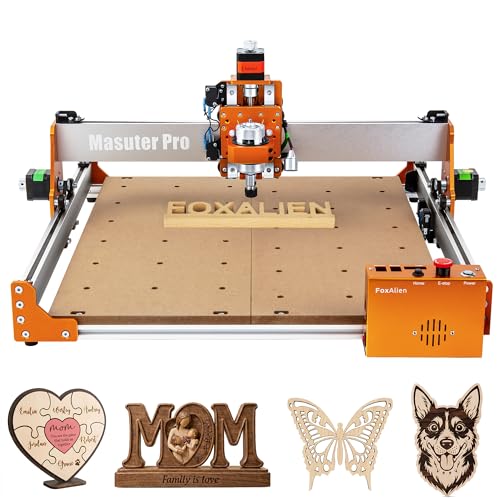
What We Like
- Pre-wired components cut setup to under 15 minutes
- All-metal frame provides a stable, rigid base for cuts
- Two included spindle clamps allow for immediate upgrades
- Dust-proof controller protects electronics in a messy shop
Trade-offs
- The 2.36-inch Z-axis limits stock thickness for 3D carving
- Optional Y-axis extension and 69mm clamp are separate purchases
The FoxAlien Masuter Pro can be assembled in 10 to 15 minutes due to its pre-wired components and largely pre-assembled structure, so a beginner can start a project quickly instead of managing complex wiring. This short setup time is a key advantage for hobbyists who want to begin learning CNC workflows without a lengthy initial build process. Its all-metal framework provides a stable and durable platform for developing skills in feeds, speeds, and CAD/CAM operation.
You trade some raw power and maximum material thickness for that out-of-the-box simplicity. The included spindle options are geared for woods and plastics, not heavy aluminum passes. When your ambitions grow to include deeper carvings or harder metals, you’ll be looking at the upgrade path for a more powerful spindle or a heavier machine like the AnoleX 4030-Evo Ultra 2. For a first CNC, however, the Masuter Pro’s sensible design gets you building confidence right away.
Product photos
FoxAlien Masuter 3S CNC Router
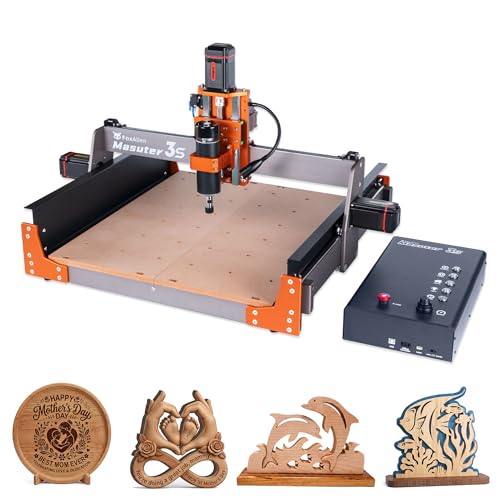
What We Like
- Closed-loop motors eliminate step-loss for reliability.
- Ultra-fine 0.05mm precision from rigid dual linear rails.
- Ready for 4th-axis rotary carving on cylindrical objects.
- Dust-proof controller box with tactile shortcut buttons.
Trade-offs
- At 58.4 pounds, it's a hefty bench-top unit.
- The 400W spindle may struggle with harder metals.
- Maximum Z-axis travel is under four inches.
Powered by closed-loop stepper motors, the FoxAlien Masuter 3S eliminates step-loss during operation, which is a major reliability benefit for users new to CNC who want to avoid mid-job errors. Its construction with reinforced extrusions and dual linear rails on the Z-axis achieves a claimed engraving precision of 0.05mm, supporting work from flat projects to cylindrical carving with an optional rotary module. The machine’s 58.4-pound weight contributes to a stable platform, though it requires a dedicated workspace to accommodate its substantial build.
The trade-off for that stability and closed-loop assurance is a machine that demands a dedicated, sturdy work surface. While its 400W spindle handles wood and plastics capably, stepping up to harder materials might feel like pushing its limits. For users whose projects demand more raw cutting power right out of the gate, the heavier AnoleX 4030-Evo Ultra 2 with its 800W router presents a compelling, more muscular alternative.
Product photos
How We Evaluated CNC Machines For Beginners
Our evaluation relied on comparing manufacturer specifications, documented features, and expert analysis from professional maker communities. We prioritized criteria that directly impact a beginner’s success. These include ease of learning through included software and community support, the rigidity and power of the machine for handling common materials, and the physical footprint and setup complexity for a home workshop. A research-led approach cannot replicate the hands-on feel of cutting different woods or metals. However, it effectively highlights the fundamental capabilities and limitations of each model as reported by experienced users and technical reviews.
What To Look For In CNC Machines For Beginners
Your first CNC should match your project ambitions, available space, and patience for setup. The right machine makes learning rewarding instead of frustrating.
Focus on work area size for your projects, spindle power for your materials, and the learning resources included. A rigid frame and good community support are more valuable than extra features you won’t use yet.
Work Area and Machine Footprint
The work area, measured in X, Y, and Z axes, dictates the maximum size of a single piece you can machine. A compact 300mm x 180mm bed is fine for small signs and plaques, but you’ll need a larger machine for furniture components. Equally important is the machine’s own footprint and weight; a 50-pound unit requires a sturdy, permanent bench, while lighter kits can be stored away. Consider both the cutting space and the physical space the machine will occupy in your shop.
Spindle Power and Z-Axis Travel
Spindle power, measured in watts, determines what materials you can cut effectively and how quickly. A 500W spindle handles wood and plastics well, while a more powerful spindle provides the torque needed for more reliable cuts in soft metals like aluminum. Z-axis travel, the maximum cutting depth, is crucial for 3D carving or machining thick stock. A limit of 45mm restricts you to relatively thin material, while 100mm allows for tall, sculptural projects.
Ease of Setup and Learning Curve
For a beginner, a machine that gets you cutting quickly is paramount. Look for pre-assembled components or clear, documented kits that can be set up in an afternoon. Integrated software suites with tutorials, like those offered by Makera, can significantly shorten the learning curve compared to configuring separate CAD, CAM, and control programs. A large and active user community, such as the GRBL community around many Genmitsu models, is an invaluable resource for troubleshooting and project inspiration.
- Check if the machine requires you to source and install your own control software or if it’s provided.
- Look for machines with auto-leveling or probing features to simplify bed calibration.
- Consider whether you want a fully enclosed machine for dust management or an open frame for easier access.
The best beginner CNC is the one you’ll actually use, not the one with the most impressive specs on paper.
CNC Machines For Beginners Compared
The comparison table below lets you quickly weigh the core specifications and key features across all ten machines.
| Product | Work Area | Spindle Power | Control Software/System |
|---|---|---|---|
| Makera Carvera Air Desktop CNC | N/A | N/A | Makera CAM |
| Genmitsu 4040-PRO MAX CNC Router | 16.1" x 15.9" x 3.0" | 710W | GRBL |
| MAKERA CARVERA Z1 Cnc | N/A | N/A | Makera CAM/APP |
| Genmitsu 3018-PRO CNC Router Kit | 300 x 180 x 45 mm | 710 watts | GRBL (Candle) |
| SainSmart Genmitsu 4040-PRO MAX CNC | N/A | 710W | N/A |
| Lunyee 3018 PRO MAX CNC Machine | 300 x 180 x 80mm | 500W | GRBL |
| WolfPawn 4040-PRO CNC Router Machine | 15.7" x 15.7" x 2.9" | 500W | GRBL (Candle) |
| AnoleX 4030-Evo Ultra 2 CNC Router | N/A | 800W | Grbl_ESP32 (GRBL 1.3a) |
| FoxAlien Masuter Pro CNC Router | 15.75" x 15.75" x 2.36" | N/A | N/A |
| FoxAlien Masuter 3S CNC Router | 15.75" x 15.75" x 3.74" | 400W | N/A |
Frequently Asked Questions
What is the best beginner CNC machine?
The best beginner CNC depends on your priorities. For a fully-featured, automated system that teaches professional 4-axis workflows, the Makera Carvera Air is an excellent choice. If you want the most power for your budget to handle wood and soft metals, the Genmitsu 4040-PRO MAX offers great value. For an absolute newcomer seeking a clean, guided start, the MAKERA CARVERA Z1 simplifies the process with integrated tutorials and dust management.
Is CNC machining a dying trade?
No, CNC machining is not a dying trade. The demand for skilled CNC operators and programmers remains strong in manufacturing, prototyping, and custom fabrication. For hobbyists and small businesses, affordable desktop CNC machines have actually expanded the trade, enabling more people to learn and apply these skills in woodworking, sign-making, and custom part creation.
What is the easiest CNC software for beginners?
Many beginners find integrated software ecosystems, like the CAM and control app provided with Makera machines, to be the easiest starting point because they are designed to work together. For machines using standard GRBL controllers, free and user-friendly options like gSender or Carbide Motion offer a gentler learning curve compared to more advanced, industrial-grade CAD/CAM suites.
How to get into CNC with no experience?
Start with a complete starter kit, like the Genmitsu 3018-PRO, which includes the machine and a basic offline controller. Focus on learning the fundamentals of toolpaths, feeds, and speeds on soft materials like wood or acrylic. Utilize the large online communities and tutorial resources available for popular platforms, and begin with simple 2D engraving projects before attempting complex 3D carving.
Can a beginner CNC machine cut metal?
Yes, many beginner-oriented CNC machines can cut soft metals, particularly aluminum. Success depends heavily on the machine’s rigidity, spindle power, and using the correct cutting tools and speeds. Machines with all-metal frames and more powerful spindles, like the Genmitsu 4040-PRO MAX or the AnoleX 4030-Evo, are better suited for metal work than lighter, less rigid kits.
The Bottom Line
The Makera Carvera Air Desktop CNC is the best overall pick for a beginner ready to invest in a system that automates complex tasks. It handles tool changes and 4-axis rotary carving, offering a direct path to professional-grade results. If your budget is tighter, the Genmitsu 4040-PRO MAX delivers exceptional cutting power and upgradeability. The MAKERA CARVERA Z1 is the clear choice for those who prioritize a clean, guided, and frustration-free first experience.
Before you choose, honestly assess the permanent space you can dedicate to a machine and the thickness of materials you plan to use most often. These two practical constraints will narrow your options faster than any feature list. Ultimately, the right machine is the one that matches your project goals and gets you making things right away.
