
How to Cut a Dado on a Table Saw: The 7-Step Process
This post contains affiliate links. As an Amazon Associate, we earn from qualifying purchases.
To cut a dado on a table saw, you need a dado blade set, the correct throat plate insert for your saw, and strict adherence to safety procedures that differ from standard ripping. The core process involves removing the blade guard and riving knife, installing the dado stack and special insert, setting the exact width and depth, and guiding the workpiece with push sticks. Manufacturer limits are not suggestions, exceeding your saw’s maximum width (which varies by model) or using a prohibited blade type risks immediate tool damage and personal injury.
The 13/16-inch maximum is the limit for saws like the DEWALT DWE7491RS and Bosch 4100, but an older Craftsman model caps you at 1/2 inch. The real guide isn’t a generic tutorial on how to cut a dado on a table saw; it’s your saw’s manual and the specific hardware it requires.
What follows is the physical sequence for how to cut a dado on a table saw: swapping the blade, configuring washers, setting the fence, and making the cut without the safety gear you normally rely on. We’ll also walk through the fallback method for when a dado set isn’t an option.
Key Takeaways
- Check your saw’s manual first for its maximum dado width and diameter. DEWALT and Bosch allow 13/16″, while some Craftsman models limit you to 1/2″.
- The blade guard and riving knife must come off for a dado cut. This trade-off demands rigorous use of push sticks and featherboards.
- Never use a dado stack at a bevel angle. Both Bosch and Delta manuals explicitly prohibit this; the cut must be made at 0 degrees. (DEWALT’s manual does not explicitly address bevel cuts.)
- For stacks over 1/2″ wide, some saws like the Bosch 4100 and GTS1041A require a special washer or clamp kit; the standard arbor nut won’t secure it safely.
- A dado-specific throat plate insert is mandatory. The larger opening prevents binding and supports the workpiece correctly.
The Tools and Terms You Need to Know
A dado is a square-walled channel cut across the wood grain. Its cousin, the groove, runs with the grain. You cut both with the same tool on a table saw when learning how to cut a dado on a table saw: a dado blade set.
You have two main types. A stacked dado blade uses two outer cutters and inner “chipper” blades you add or remove to get the exact width. This is the clean, precise method every major manufacturer designs their saws to accommodate. The other type is a wobble dado, a single blade mounted on a tilted washer that swings side-to-side to create width. It’s less common now because it leaves a rounded bottom and puts uneven stress on the saw’s arbor.
The Sears manual for one model puts it bluntly: “DO NOT use Adjustable or Wobble type dadoes.” Bosch’s manual for the GTS1041A is just as clear.
For many saws, a dado insert or throat plate is essential. The slot in your saw’s standard plate is only wide enough for a single blade. A dado stack needs a wider, specially designed opening. Trying to force the cut through the standard plate can pinch the blades, cause kickback, and likely shatter the plate. (Check your manual; DEWALT, Bosch, and Delta require a special insert.)
Before you start: You will be removing the blade guard and riving knife, eliminating two critical kickback protections. Have multiple push sticks within reach and set up a featherboard to hold the workpiece against the fence. Never let your hands cross the plane of the blade.
What Your Saw’s Manual Actually Says (This Matters)
Your first step is opening your saw’s manual. The limits printed there are based on the physical design of your specific model’s arbor length and motor capacity.
Take maximum width. For most modern contractor saws like the DEWALT DWE7491RS, Bosch 4100, and Delta 36-6022, the hard limit is 13/16 of an inch (20-20.64 mm). But if you own an older Craftsman 137.248830 or a Sears model referenced in manual L0511163, your maximum is only 1/2 inch. Assuming the wider limit can leave the arbor nut barely engaged, a direct path to the stack coming loose at 3,000 RPM.
Diameter is the other big divider. DEWALT, Bosch, and Delta set an 8-inch maximum. Some Craftsman and Sears manuals specify a 6-inch maximum. And Bosch adds a unique minimum: its GTS1041A manual states not to use dado sets smaller than 6 inches in diameter.
| Saw Model (Source) | Max Dado Width | Max Dado Diameter | Wobble Dado Allowed? |
|---|---|---|---|
| DEWALT DWE7491RS | 13/16″ (20 mm) | 8″ (200 mm) | Not explicitly prohibited |
| Bosch 4100 / GTS1041A | 13/16″ | 8″ | No – “Do not use wobble dado.” |
| Delta 36-6022 | 13/16″ (20.64 mm) | 8″ (200 mm) | Not explicitly prohibited |
| Craftsman/Sears (L0511163) | 1/2″ | 6″ | No – “DO NOT use Adjustable or Wobble type dadoes.” |
The manuals also dictate hardware. The Delta manual notes the standard outer arbor flange “cannot be used with certain dado blade combinations.” For the Bosch 4100, if your stack exceeds 1/2 inch in width, the table saw’s inner washer should not be used; instead, the accessory dado washer (included with Bosch Dado Table Insert TS1007) should be used. This is about having enough threaded arbor to properly secure the stack.
The 7-Step Process for a Clean Dado Cut
Once you’ve verified your saw and blade are compatible, the physical process is a strict sequence. Missing a step here doesn’t just ruin a cut; it breaks things.
1. Power Down and Strip the Saw.
Unplug the saw. Remove the standard blade guard, anti-kickback pawls, and riving knife. Lower the riving knife to its lowest position if it doesn’t come off. This exposes the arbor. Take out the standard throat plate.
2. Install the Dado Stack.
Take off the arbor nut and outer washer. Slide your configured dado stack onto the arbor. Here’s the critical check: if your stacked width is over 1/2″, consult your manual. For the Bosch 4100, you’d now use the special clamp assembly from kit TS1006 instead of the arbor nut. For other saws, ensure at least one full thread of the arbor is visible past the nut when it’s tightened. The Craftsman manual emphasizes this point. Tighten the nut or clamp firmly with the wrench.
3. Install and Zero the Dado Insert.
Place the dado-specific throat plate into the table. Most have set screws to adjust their height. You want the insert perfectly flush with the table surface.
4. Raise the Blade and Plunge-Cut the Insert.
With the insert secured, plug the saw back in. Turn it on and slowly raise the spinning dado stack up through the insert, cutting a perfect, zero-clearance slot for your specific width. Turn the saw off and unplug it again.
5. Set the Fence and Blade Height.
Set your fence to the desired position of the dado on your workpiece. The fence must be parallel to the blade. Then, set the blade height. For a through dado (a channel that runs off both ends of the board), the depth is simply the thickness of your mating piece. For a stopped dado, you’ll need to mark start and stop lines on your workpiece and use a sacrificial fence block.
6. Make the Cut with Push Sticks.
Use a featherboard clamped to the table to keep the workpiece tight against the fence. Position a push stick to move the board forward and a second one to keep it down. Start the saw, feed the workpiece steadily, and never let your hands cross over the open blade slot.
7. Return the Saw to Normal.
After the cut, unplug the saw. Remove the dado stack and reinstall your standard blade, washers, riving knife, blade guard, and standard throat plate. The Bosch manual stresses this: “ALWAYS PLACE THE BLADE WASHERS IN THE ORIGINAL POSITIONS.”
The part nobody mentions: That final “return to normal” step is where people get lazy. Leaving the dado insert in place for a regular rip cut creates a huge gap next to the blade. A small offcut can drop in, catch, and become a projectile. It takes two minutes to swap back. Do it every time.
Where Dado Cuts Go Sideways (And How to Avoid It)
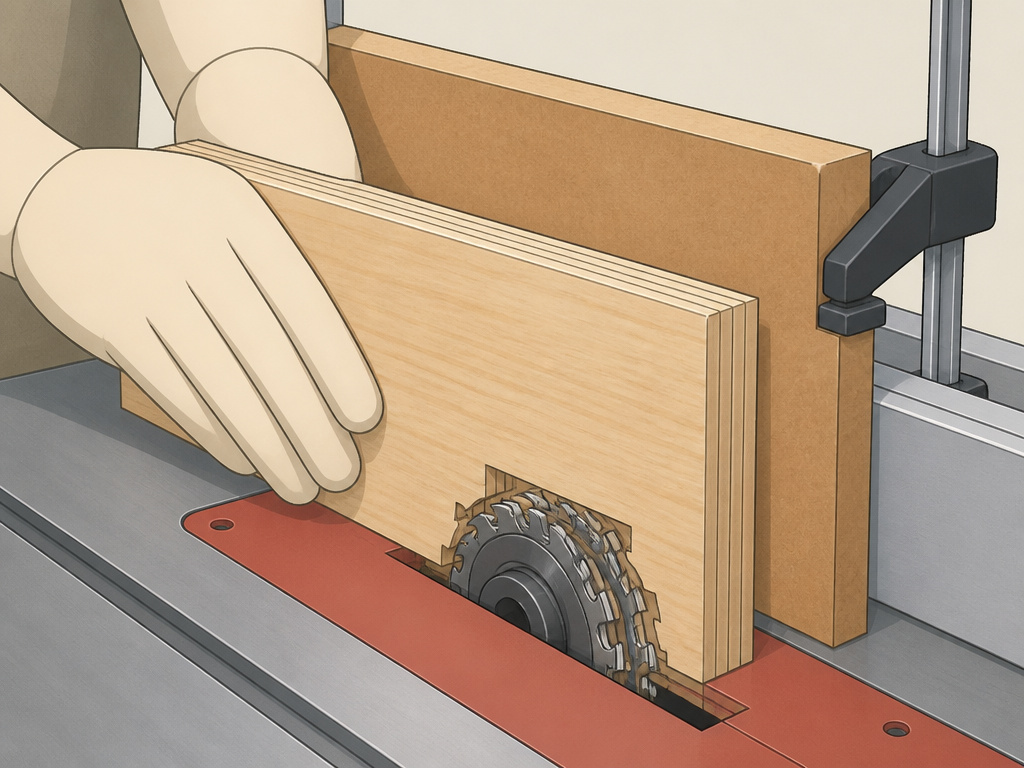
A smooth, square-bottomed dado feels like a win. A chipped, burned, or wandering one is a lesson. These are the usual culprits.
Tear-out on plywood. The outermost veneer layers of plywood are fragile. Cutting across them with a dado stack can splinter the exit side. The fix is simple: put a sacrificial scrap board behind your workpiece. This supports the veneer fibers as the blades exit, leaving a clean edge.
Burning and slow feed. If you smell burning wood, you’re feeding too slowly or the blades are dull. A sharp dado stack should cut cleanly with steady pressure. Burning can also happen if the dado insert is pinching the stack, another reason to have that custom, zero-clearance slot you cut in step 4.
The bevel mistake. You might think tilting the blade to 45 degrees would let you cut a beautiful beveled dado. Don’t. The Delta manual states, “Never attempt to use the dado head in a bevel position.” The Bosch manual agrees.
Inaccurate width. If your final joint is too tight or loose, your setup is off. First, verify your stack configuration. Did you forget a chipper? Use a spacer? Then, make a test cut on scrap and measure the actual slot with calipers. Finally, check that your fence is perfectly parallel to the blade. A fence that toes in or out will create a tapered, ill-fitting dado.
What If You Don’t Have a Dado Blade?
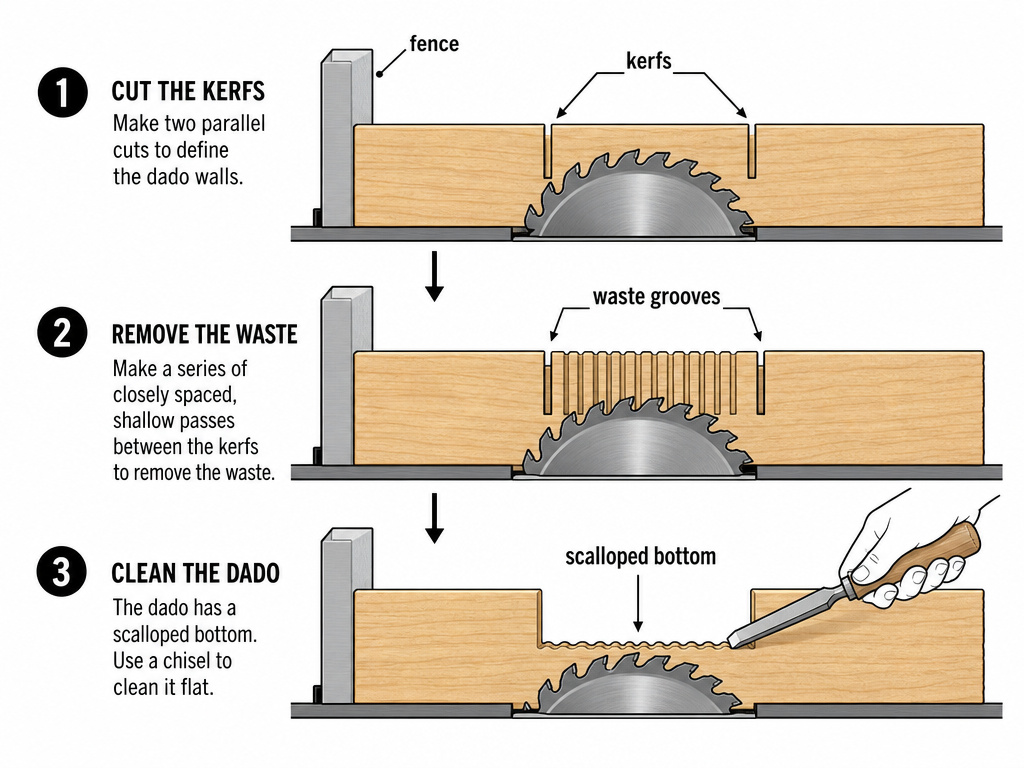
You can cut a dado with a standard single blade. It’s slower and requires more setup, but it works. You’re essentially making two rip cuts to define the walls of the dado and then cleaning out the waste in between with multiple passes.
1. Define the Walls. Set your fence so the blade cuts the left-hand side of your desired dado. Make that cut. Then, without moving the workpiece, adjust the fence so the blade cuts the right-hand side. You now have two parallel kerfs.
2. Remove the Waste. Lower the blade slightly. Make a series of passes between the two kerfs, shifting the workpiece over a tiny amount each time. It looks like cleaning a slot with a dozen small grooves. The remaining thin webs of wood are fragile.
3. Clean the Bottom. A few light final passes will snap out the remaining webs. You’ll be left with a flat bottom, but it will have small scallops from the blade’s curvature. For a truly flat bottom, you’ll need to clean up the channel with a sharp chisel.
This method is tedious for wide dados and impossible for stopped cuts. But for a one-off job or a saw that can’t accept a dado stack, it gets the joint made. It also reinforces why a router is often the better alternative for one-off, precise dado work.
| Method | Best For | Limitations |
|---|---|---|
| Stacked Dado Blade | Repeat, precise cuts; wide dados; production work. | Requires compatible saw & accessory insert; guard removed. |
| Multiple Passes (Single Blade) | One-off cuts; saws with short arbors; narrow dados. | Very slow; scalloped bottom; impractical for wide/stopped dados. |
| Router with Guide | Stopped/blind dados; ultra-smooth bottoms; plywood. | Requires separate tool & jig; can be cumbersome for long cuts. |
How to clean up the bottom of a dado with a chisel
After cutting a dado, you may find ridges or a rough surface left in the channel. This is common, especially with certain blade types. A sharp woodworking chisel is the right tool for cleaning this up. Place the workpiece securely on your bench with the dado facing up. Use the chisel bevel-down and take light, controlled shavings, working with the grain of the wood. The goal is to pare away the high spots to create a flat, smooth bottom for your joint. Work carefully to avoid digging in or changing the depth of the cut. A clean, flat-bottomed dado ensures a tight glue joint and a professional-looking result.
How to cut a dado across the grain
Cutting a dado across the grain of a board requires a different approach than with-the-grain cuts. Never make freehand cuts. You must use a crosscut sled or a miter gauge to guide the workpiece squarely across the dado blade. A crosscut sled is ideal as it fully supports the workpiece and keeps your hands safely away from the blade. Clamp a stop block to your sled’s fence or use the miter gauge’s fence to control the start and stop points of the cut. This ensures the dado is positioned accurately. Always use push sticks and hold-downs to maintain control, especially since the blade guard assembly must be removed for these cuts.
Frequently Asked Questions
Can any table saw use a dado blade?
No. Many compact, benchtop, and older saws cannot. You must check the manual for three things: maximum dado width (often 13/16″ or 1/2″), maximum diameter (8″ or 6″), and whether a dedicated dado insert is available for your model. The arbor must also be long enough to safely fit the stack and securing nut.
Is a dado blade dangerous?
It carries different risks. The primary danger is the mandatory removal of the blade guard and riving knife, which increases kickback risk. This is offset by strictly using push sticks, featherboards, and working deliberately. The blade itself, when properly installed within the saw’s limits, is not inherently more dangerous than a standard blade.
Why is my dado cut not straight?
Wandering cut is almost always a fence alignment issue. If your fence isn’t parallel to the blade, the workpiece will drift during the cut, creating a tapered slot. Before blaming the dado blade, verify your fence alignment. Also, ensure the workpiece is held firmly against the fence throughout the cut with a featherboard.
How do I cut a stopped dado on a table saw?
Stopped dado, or blind dado, doesn’t run off the end of the board. To cut one, you need a sacrificial fence attached to your regular fence. You raise the spinning dado stack into the workpiece after it’s already past the leading edge of the blade, and lower it before the trailing edge exits. This requires precise marking, practice, and often a jig. For many, a router is a safer and easier tool for this specific joint.
Before You Go
The clean, strong joint a perfect dado creates is worth the setup time. But the setup is critical. Your saw’s manual is the engineering specification for what your tool can handle without failing.
So the rule is simple: know your saw’s limits, use the exact hardware it calls for, and never skip the safety trade-offs when the guard comes off. That’s how you move from just making a cut to building something that lasts. If you’re new to using a table saw, master a standard rip cut and crosscut before adding the complexity of a dado stack. Get the fundamentals right, and the joinery follows.
