
Types of Oscillating Multi Tool Blades
This post contains affiliate links. As an Amazon Associate, we earn from qualifying purchases.
Oscillating multi-tool blades are defined by two things: the material they’re made to cut and the mounting system that connects them to your tool. The main types are bi-metal for wood and nails, carbide for extreme materials, high carbon steel for soft wood, diamond grit for tile and masonry, and scrapers for removal tasks. Your tool’s mounting system. Universal or Starlock, decides which blades you can physically use.
That last point is where people waste money. You can’t just match a blade to a material; you have to match it to your tool’s head first. A blade that cuts everything is useless if it doesn’t snap into your machine. This is true for all types of oscillating multi tool blades.
What follows is a breakdown of each of the types of oscillating multi tool blades by what it’s actually made for, the hard numbers on how long they last, and the mounting compatibility maze you have to navigate before you buy anything.
Key Takeaways
- Match the mounting system first. Milwaukee states their OPEN-LOK™ blades are not compatible with Starlock tools, while Bosch and Makita claim their Starlock blades are compatible with some Milwaukee tools that use the OIS system. Check your tool’s manual.
- For cutting wood with embedded nails or screws, a carbide blade lasts exponentially longer. Milwaukee’s NITRUS™ Carbide blade delivers 2X more cuts than their standard carbide teeth blade.
- Bi-metal blades are the versatile workhorse. A bi-metal blade, like Milwaukee’s TITANIUM CHARGED™ line, offers up to 15x longer life than basic high carbon steel and handles wood, plastic, and drywall.
- Diamond grit blades are for abrasion, not sawing. Use them for grout removal or scoring hard materials; they grind where toothed blades cut.
- Start with a multi-blade set. A kit like the Milwaukee 3 PC Multi-Material Set gives you a strategic mix (carbide, bi-metal) for common demolition and remodeling tasks.
The Core Blades by Material (What They Actually Cut)
Forget grouping the types of oscillating multi tool blades by shape for a second. The material of the cutting edge determines what it can cut and how long it will last. This is the decision that affects your wallet and your timeline on the job.
Bi-Metal Blades: The Demolition Default
These are the first blade you should reach for in a renovation. A bi-metal blade has a body of flexible, shock-absorbing steel welded to a tooth edge of hardened, high-speed steel. This combination allows the blade to handle the vibration of cutting through unpredictable materials, like wood with hidden nails, without breaking.
Where this goes sideways: Using a bi-metal blade for clean finish cuts in hardwood. The aggressive tooth design and inherent vibration leave a rougher kerf than a dedicated wood blade. You’ll spend more time sanding.
According to Milwaukee Tool, their TITANIUM CHARGED™ Bi-Metal Multi-Material blades provide up to 15x longer life versus high carbon steel blades. They’re designed for wood, nails, PVC, copper pipe, and drywall. A 2-1/2″ model has a 1-5/8″ max plunge depth.
I used to burn through cheap blades on every other project. Then I timed a Milwaukee bi-metal blade on a deck demolition. It went through old, nail-embedded pressure-treated wood for an extended period before the cut speed noticeably dropped. That’s the difference between buying a pack of 10 and a pack of 2.
| Blade Type | Best For | Will Struggle With | Longevity Benchmark |
|---|---|---|---|
| Bi-Metal | Wood with nails, PVC, drywall, plastic | Hardened steel, masonry, clean finish cuts | Up to 15x longer than HCS (Milwaukee) |
| Carbide Grit | Tile, brick, stone, fiber cement | Any precise, clean cutting | Wears by abrasion, not dulling |
| High Carbon Steel (HCS) | Softwood, drywall, plastics | Nails, hardwoods, metal | Lowest; a few projects |
Carbide Teeth & Grit: For When Everything is Hard
Carbide blades come in two distinct flavors: carbide-tipped teeth and solid carbide grit. They serve different masters.
Carbide-tipped tooth blades, like the Milwaukee Carbide Teeth series, are for multi-material applications like wood, screws, nails, cement board, and plaster. Their unique aggressive tooth design is for cutting wood, screws, nails, cement board, and plaster. Milwaukee Tool claims their Carbide Teeth blades last up to 50X longer than standard bi-metal blades. The trade-off is cost and vibration, they’re expensive and transmit more shock into the tool and your hands.
Then there’s the top tier: extreme carbide. Milwaukee’s NITRUS™ Carbide Extreme Materials blade is in its own category. Their testing shows it delivers 2X more cuts than their standard Carbide Teeth blades, capable of hundreds of cuts in screw-embedded wood. This is the blade for extreme multi-material cutting.
Carbide grit blades, on the other hand, have no teeth. They have a solid edge coated in tungsten carbide granules. They don’t cut; they grind. This is what you use for grout removal, scoring ceramic tile, or notching brick. They create a huge amount of fine dust and go through material slowly, but they won’t shatter brittle tile like a toothed blade will.
Specialized Blades: Diamond, Scrapers, and Sanders
Once you move past cutting, the oscillating tool’s real utility shines.
- Diamond Grit Blades: These are an upgrade from carbide grit for the hardest materials. Think granite, hardened concrete, or thick porcelain tile. They are a specialized option for very hard materials like granite, hardened concrete, or thick porcelain tile.
- Scraper Blades: These are just stiff, flat pieces of metal. They’re for paint removal, lifting vinyl flooring, peeling up adhesive, or scraping off caulk. The high-frequency oscillation makes them incredibly effective at breaking bonds without gouging the substrate underneath, if you keep them flat.
- Sanding Pads & Attachments: These are often triangle-shaped and use hook-and-loop (Velcro) pads. They’re not for primary sanding. They’re for getting into corners a random orbital sander can’t reach, or for light shaping. The oscillating motion can leave swirl marks if you’re not careful.
Blade Mounting Systems: Universal vs. Starlock
This is the most confusing and critical part of buying blades. The blade must physically lock into your tool. There are two main camps, and they are not fully compatible.
Universal Fit (including OPEN-LOK™): This is the older, more common system. It’s a simple arbor with a hole and often a pair of locking pins. Universal Fit blades are designed to fit tools with a universal arbor system. Milwaukee’s iteration is called OPEN-LOK™, a reinforced Universal Fit anchor.
Starlock: Developed by Bosch and Fein, this is a tool-free, quick-change system. The blade has a proprietary plastic collar with locking tabs that snap directly into the tool’s head. Starlock is a tool-free, quick-change system developed by Bosch and Fein.
Here is the active disagreement you must know about, straight from the manufacturers’ mouths:
| Source | Claim on Compatibility | What It Really Means |
|---|---|---|
| Milwaukee Tool | Their OPEN-LOK™ blades are “Not compatible with Starlock tools.“ | If your tool has a Starlock-only head, our blades won’t fit. |
| Bosch Professional | The Starlock interface “also works with OIS® compatible tools including Bosch, Fein, Milwaukee, Makita, rigid, others.“ | Starlock blades are backwards-compatible with some older tool systems (OIS). |
| Makita USA | Their Starlock blades are “compatible with competitive OIS, Starlock®, StarlockPlus®, and StarlockMax® oscillating multi-tools.” | They agree with Bosch; Starlock can work on some non-Starlock tools. |
The bottom line: If you own a Universal/OPEN-LOK™ tool, Milwaukee states you cannot use Starlock blades. However, Bosch and Makita claim their Starlock blades are compatible with OIS systems found on some older tools from various brands, which could include some Universal tools.
Common mistake: Buying a premium Starlock blade for a Universal tool because the package says “fits most tools.” It won’t lock in. The plastic collar will prevent it from seating.
Blade Shapes and What They’re Designed to Do
Once you’ve matched material and mount, shape determines the kind of cut you can make. It’s about access and control.
- Plunge Cut Blades (Straight): The standard. A straight blade with a pointed or rounded tip for plunging directly into the middle of a surface. Ideal for cut-outs in drywall, flooring, or making a starter hole.
- Segmented Saw Blades (Curved): The blade has a curved, sometimes semi-circular profile. This shape is for long, straight rip cuts along a surface. The curve allows more teeth to be in contact with the material, making it faster for trimming door jambs or cutting along a baseboard.
- Flush-Cut Blades: These have the cutting teeth extended right to the edge of the blade’s mounting arbor. They let you cut flush against a wall, floor, or other surface where a standard blade’s body would get in the way. Essential for undercutting door casings.
- Japanese-Tooth Blades: A specific tooth pattern with a steep, aggressive angle. It’s designed for fast, clean cuts in hardwoods and laminates with less tear-out. It’s a specialist shape for finish work.
Choosing the right shape is about physics. A segmented blade is more rigid for long cuts but can’t plunge. A thin, pointed plunge blade can start a hole anywhere but will wander on a long cut.
Putting It All Together: How to Choose Your Next Blade
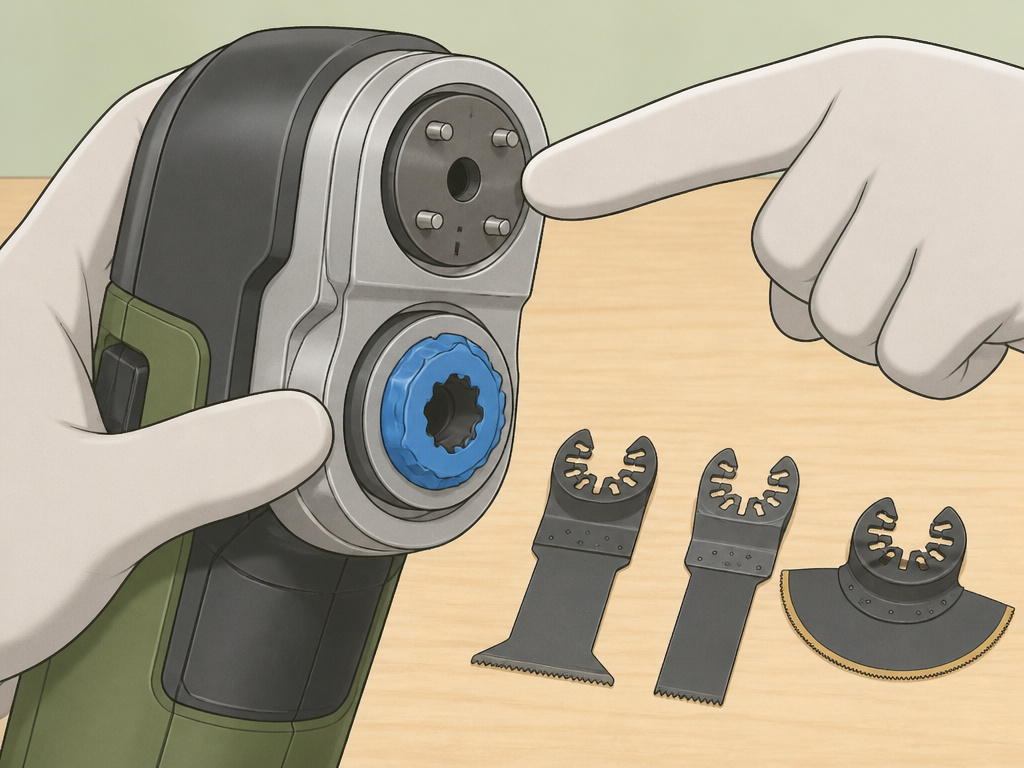
Stop looking at the wall of blades. Follow this sequence.
First, identify your tool’s mount. Look at the head. Does it have a simple hole with pins (Universal), or a colorful plastic collar with a button (Starlock)? Check the manual. This is essential.
Second, define the primary material. Is it just wood? Wood with possible nails? Tile? Grout? Adhesive? Your answer points you to the blade material.
Third, consider the cut type. Need to start in the middle? Use a plunge blade. Trimming something flush? Use a flush-cut blade. Making a long cut? A segmented blade is faster.
Let’s be real about this. For most DIYers starting out, a multi-blade set is the smartest buy. It forces you to learn by using different types. The Milwaukee 3 PC Multi-Material Universal Fit Set (49-10-9005) is a perfect example. It includes a 1-3/8″ NITRUS™ Carbide blade for the worst stuff, and two sizes of TITANIUM CHARGED™ Bi-Metal blades for everything else. It’s a pre-made strategy.
For a deep dive on picking the right blade for specific materials like wood or metal, our blades for wood and blades for metal guides break it down further.
Essential Safety and Usage Tips
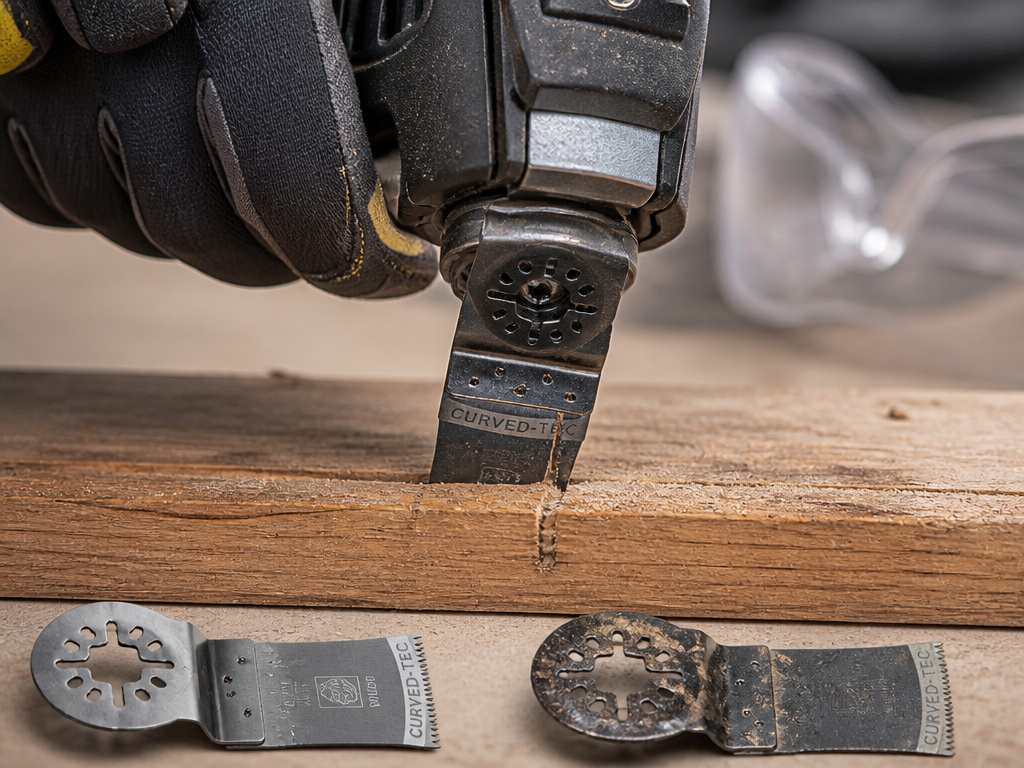
An oscillating tool is safe until it isn’t. The high speed and short stroke can lull you into complacency.
Before you start: Always wear protective goggles that comply with ANSI Z87.1, EN 166, or AS/NZS 1336. Do not operate in explosive atmospheres (flammable dust, gases). If using outdoors or in damp locations, use an RCD-protected supply or a cord rated for outdoor use.
The Makita TM001G manual lists these safety rules. That manual also specifies the tool oscillates at 10,000 – 20,000 oscillations per minute with a 3.6° total arc. That’s a tiny, furious movement.
- Let the tool do the work. Applying heavy pressure overheats the blade, dulls it faster, and can stall the motor. You should feel vibration, not resistance.
- Watch for binding in plunge cuts. As the blade sinks in, the kerf can close and pinch the blade. This can snap it. Use a slight rocking motion.
- Keep blades clean. Pitch and sap buildup on wood blades insulates the teeth, causing heat buildup. A quick scrape with a wire brush or a dip in solvent restores cutting performance.
- Listen to the sound. A sharp blade makes a consistent, high-pitched whirring sound. A dull blade labors, and the tone drops and becomes uneven. That’s your cue to change it.
For a full walkthrough on handling the tool itself, from basic cuts to advanced techniques, see our guide on how to use an oscillating multi-tool.
Wood Cutting Blades
Selecting the right wood blade depends on the cut you need. For general rough cuts in framing lumber or where you might hit a nail, a coarse-toothed bi-metal or carbide blade is a durable choice. Fine-tooth blades provide a cleaner, slower cut for finish work. A Japanese tooth design, which features a triple-chip grind, is engineered to reduce vibration and can offer a smoother finish. Curved blades are useful for making sweeping, flush cuts against a surface. Always match the blade’s material to the task; carbide blades last significantly longer in tough conditions, while bi-metal offers a balance of cost and performance for mixed materials.
Plunge Cutting Blades
Plunge cutting blades are designed to start a cut in the middle of a material, not from an edge. They typically have a pointed or rounded tip that you can rock into the surface to begin the cut. The key specifications for these blades are their maximum plunge depth and cutting width, which determine how deep and wide a slot you can make. For cutting into walls or floors to create openings for electrical boxes or pipes, a blade with a deeper plunge capacity is necessary. Ensure the blade material is suited for what you’re cutting through, like wood, drywall, or materials that may contain screws or nails.
Brand Recommendations
Several major tool manufacturers produce high-quality oscillating tool blades. Milwaukee offers a range of blades, including bi-metal and carbide tooth options. Their carbide teeth blades are noted for extreme longevity in multi-material applications, featuring a protective black oxide coating. These blades use a reinforced Universal Fit OPEN-LOK™ anchor and are made in the USA. Bosch Professional and Makita produce blades with the Starlock® interface, which is also compatible with many OIS® tools from other brands. Makita offers sets that include various blade types, such as curved plunge cut blades with Japanese tooth designs. When choosing a brand, first verify the blade’s compatibility with your specific tool’s attachment system.
Frequently Asked Questions
Are all oscillating tool blades the same?
No. They differ by cutting material (bi-metal, carbide, etc.), mounting system (Universal vs. Starlock), and shape (plunge, segmented, flush-cut). Using the wrong type leads to poor results, broken blades, or a blade that won’t even fit your tool.
What is the best all-purpose oscillating tool blade?
High-quality bi-metal blade is the best starting point for general use. It balances cost, longevity, and the ability to handle wood, nails, and plastics. It won’t excel at any one task, but it won’t fail catastrophically at most common DIY jobs.
Can I use Starlock blades on my Milwaukee tool?
It depends on your specific Milwaukee tool model. Milwaukee states their OPEN-LOK™ blades are not compatible with Starlock tools. However, if you have an older Milwaukee tool that uses the OIS mounting system, Starlock blades from Bosch or Makita may fit, as they claim backwards compatibility. Check your tool’s manual or look at the head, if it doesn’t have a Starlock collar, Starlock blades won’t work.
How do I change an oscillating tool blade?
Most modern tools have a tool-free lever. Push or pull the lever to release the locking mechanism, remove the old blade, insert the new one until it clicks, and release the lever. For specific steps and a visual guide, our tutorial on how to change an oscillating tool blade covers every system.
Why does my oscillating tool blade get so hot?
Heat comes from friction. The most common causes are a dull blade, too much downward pressure, or cutting a material that’s too hard for the blade type. A hot blade loses temper (softens), which dulls it permanently. Let the blade cool, check that it’s sharp and appropriate for the material, and use a lighter touch.
Before You Go
The one rule that overrides all others: your tool’s mounting system is the gatekeeper. No amount of research on carbide versus bi-metal matters if you buy a blade that doesn’t physically lock into your machine. Find that out first.
From there, let the material dictate your choice. For clean wood, a simple high-carbon steel blade is fine and cheap. The moment you suspect a nail, step up to bi-metal. When you’re facing a job full of screws, cement board, or plaster, that’s your signal to invest in a carbide blade, it’s not an upgrade, it’s the correct tool.
Everything else, the shape, the tooth design, the brand, is fine-tuning. Start with a purpose-built set that covers your mounting system, then buy individual specialty blades as specific jobs demand them. That’s how you build a blade collection that actually works, instead of a drawer full of disappointing, single-use mistakes. For ongoing comparisons and testing of specific models, our detailed blade reviews and comparisons are updated regularly.
