
10 Best Cnc Router Woodworking in 2026
This post contains affiliate links. As an Amazon Associate, we earn from qualifying purchases.
Our research points to the Genmitsu PROVerXL 4030S as the best overall CNC router for woodworking, thanks to its industrial-grade precision and high 130mm Z-axis for complex projects. Other top picks include the FoxAlien XE-Ultra 8080 for large benchtop work and the MAKERA CARVERA for quick tool changes. Choosing the right CNC involves balancing workspace, power, and precision for your specific woodworking goals. This guide is built from manufacturer specifications, expert analysis, and patterns in owner feedback to help you make a confident choice.
Top 10 CNC Routers For Woodworking in the Market
Certain content that appears on this site comes from Amazon. This content is provided "as is" and is subject to change or removal at any time.
The Best CNC Routers For Woodworking, Reviewed
Genmitsu PROVerXL 4030S CNC Router
What We Like
- Upgraded 32-bit MCU for smooth, complex toolpaths.
- High 130mm Z-axis opens up rotary and tall projects.
- Industrial-grade linear guideway ensures stable, precise cuts.
- Smartphone app compatibility for wireless control and monitoring.
Trade-offs
- WiFi module requires a separate purchase for smart features.
- Weighs 72.8 lb, demanding a sturdy, permanent benchtop.
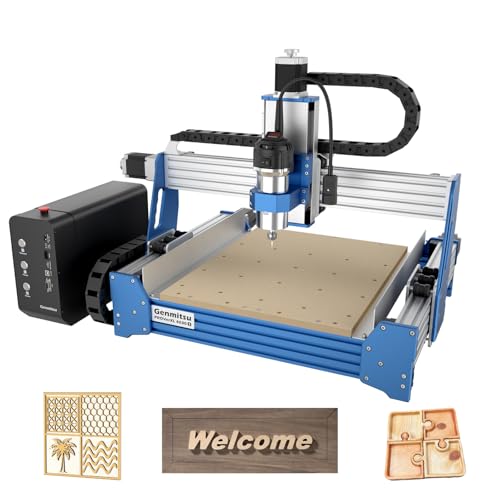
A repeatable accuracy of ±0.05 mm means this machine delivers professional, consistent results right on your workbench. That precision, paired with a 710W spindle, moves it firmly out of the hobbyist category and into the realm of serious makers who need to cut aluminum and acrylic reliably. The standout 130mm Z-height allows for tackling rotary carving or thicker material blocks, a capacity most desktop routers simply don’t offer. It’s built for the user who has outgrown entry-level machines and demands industrial stability without sacrificing the convenience of a modular, fast-assembly design.
That stability and expanded capacity come with a footprint and heft that require dedicated shop space. At 72.8 pounds, this is not a machine you will be moving around often. Compared to the 36.2-pound Genmitsu 4040-PRO MAX, you get significantly more Z-axis room, but you also commit more bench real estate. For the woodworker or maker ready to step up to a tool that can handle detailed relief carving, curved surfaces, and harder materials with authority, this CNC strikes an exceptional balance of power, precision, and creative freedom.
FoxAlien XE-Ultra 8080 CNC Router
What We Like
- Massive 33-inch square workspace for large panels
- Industrial-grade ball screws and linear rails for precision
- Closed-loop motors prevent lost steps at high speeds
- Flexible open spindle ecosystem for various tools
Trade-offs
- Heavy 88.2 lb frame demands a sturdy, permanent bench
- Large footprint consumes significant shop space
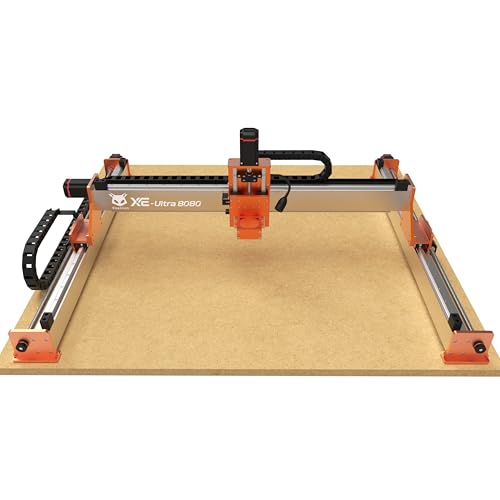
A 33-inch square work area lets you machine full cabinet doors or large signs without tiling, which is the core appeal here. This machine suits the advanced hobbyist or small shop ready to graduate from smaller desktop CNCs, who needs that capacity for furniture parts or complex inlays. The industrial ball screws and closed-loop motors mean you can push it to its 5,000mm/min speed without sacrificing the fine detail in hardwood or aluminum, a combination that’s rare in the benchtop category.
The trade-off is its substantial heft and the fact it arrives as a serious kit, you’ll need to source your own spindle. That’s a deliberate choice by FoxAlien, giving you the freedom to install a 1.5kW VFD spindle for metal or stick with a handheld router for wood. Compared to the more compact and plug-and-play Genmitsu PROVerXL 4030S, the XE-Ultra demands more from your workshop and your budget for accessories, but it delivers a far larger and more rigid canvas.
Genmitsu 4040-PRO MAX CNC Router
What We Like
- Stable X-axis with linear rails reduces vibration
- Reinforced spoilboard prevents sagging under load
- Optional wireless module for app control
- Upgradeable with extension kits and 4th axis
Trade-offs
- Work area depth is a compact 3.0 inches
- Wireless function requires a separate module purchase
- Lighter build than heavier-duty benchtop models
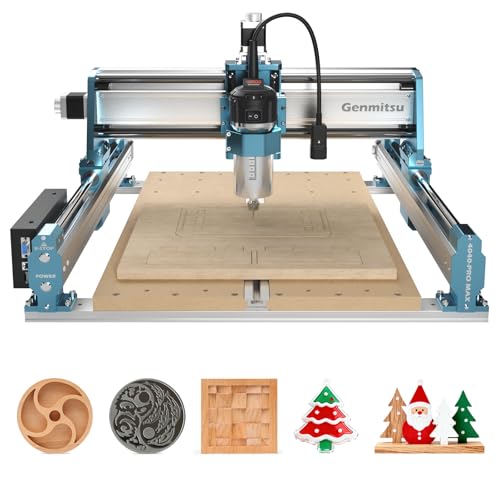
Wireless control is supported via an optional module, allowing for remote operation through an official app. This upgradeable mainboard offers flexibility for users who prefer not to be tethered directly to the machine. With a 710W spindle and a work area of 16.1 by 15.9 inches, the router provides capable power for engraving and cutting operations. Its design caters to those seeking modern functionality alongside precise performance in materials like wood and metal.
The machine has a Z-axis travel of 3.0 inches, which defines its clearance for workpieces. Its overall weight is listed at 36.2 pounds. The reinforced spoilboard includes an aluminum support bar to prevent sagging, enhancing stability during use. An upgradeable design allows for the addition of accessories like a Y-axis extension kit or a rotary module, enabling users to adapt the machine to evolving project needs.
LUNYEE 4040 Pro Max CNC Router
What We Like
- 800W router provides strong cutting performance
- Reinforced gantry and linear guides ensure stable movement
- Magnetic dust baffles protect key motion areas
- Pre-assembled modules for faster setup
Trade-offs
- 90mm Z travel limits thickness for some 3D carving
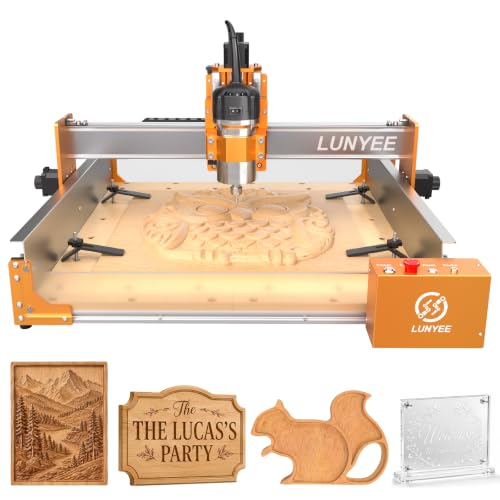
An 800W router in a desktop machine means you can push through hardwoods and light aluminum without the spindle bogging down. That power, paired with a ball screw drive and dual linear guides on the Z-axis, gives you the rigidity for clean, repeatable cuts in a footprint that fits on a workbench. This combination makes it a serious option for the maker who needs real cutting muscle but doesn’t have the space for a full-sized machine.
You get compact power, but with a 90mm Z-axis travel. You will be fine for signs, inlays, and PCB work, but you will hit the limit if you want to carve deep 3D reliefs into a thick block. For deeper carving in a similar size, the Genmitsu PROVerXL 4030S offers 130mm of Z-height, though with a slightly less powerful spindle. The choice comes down to prioritizing raw cutting force over maximum material thickness.
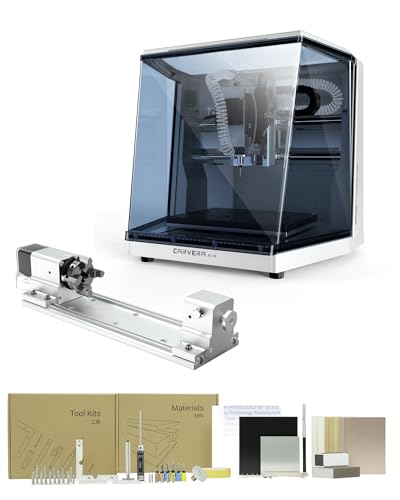
MAKERA CARVERA CA1 Cnc Router Woodworking
What We Like
- Automatic tool changes in 10 seconds
- Includes true 4th-axis simultaneous machining
- Auto-probing and leveling for precise calibration
- Cross-platform control and CAM software
Trade-offs
- Desktop footprint limits workpiece size vs. larger models
The ability to swap tools automatically in 10 seconds fundamentally changes how you approach a complex project. You can move from a roughing bit to a finishing detail without manual intervention, which keeps the workflow tight and dramatically reduces setup time between operations. That automation, paired with the integrated auto-probing and closed-loop spindle, makes the Carvera Air a smart choice for a hobbyist ready to tackle intricate inlays, detailed 3D models, or projects requiring multiple toolpaths. It’s built for the maker who values process efficiency as much as the final cut.
You trade some work envelope for that automation. Compared to a machine like the FoxAlien XE-Ultra 8080, the Carvera Air operates in a more compact, desktop-friendly space. That makes it less suited for large sign-making or panel processing. Its strength is in precision and automated workflow on smaller, more complex pieces, especially with the optional 4th axis for cylindrical work. If your projects demand a large cutting bed for sheet goods, you’ll find the physical limits here a constraint.
Product photos
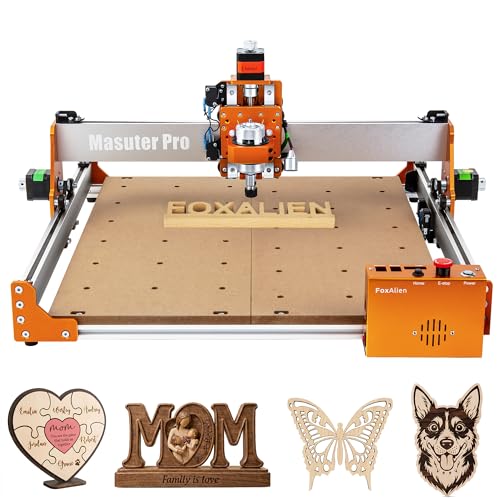
FoxAlien Masuter Pro CNC Router
What We Like
- All-metal frame for enhanced stability
- Pre-wired controller and parts for 15-minute setup
- Dust-proof controller box with accessible E-stop
- Large work area with optional Y-axis extension
Trade-offs
- Standard Z-axis travel is only 2.36 inches
- Spindle not included, must be purchased separately
- Lighter weight may limit rigidity for harder materials
With main parts pre-assembled and wiring connected to the controller, the FoxAlien Masuter Pro can be ready in 10 to 15 minutes. This quick setup is a clear advantage for beginners who want to start routing projects without spending hours on complex assembly. The all-aluminum structure and linear rail Z-axis provide a stable platform for detailed work on materials like wood, acrylic, and MDF.
You get a capable platform with a quick start, but not a complete tool. You will need to source your own spindle, and the 60mm Z-axis travel limits the thickness of material you can work with in a single pass. For someone ready to tackle deeper carvings or harder metals right away, a more complete package like the Genmitsu 4040-PRO MAX would be a better starting point despite its longer assembly. That model includes a powerful 710W spindle and greater Z-height.
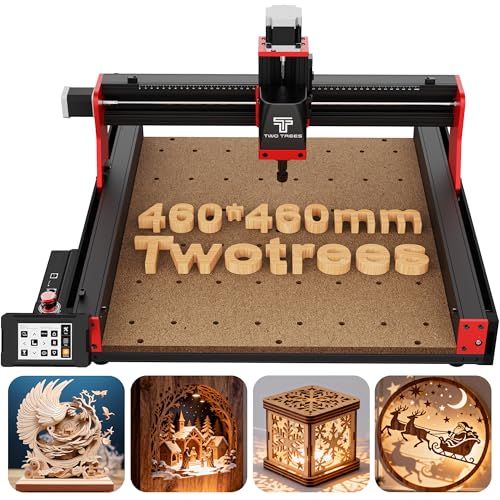
Twotrees TTC450 Pro CNC Router
What We Like
- Intuitive 3.5-inch capacitive touchscreen control
- Professional expansion ports for 4th-axis and laser upgrades
- Open-source GRBL system with wide software compatibility
- Complete accessory set includes 10 cutting tools and clamps
Trade-offs
- 3.1-inch Z-axis height limits thickness of workpieces
- Requires specific driver installation for Windows 11 compatibility
The 3.5-inch capacitive touchscreen makes operating this machine notably more intuitive than fiddling with buttons and a small LCD. That smooth interface combines with its open-source GRBL heart. You can jump from design in software like Easel or Fusion 360 to carving with less friction. Its all-metal frame and included bundle of ten bits make it a solid turnkey option for a home craftsman or educational space ready to start prototyping in wood, acrylic, or even soft metals right out of the box.
A responsive 3.5-inch capacitive touch screen makes operation intuitive, which is a notable upgrade from machines that rely on basic buttons or require a constant computer connection. The control box includes ports for adding a 4th-axis rotary attachment or a laser module, allowing for future expansion without replacing the entire unit. This setup is ideal for users who want a modern interface and the flexibility to add capabilities like rotary engraving or laser cutting down the line.
Product photos
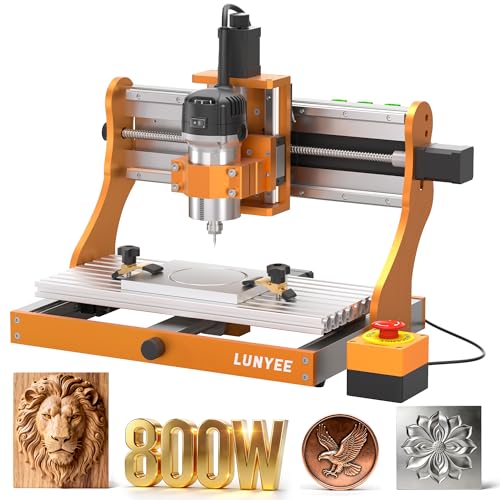
LUNYEE 3020 Nova CNC Router
What We Like
- All-metal linear guides and ball screws on all axes
- Fully assembled, ready-to-use design
- Wide software compatibility with GRBL platforms
- 800W spindle handles wood, aluminum, and plastics
Trade-offs
- 42.3 lb weight requires a sturdy benchtop
- Tool-only package lacks a vise or clamps
An all-metal drive system with ball screws and linear guides on every axis is what separates a rigid machine from a wobbly one. This construction gives the LUNYEE 3020 Nova its notable stability, making it a solid choice for someone who needs predictable, precise cuts in harder materials like aluminum and brass, not just wood and plastic. The 800W spindle and its wide speed range provide the necessary torque and control for that work. This machine suits users who value a no-compromise frame over a large work envelope.
The LUNYEE 3020 Nova arrives as a fully assembled unit with all wiring pre-connected, so you can install the Z-axis and start using it right away without a complicated setup. This machine is listed with external dimensions of 16.1 inches in length and width, making it a compact desktop tool. Its industrial-grade drive system with ball screws and linear guides on each axis is engineered to eliminate backlash for precise engraving.
Product photos
AnoleX 4030-Evo Ultra CNC Router

What We Like
- Dual steel linear rails on every axis enhance rigidity
- GRBL 1.3a firmware supports advanced features like 4th axis
- Built-in WiFi and macro buttons for flexible control
- Ball screws with dual-bearing ends reduce vibration
Trade-offs
- At 83.8 pounds, it's a substantial, stationary benchtop machine
- Router speed adjustment requires manual dial, not software
- Requires a dedicated, sturdy work surface due to its weight
The AnoleX 4030-Evo Ultra’s defining feature is its HGH-15 dual linear rails on every single axis, a construction choice that translates directly into exceptional frame stability. This isn’t just about smoother motion; it’s about resisting deflection when pushing that 800W router through harder materials like aluminum. The machine’s ±0.005mm repeatability and dual-bearing ball screws lock in that precision, making it a solid fit for a hobbyist or small shop ready to tackle mixed-material projects where chatter and tool drift are the enemy. It’s built for the user who prioritizes a rock-solid foundation over portability.
At 83.8 pounds, the AnoleX 4030-Evo Ultra CNC Router’s weight signals a stable, rigid platform for demanding materials. Its professional-grade motion system uses dual steel linear guides and ball screws on every axis, a design that enhances precision and load capacity for metal cutting. This all-metal construction prioritizes mechanical rigidity over portability, which is a key consideration for users whose projects require consistent accuracy in aluminum or brass.
Product photos
WolfPawn Large-Format CNC Router

What We Like
- Large 1000mm square work area for oversized projects
- Linear guides and ball screws on all axes for precision
- Open-source GRBL firmware supports extensive software compatibility
- Upgraded controller includes spindle speed adjustment knob
Trade-offs
- The 39.4-inch square frame demands significant dedicated shop space
- Large footprint and open design require a sturdy, level mounting surface
A 1000mm square working travel is the defining feature here, letting you tackle full-size sign panels or large furniture components without the hassle of tiling smaller cuts. This WolfPawn router is built for the hobbyist or small shop that regularly pushes past the constraints of a standard desktop machine. The linear guides and ball screws on every axis provide the rigidity needed for clean cuts in both wood and aluminum, which is essential when you’re running a large bit across a wide surface. It’s a machine for creators whose ideas consistently outgrow a 2×2 foot workspace.
With a working area of 1000 by 1000 millimeters, the WolfPawn router provides a large-format capacity for oversized wood crafts and custom signage. This generous travel means you can tackle projects like full-sized decorative panels without the need for tiling smaller sections. The machine’s open-source GRBL v1.1 firmware supports mainstream software and offers expandability for users who enjoy community-driven modifications and personalized upgrades.
Product photos
How We Evaluated CNC Routers For Woodworking
Our evaluation is a research-based synthesis of technical specifications, manufacturer documentation, and expert round-ups from the woodworking community. We looked for patterns in owner feedback regarding reliability, ease of use, and real-world performance. Key criteria included work area dimensions and Z-axis travel for project versatility, the rigidity of the frame and motion system for cut quality, and the type of spindle or router for power and material compatibility.
A research-led approach like this cannot replicate years of hands-on shop use, but it effectively highlights the engineering and features that matter most to users.
What To Look For In CNC Routers For Woodworking
The right CNC router matches its capabilities to your most common projects. Beyond the advertised work area, consider the machine’s rigidity, cutting power, and how it fits into your shop’s workflow.
Focus on the work envelope for your typical project size, the Z-axis travel for material thickness, and the drive system’s rigidity for clean cuts. A dedicated spindle often offers better long-term performance than a standard router.
Work Area & Z-Axis Travel
The work area defines the maximum size of a single-piece project, while Z-axis travel limits the thickness of material you can carve or cut through. A machine like the FoxAlien XE-Ultra 8080 offers a massive 33-inch square workspace for large panels, while others are designed for more compact projects. For 3D carving or working with thick stock, a taller Z-axis, like the 130mm on our best overall pick, is essential. Some software allows tiling to cut larger designs in sections, but that adds complexity.
Frame Rigidity & Drive System
A rigid frame and precise drive system are critical for achieving clean, accurate cuts, especially in hardwoods or light metals. Look for industrial-grade linear guideways and ball screws, like those on the Genmitsu PROVerXL 4030S and AnoleX 4030-Evo Ultra, which minimize vibration and lost steps. All-metal construction, as seen on the LUNYEE 3020 Nova, also enhances stability. A less rigid machine may struggle with detailed work or faster feed rates, leading to chatter and imperfect finishes.
Spindle Power & Collet Type
The cutting power and bit-holding system directly affect what materials you can work with and the quality of the finish. An 800W router, like on the LUNYEE 4040 Pro Max, provides strong performance for detailed panels and signs. For longevity and precision, a dedicated spindle with ER-style collets is often preferred over a standard router; ER collets are machined to tighter tolerances for less runout. Our guide to CNC router bits covers the tooling that pairs with these systems.
- Check the spindle’s RPM range for compatibility with different bit sizes and materials.
- Verify if the machine includes a spindle or requires you to supply your own router.
- Consider noise levels and duty cycle; spindles are often designed for longer run times.
A machine’s true value is how well it handles the materials and project sizes you use most.
CNC Routers For Woodworking Compared
The following table compares key specifications across all ten picks to help you see the differences at a glance.
| Product | Spindle Power | Working Area (XYZ) | Weight |
|---|---|---|---|
| Genmitsu PROVerXL 4030S CNC Router | 710W | N/A | 72.8 pounds |
| FoxAlien XE-Ultra 8080 CNC Router | Open 65mm clamp system | 33x33x4.72in | 88.2 pounds |
| Genmitsu 4040-PRO MAX CNC Router | 710W digital display | 16.1" x 15.9" x 3.0" | 36.2 pounds |
| LUNYEE 4040 Pro Max CNC Router | 800W trim router | 400 x 400 x 90mm | 33.0 pounds |
| MAKERA CARVERA CA1 Cnc Router Woodworking | N/A | N/A | N/A |
| FoxAlien Masuter Pro CNC Router | 52mm & 65mm clamps | 15.75" x 15.75" x 2.36" | 28.7 pounds |
| Twotrees TTC450 Pro CNC Router | 775 brushed motor | 18.1 inches (460 x 460 x 80mm) | 45.2 pounds |
| LUNYEE 3020 Nova CNC Router | 800W | N/A | 42.3 Pounds |
| AnoleX 4030-Evo Ultra CNC Router | 800W trim router | N/A | 83.8 pounds |
| WolfPawn Large-Format CNC Router | N/A | 1000×1000×110mm | N/A |
Frequently Asked Questions
What is the best CNC router for woodworking?
For most woodworkers, the best overall choice is the Genmitsu PROVerXL 4030S, which combines industrial-grade linear guides for precision with a high Z-axis for complex projects. If you need to process large panels, the FoxAlien XE-Ultra 8080 is a better fit, while those focused on automated milling of smaller pieces should look at the MAKERA CARVERA. The right machine depends heavily on your typical project size and required precision.
What is the best CNC router machine for wood?
The best machine depends on your primary need. For all-around precision and a tall Z-axis, the Genmitsu PROVerXL 4030S is our top pick. For the largest benchtop workspace, choose the FoxAlien XE-Ultra 8080. If wireless control and upgradeability are priorities, the Genmitsu 4040-PRO MAX excels. Our full list of best wood CNC routers breaks down these options further.
What should I look for in a beginner CNC router?
Beginners should prioritize clear documentation, straightforward software, and a supportive user community. Machines with pre-assembled modules, like the FoxAlien Masuter Pro, can simplify setup. It’s wise to start with a capable but manageable machine to learn the fundamentals of CNC routing before investing in more advanced features. Many affordable CNC routers for beginners offer a great entry point.
What are the downsides of using a CNC router?
CNC routers require a significant upfront investment in both the machine and learning CAD/CAM software. They also demand substantial, permanent shop space and a very sturdy work surface due to their weight and vibration. Operation can be noisy, and creating efficient toolpaths adds a digital design step to the workflow that differs from traditional hands-on woodworking.
What’s the difference between a CNC router and a CNC mill?
CNC routers are typically designed for cutting sheet goods, wood, plastics, and non-ferrous metals using a rotary cutting tool at high speeds. CNC mills are built for heavier, slower machining of solid metal blocks, offering greater rigidity and torque. For a detailed breakdown of the functional differences between CNC routers and mills, including spindle types and typical applications, consult our comparison guide.
The Bottom Line
The Genmitsu PROVerXL 4030S stands out as the best overall CNC router for the serious hobbyist or professional maker who needs industrial precision and the capacity for tall or rotary projects. If your budget is tighter or your shop space is limited, consider the compact power of the LUNYEE 4040 Pro Max or the quick assembly of the FoxAlien Masuter Pro. For any woodworker, the single most important factor is matching the machine’s work envelope and rigidity to the size and materials of your most common projects.
