
10 Best Engravers in 2026
This post contains affiliate links. As an Amazon Associate, we earn from qualifying purchases.
For a single tool that handles extended engraving sessions across many materials, the Dremel 4000 Rotary Tool Kit is our best overall pick. The best 5-in-1 multi-surface pen is the xTool Selected Engraving Pen, while beginners seeking a simple laser engraver should consider the SCULPFUN C1 Mini Laser Engraver.
Choosing the right engraver depends on whether you need a portable pen for quick jobs, a powerful rotary tool for the workshop, or a dedicated laser for precise, automated work. Our guide sorts through the options based on power, portability, and project type to match you with the right tool.
Top 10 Engravers in the Market
Certain content that appears on this site comes from Amazon. This content is provided "as is" and is subject to change or removal at any time.
The Best Engravers, Reviewed
Dremel 4000 Rotary Tool Kit
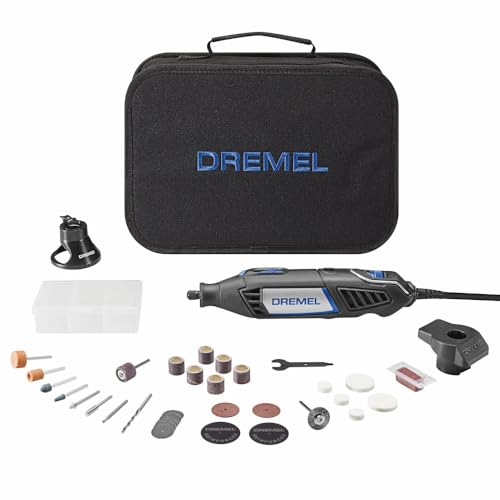
What We Like
- Powerful 1.6A motor for demanding applications
- Wide 5,000-35,000 RPM range for versatility
- Electronic speed control maintains consistency under load
- Ergonomic 360-degree grip for extended comfort
Trade-offs
- Corded design limits mobility compared to battery-powered pens
- Requires managing a power cord during detailed work
With a motor 33% more powerful than the Dremel 3100, this tool maintains speed under load, so grinding metal or carving hardwood won’t cause it to stall. The 5,000 to 35,000 RPM range handles aggressive material removal and fine-detail engraving, while electronic speed control keeps performance consistent from initial cut to final polish. This makes it suitable for workshop users who need a single tool for a wide variety of tasks.
The trade-off for that power and cooling is a cord. You’re tethered to an outlet, which can feel cumbersome for quick, freehand engraving tasks where a compact pen-style tool would be more nimble. Compared to something like the ultra-portable Resparked Customizer Engraving Pen, this is a stationary workhorse, not a pocket-sized doodler. Its size and sustained power output are built for longer sessions at a bench, where its ergonomic grip and ventilation system really pay off by reducing fatigue and heat buildup.
xTool Selected Engraving Pen
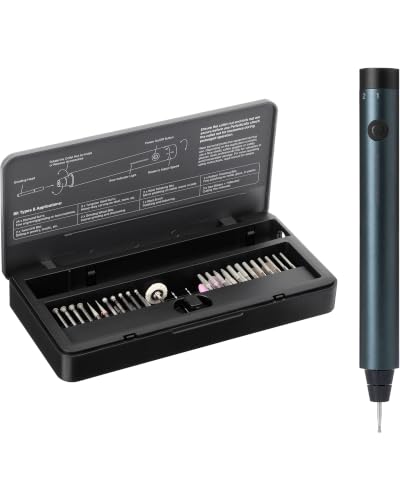
What We Like
- 5-speed motor handles 50+ surfaces
- Vibration-free precision for clean detail
- LED ring illuminates work in low light
- Complete 42-piece kit for 5 jobs
Trade-offs
- Collet nut may require pliers to adjust
- Maximum 25,000 RPM is lower than some rotary tools
A 5-speed motor and a kit of 42 bits let this one pen engrave, polish, and drill across glass, metal, and wood. The 160 gf·cm of anti-twist torque keeps the tip from skipping, which gives beginners the control for clean letters and lets pros get repeatable accuracy on hard materials. Its cordless, rechargeable design with pass-through charging means you can work anywhere without stopping, and the ring of LEDs is a genuinely useful touch for seeing fine details. This is the grab-and-go solution for a crafter who wants a single, capable tool for a wide variety of light engraving and finishing tasks on small to medium projects.
Weighing just 100 grams and shaped like a pen, the xTool Selected Engraving Pen is designed for handheld comfort during detailed work, not for heavy grinding on large projects. Its collet nut can be difficult to grip by hand, requiring pliers to loosen or tighten it during bit changes. This makes it a precision instrument best suited for etching, carving, and fine engraving across its many compatible materials.
Product photos
Foredom Brushless Rotary Micromotor Kit
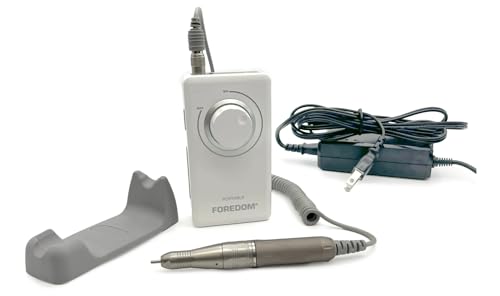
What We Like
- Brushless motor runs cooler and lasts longer.
- Cordless design allows for true portability.
- High 35,000 RPM enables precise detail work.
- Forward/reverse rotation aids in specialty techniques.
Trade-offs
- No power outlet required limits stationary, continuous heavy-duty use.
- Cordless design limits continuous use compared to plug-in tools
A brushless motor design runs cooler and lasts longer than brushed types, delivering consistent power up to 35,000 RPM for precise control in detailed work. Its cordless, portable design with a rechargeable lithium-ion battery means the tool can be taken anywhere without a power outlet.
The cordless, portable design requires recharging, which limits continuous use compared to plug-in models. Forward and reverse rotation allows for easy switching between directions for left- or right-handed operation or specialty techniques.
SCULPFUN C1 Mini Laser Engraver
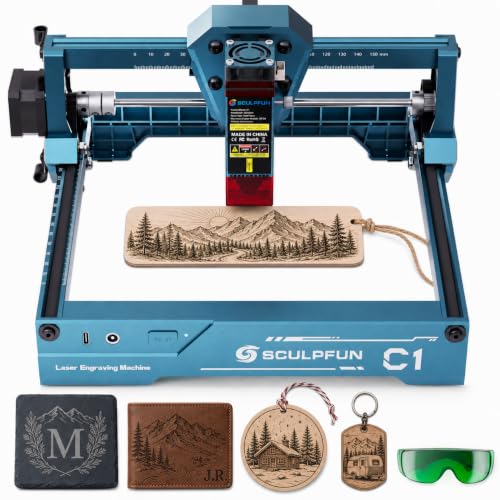
What We Like
- Fully pre-assembled for zero-setup use
- Ultra-fine detail on 100+ materials like wood and leather
- Compact, portable design at just 2.3 pounds
- Includes safety features like limit switches and a protective cover
Trade-offs
- Cannot engrave bare metals or cut materials
- Limited 150x130mm area restricts project size
A 3W laser in a 2.3-pound, fully assembled package means you can start etching intricate designs on wood or leather minutes after unboxing, with no technical setup to fumble through. That’s why it’s a natural first step for anyone curious about laser engraving.
Its plug-and-play simplicity does come with inherent limits in power and size. You won’t be marking metal tools or cutting out wooden plaques; this is strictly for surface engraving on compatible materials. For larger projects or materials like metal, you’d need to step up to a more capable machine. For learning the ropes on smaller, detailed work, however, the SCULPFUN C1’s constraints are actually a useful, focused boundary.
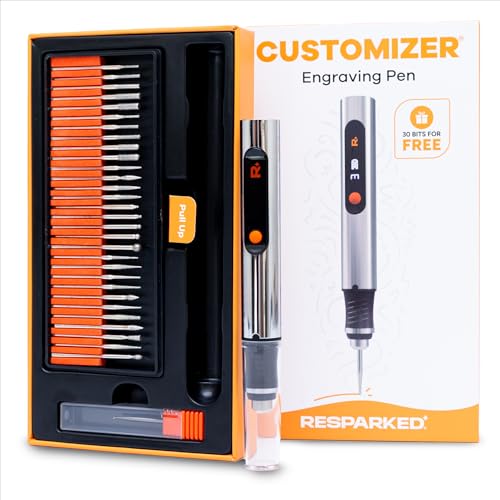
Resparked Customizer Engraving Pen
What We Like
- Cordless, rechargeable design for full portability
- Comprehensive starter kit includes 30 bits and a guide
- Lightweight, ergonomic pen body for precise control
- Versatile on over 50 material surfaces
Trade-offs
- Battery runtime is limited to two hours per charge
- Compact 4.9-inch length may be too small for some grips
A cordless pen with a two-hour battery and USB-C charging slips right into a toolbox or apron pocket, ready for a solid session of detail work anywhere. The kit also throws in 30 bits and a mastery guide right out of the box. That makes this the obvious recommendation for a beginner who wants to try engraving without a big upfront investment, as you get everything needed to start marking metal, glass, or wood the day it arrives.
The trade-off is in its scale and simplicity. It’s a dedicated engraving pen, not a full rotary tool system. For sustained, heavy-duty grinding or sanding projects, you’ll feel the limit of that two-hour battery and miss the accessory ecosystem and wider speed control of something like the Dremel 4000. But for learning the craft and handling small personalization jobs, this package delivers remarkable utility for its class.
Dremel Stylo+ Rotary Tool Kit
What We Like
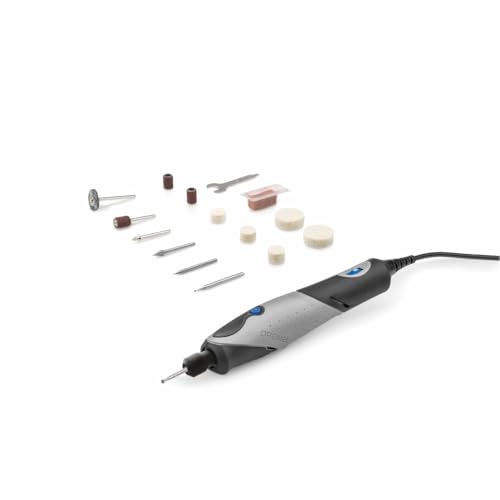
- Slim, lightweight design for maximum control.
- Variable speed up to 22,000 RPM for versatile applications.
- Works on wood, glass, metal, leather, and stone.
- 6-foot power cord provides flexible workspace placement.
Trade-offs
- Corded design limits mobility compared to battery-powered pens.
The Dremel Stylo+ rotary tool weighs half a pound, so it feels light and balanced in the hand for detailed control. Its slim, pen-like design allows you to work close to materials like wood, glass, or metal. Speed adjusts from 5,000 to 22,000 RPM, providing the finesse for engraving glass or the power for light wood carving. A 120V motor delivers reliable performance for home projects and operates quietly.
A six-foot power cord provides flexibility but requires an outlet, which can limit positioning around large workpieces. For users who prioritize complete freedom of movement, other products like the xTool Selected are cordless. The Stylo+ serves as a versatile, plug-in option between a full-sized rotary tool and a mini engraver.
LONGER Ray5 10W Laser Engraver
What We Like
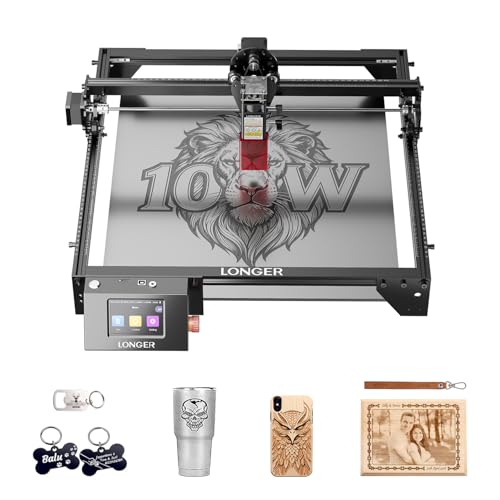
- Powerful 10W laser for faster cuts and engraving
- High 0.01mm accuracy for crisp, professional detail
- Versatile connectivity via USB, Wi-Fi, TF card, and app
Trade-offs
- Large 24.5-inch length requires significant workspace
- Primarily for engraving; thick material cutting is slow
With a 400 × 400 mm working area, the LONGER Ray5 gives you the space to handle large signs, home décor panels, or batch several smaller items at once. This generous size makes it a fit for small business production, workshops, and classrooms, moving beyond the limits of compact desktop engravers. Its 10W dual-beam laser and high-speed processor can deliver professional-quality results on materials like wood, leather, and acrylic. The 3.5-inch touchscreen allows for real-time monitoring and adjustments, while the controller’s ability to run multiple machines simultaneously supports scaling up work.
The trade-off is that its open-frame design, while allowing for large items, can lead to heat reflection burning the underside of materials during cutting, a noted issue from user experience. For intricate, handheld engraving on jewelry or small metal pieces, a tool like the xTool Selected Engraving Pen is far more appropriate. The Ray5 is built for stationary, area-based projects where its size and power are assets, not for detailed freehand work or quickly cutting through thick stock.
Product photos
Fanttik F2 Master Engraving Pen
What We Like
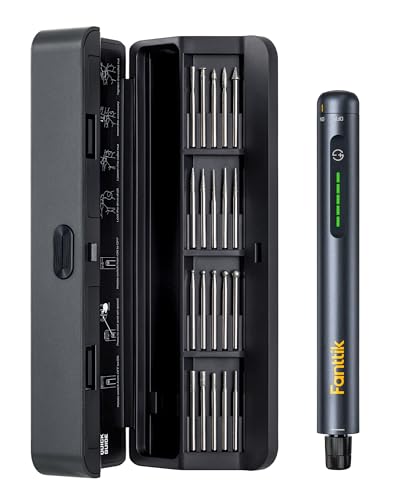
- Ultra-low 32 dB noise for quiet operation
- Built-in shadow-free LED work light
- Fast USB-C charging in about 1 hour
Trade-offs
- Collet only accepts 3/32" (2.3mm) accessories
- USB-C cable not included with the tool
Powered by a durable motor, the Fanttik F2 Master Engraving Pen operates at just 32 dB, which is quieter than many household appliances. This low noise level, combined with ultra-low vibration, allows for intense focus on fine details without distraction. A high-concentricity shaft minimizes wobble for cleaner lines and reduced hand fatigue, making it particularly suited for intricate work on materials like metal, glass, and plastic.
This quiet, controlled performance does follow a specific tool path. Its collet is built for 3/32″ accessories, so you can’t use the wider array of bits that fit a full-sized rotary tool like the Dremel 4000. For deep carving or heavy material removal, you’ll feel the limit of its five speed settings. It’s a specialist, not a generalist, excelling where finesse and a steady hand are more important than brute force.
Product photos
Uolor USB Rechargeable Engraving Pen

What We Like
- USB-rechargeable for cordless convenience
- Three adjustable speed levels for different materials
- Compact 4.9-inch length for easy portability
- Includes smart power-off overload protection
Trade-offs
- 30-minute idle time may limit long engraving sessions
- Maximum 18000 RPM is lower than dedicated rotary tools
Its cordless design and compact size, just under five inches long, let this engraver fit easily into a pocket for quick personalization jobs anywhere. Weighing only 0.6 pounds, it’s a natural fit for hobbyists working on jewelry or small wooden crafts. The rechargeable pen can be powered by any device with a USB interface, offering flexibility for its up to 30 minutes of idling runtime after a full charge. This straightforward kit comes with 42 bits for engraving on materials like metal, plastic, glass, and wood.
An ultra-portable design like this naturally trades off some sustained power. With a top speed of 18,000 RPM and a 30-minute idle runtime, it’s designed for intermittent detail work, not prolonged, heavy-duty grinding. Users who need more muscle and longer runtimes for bigger projects would want a tool like the Dremel 4000, which offers significantly higher power and a broader accessory ecosystem. This pen excels at being the grab-and-go option when your main workshop tool is across the room or back in the garage.
Product photos
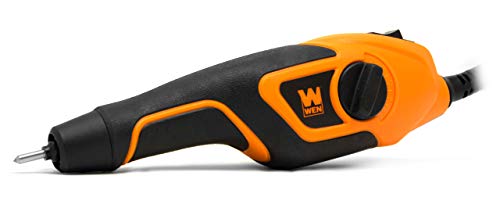
WEN Variable-Depth Carbide Engraver
What We Like
- Variable-depth dial for precise stroke control.
- Lightweight 9 oz design with soft-touch grip.
- Includes stencil set and durable carbide tip.
- Versatile for plastic, metal, glass, wood, leather.
Trade-offs
- Corded design limits mobility compared to cordless pens.
- Tool-only kit; workpieces and safety gear not included.
The 9-ounce weight and soft-touch grip make this engraver feel like an extension of your hand, reducing fatigue during detailed sessions. The standout feature is the depth-adjustment dial, letting you control the stroke length for anything from light etching to deeper carving. That dial is the key reason this tool excels for users who need repeatable, controlled results across materials like metal and wood. It’s built for the craftsperson who values precision over raw speed.
A corded design means you trade unlimited portability for consistent power without battery delays. Its 13-watt motor delivers up to 7,200 strokes per minute, a speed suited for hand-guided engraving. This tool is purpose-built for its namesake job, chosen when your priority is using the depth-adjustment dial for a controlled engraving, not for tasks like sanding or polishing.
Product photos
How We Evaluated Engravers
Our evaluation was based on manufacturer specifications, expert round-up reviews, and patterns in owner feedback. We prioritized criteria that matter most for engraving: power delivery and speed range for handling different materials, ergonomics and design for control during detailed work, and included accessory kits for getting started immediately.
We also weighed the core trade-offs between corded and cordless designs, and between rotary tools, engraving pens, and dedicated laser engravers. This research-led approach identifies tools suited for specific tasks, but it cannot replicate long-term durability testing or hands-on feel.
What To Look For In Engravers
Engravers range from handheld rotary tools to automated laser machines. Your choice hinges on the materials you work with, the level of detail you need, and where you plan to use the tool.
Focus on power source (corded for unlimited runtime, cordless for portability), speed control (variable RPM for different materials), and included accessories. For lasers, consider the engraving area, material compatibility, and safety features.
Tool Type: Rotary, Pen, or Laser
Rotary tools like the Dremel 4000 offer the highest power and accessory versatility for grinding, polishing, and engraving, but their corded design tethers them to a workspace. Engraving pens are compact, often cordless, and designed specifically for detailed marking on many surfaces; they excel in portability but lack the brute force for heavy material removal.
Laser engravers, like the SCULPFUN C1 Mini, provide hands-free, pixel-perfect detail on flat materials but cannot engrave bare metals or offer the tactile control of a handheld tool. For a deeper dive into the different styles, our guide to handheld engravers breaks down the pros and cons.
Power & Speed
A tool’s motor strength, measured in amps or watts, determines its ability to handle demanding jobs without bogging down. Speed, measured in rotations per minute (RPM), needs to be variable and sufficiently high for fine detail work; a range from 5,000 to 35,000 RPM covers most engraving tasks. Electronic speed control, found on better rotary tools, maintains consistent RPM under load for uniform results. For engraving harder materials like metal, the importance of sufficient power and durable bits is highlighted in research on engravers for tools.
Design & Ergonomics
Comfort and control are critical for precision. Look for an ergonomic grip, like the 360-degree grip on the Dremel 4000, to reduce fatigue during long sessions. Weight and balance matter greatly; a lightweight pen is easier to maneuver for intricate script. For laser engravers, a compact footprint or enclosed design is key for safety and workspace integration. Low-vibration designs, like that of the Fanttik F2 Master Engraving Pen, minimize hand fatigue and improve line quality.
Included Kits & Accessories
A comprehensive starter kit gets you working immediately. Check for a variety of engraving bits, collets for different shank sizes, and practical extras like a guide ruler or stencils. For laser engravers, look for included software and safety features like a protective cover or limit switches. Many engraver pens come in kits with dozens of bits for different materials.
- Verify the accessory shank size matches your tool’s collet.
- Look for a case or organizer to keep small bits from getting lost.
- For lasers, ensure the software is compatible with your computer.
A well-chosen kit saves money and frustration compared to buying accessories separately.
Engravers Compared
The table below summarizes key specifications to help you compare our top picks at a glance.
| Product | Power Source | Speed Range / Max Speed | Weight |
|---|---|---|---|
| Dremel 4000 Rotary Tool Kit | Corded | 5,000-35,000 RPM | N/A |
| xTool Selected Engraving Pen | Rechargeable, pass-through | 12,000-25,000 RPM | 100g aluminum |
| Foredom Brushless Rotary Micromotor Kit | Cordless lithium-ion battery | 35,000 RPM | N/A |
| SCULPFUN C1 Mini Laser Engraver | N/A | N/A | 2.3 pounds |
| Resparked Customizer Engraving Pen | USB-C fast charging | 3 adjustable speeds | 0.5 pounds |
| Dremel Stylo+ Rotary Tool Kit | 120V corded | 5,000 to 22,000 RPM | 0.5 Pounds |
| LONGER Ray5 10W Laser Engraver | N/A | N/A | N/A |
| Fanttik F2 Master Engraving Pen | USB-C | 5 adjustable speeds | 0.8 pounds |
| Uolor USB Rechargeable Engraving Pen | USB Recharging | 5000-18000 r/min | 0.6 pounds |
| WEN Variable-Depth Carbide Engraver | N/A | Up to 7,200 SPM | 9 oz |
Frequently Asked Questions
What is the best engraver?
The best engraver depends on your primary use. For a versatile, powerful tool suitable for many materials and extended use, a rotary tool like the Dremel 4000 is an excellent choice. For portable, detailed work on over 50 surfaces, an engraving pen like the xTool Selected is ideal. For automated, high-detail work on wood and leather, a beginner laser like the SCULPFUN C1 Mini is a great starting point.
Which type of laser engraver is best?
The best type of laser engraver depends on your target materials. Diode lasers are affordable and great for beginners working with wood, leather, and dark acrylic. CO2 lasers are best for cutting thicker woods and any color of acrylic. For engraving bare metals like stainless steel, a fiber laser is required. Our dedicated guide to laser engravers explores these differences in detail.
How much should an engraving cost?
We never discuss specific prices, as tool costs vary widely. Entry-level engraving pens and basic rotary tool kits are budget-friendly. Mid-range options offer more power, better ergonomics, or more comprehensive kits. Professional-grade rotary tools and laser engravers with larger work areas and higher precision command a premium price. Your investment should align with the materials you plan to work with and the volume of projects you anticipate.
Can I engrave metal with a laser engraver?
Yes, but not all lasers can engrave bare metal. Standard diode and CO2 lasers struggle with untreated metals. To engrave stainless steel, aluminum, or brass directly, you need a specialized fiber laser or a dual-beam system that includes a fiber laser module. For more on this specific application, see our resource on metal laser engravers.
What’s the difference between a rotary tool and an engraving pen?
Rotary tools are more powerful, corded (typically), and designed for a wide range of tasks including grinding, sanding, and cutting, in addition to engraving. Engraving pens are purpose-built for marking, are often cordless and pen-shaped for maximum control in detailed work, and are less suited for heavy material removal. Learning to engrave with a rotary tool requires practice to master control.
The Bottom Line
The Dremel 4000 Rotary Tool Kit is the best overall engraver for the workshop DIYer who needs a single, powerful tool for extended sessions across wood, metal, and plastic. Its wide speed range and consistent power under load make it a versatile workhorse.
If you’re on a tight budget or just starting out, look at the Resparked Customizer Engraving Pen for its all-in-one value, or the SCULPFUN C1 Mini Laser Engraver for a plug-and-play laser experience. For specialized needs, our other award winners offer top performance in portability, quiet operation, or large-format laser work.
Ultimately, matching the tool’s core strength, be it rotary power, laser precision, or pen-like portability, to your most common projects is the single most important factor in choosing the right engraver.
