
How to Change a Drill Bit: Step-by-Step (Without Damage)
This post contains affiliate links. As an Amazon Associate, we earn from qualifying purchases.
To change a drill bit, first disconnect all power, remove the battery or unplug the cord. For many drills like Ryobi models, rotate the collar counterclockwise to open and clockwise to tighten, but always check for arrows on the chuck as the Ryobi P209D manual advises they indicate the correct direction. For a keyed chuck, insert the key and turn it counterclockwise to loosen before changing the bit.
That power disconnect step is essential. It’s the line between a routine swap and a trip to the emergency room, because a drill’s trigger can get bumped during the change. Sources differ on the specific procedure for how to change a drill bit; for example, Ryobi says to disconnect the battery, while the 1239-153 manual says to ensure the spindle has come to a complete stop, and the Ryobi P209D manual says to lock the switch trigger.
What follows: a visual guide to identify your chuck type, the exact hand motions for each method, the manufacturer specs that settle common arguments about how to change a drill bit, and what to do when a bit won’t let go.
Key Takeaways
. Disconnect all power first, this is the single most important safety step, cited by every manufacturer manual. . Sources agree that you should not use the drill’s power to tighten the chuck, but they differ on using tools: the 1239-153 manual says “Do NOT use pliers,” while the Ryobi P209D manual says “Do not use a wrench.” . Insert the bit straight and fully into the chuck jaws; an angled or partial insertion causes wobble and can throw the bit. . After tightening, test for wobble by jogging the trigger at low speed before drilling; excessive vibration means the bit isn’t seated correctly. . If a bit is stuck, never force it with power; use locking pliers on the bit shank while holding the chuck, or apply a penetrating lubricant.
Keyless vs. Keyed Chuck: How to Tell
Look at the front of your drill. If you see a smooth, knurled metal collar with no holes, you have a keyless chuck. If you see three small holes spaced evenly around the collar, you have a keyed chuck.
The keyless chuck is the modern standard for cordless drills like the Ryobi 18V ONE+ series and many corded models. You turn the collar by hand. The keyed chuck is common on older drills, heavy-duty corded models, and some bargain cordless tools. It requires a small, L-shaped chuck key to tighten and loosen.
Where this goes sideways: Assuming all chucks work the same. Trying to turn a keyed chuck by hand will strip your knuckles. Trying to find the key for a keyless chuck wastes ten minutes of rummaging.
Before You Start: The Non-Negotiable Safety Steps
Before you start: A drill bit that is not installed correctly can be thrown from the chuck with dangerous force., and a spinning chuck can grab loose clothing or skin. These three steps mitigate that.
First, disconnect the power source. The Ryobi support guide states to “Disconnect the battery pack before inserting or removing any drill or driver bit,” while other manuals, like the 1239-153, emphasize ensuring the spindle has come to a complete stop.
Second, put on eye protection that meets ANSI Z87.1 standards. Safety glasses with side shields that meet ANSI Z87.1 are the minimum; for additional protection, use an approved face shield. This isn’t just for drilling, metal chips or debris can fall from the old bit when you remove it.
Third, if the drill was just used, let the bit and chuck cool. A hot bit can burn your fingers, and a hot chuck can expand slightly, making the bit harder to remove. The Ryobi guide notes a cooling period may be required.
The 5-Step Keyless Chuck Method
This is the process for the vast majority of modern drills. The goal is a tight, straight grip without over-tightening.
- Disconnect power and secure the drill. Hold the drill by the handle or the main body with your non-dominant hand. Your grip should be firm and comfortable.
- Open the jaws. With your other hand, grasp the knurled chuck collar. Rotate it counterclockwise (lefty-loosey). The jaws will open. For a Ryobi drill, the official support direction is “anti-clockwise (to the left).” Open them wider than the bit shank you’re about to insert.
- Insert the new bit. Clean any dirt or debris from the bit’s smooth shank. Push the bit straight into the center of the chuck until the shank seats fully against the back of the jaws. The Ryobi P209D manual is adamant: “Make sure to insert the drill bit straight into the chuck jaws. Do not insert at an angle.”
- Tighten the chuck. While still holding the drill body steady, rotate the chuck collar clockwise (righty-tighty). Tighten it firmly by hand. You should feel solid resistance. The Ryobi P209D manual warns: “Do not hold the chuck body with one hand and use the power of the drill to tighten the chuck jaws on the drill bit.” This can cause severe injury.
- Check your work. Briefly squeeze the trigger at low speed without touching the bit to anything. Watch and listen. The bit should spin smoothly with no visible wobble or rhythmic clicking. If it vibrates excessively, the bit is off-center, loosen it and reinsert it straight.
Common mistake: Over-tightening a keyless chuck. The mechanism is designed for hand torque. Cranking it with all your might can distort the internal jaws or wear the thread prematurely. Snug is sufficient.
| Step | Action | Risk If Skipped |
|---|---|---|
| 1. Disconnect Power | Remove battery or unplug cord | Accidental startup causing injury |
| 2. Open Jaws | Turn collar counterclockwise | Cannot remove old bit or insert new one |
| 3. Insert Bit | Push bit straight in fully | Bit wobbles, throws from chuck, damages workpiece |
| 4. Hand-Tighten | Turn collar clockwise firmly | Bit slips under load or jaws are damaged by tools |
| 5. Test Spin | Jog trigger at low speed | Unseen wobble causes poor holes or broken bit |
The Keyed Chuck Method
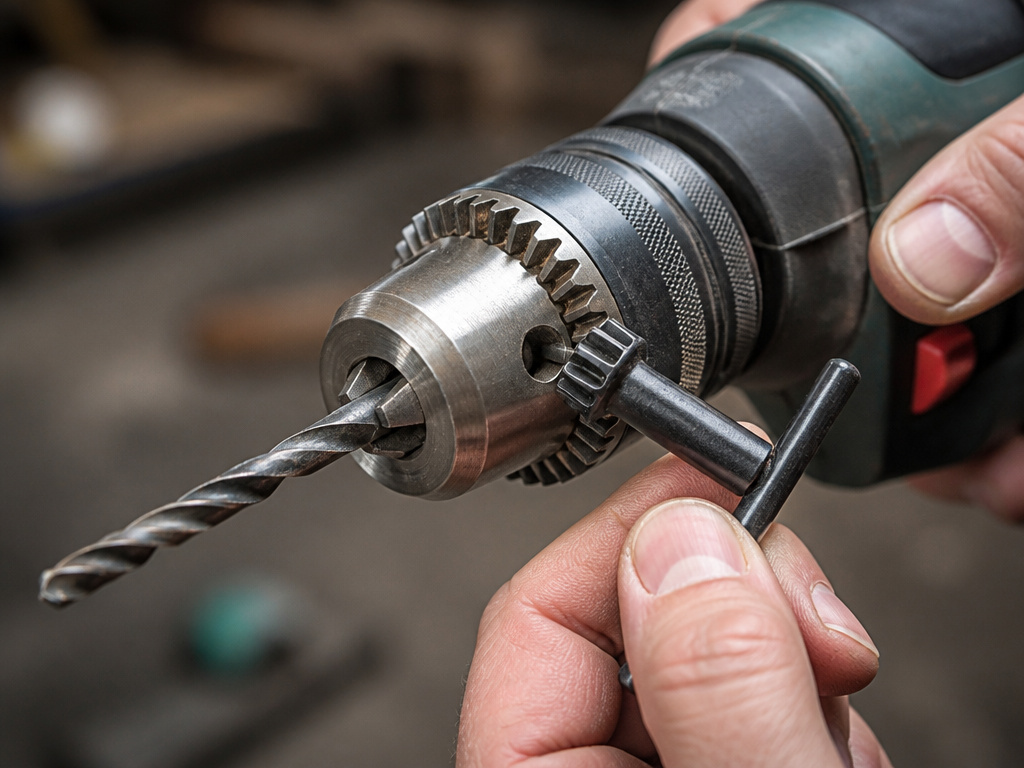
If your drill has three holes, you need the chuck key. The process is similar but adds one critical tool.
First, locate the chuck key. It’s often stored in a slot on the drill’s handle or in the case. Insert the key’s geared end into one of the three holes on the chuck collar. The teeth should mesh fully.
To loosen, turn the key counterclockwise. You may need to use a second key in another hole for high-torque chucks. The jaws will open. Remove the old bit.
Insert the new bit’s shank straight into the jaws, pushing it all the way back. Now, insert the key and turn it clockwise to tighten. Move the key to each hole in sequence, giving it a firm turn each time, to ensure the jaws close evenly and concentrically.
Finally, remove the key. Always remove the chuck key from the drill before operating. A flying key is a dangerous projectile.
What If the Bit is Stuck?
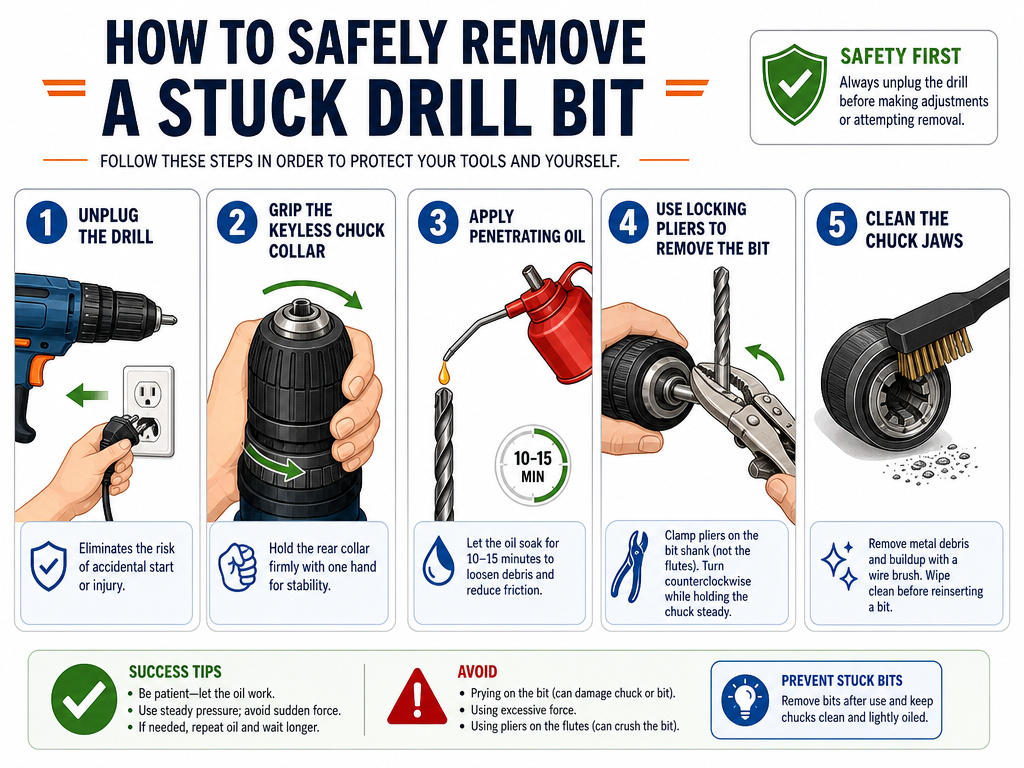
A bit that won’t come out is usually caused by overtightening, corrosion, or debris in the jaws. Do not use the drill’s power to try and shake it loose, this is prohibited in manuals like the 1239-153, which states never to use drill power to loosen bits.
Here’s the safe sequence:
- Disconnect power. Always.
- Try manual force first. For a keyless chuck, grip the collar and turn counterclockwise with steady pressure. For a keyed chuck, use the key.
- Apply penetrating oil. If corrosion is suspected, put a drop of penetrating oil (like Liquid Wrench) where the bit shank meets the jaws. Let it sit to allow the oil to penetrate.
- Use locking pliers on the shank. If the chuck turns but the bit doesn’t release, clamp locking pliers onto the smooth, undamaged portion of the bit shank. Hold the chuck steady with one hand and turn the pliers counterclockwise with the other. This breaks the grip directly.
- Inspect and clean. Once removed, clean the bit shank and the chuck jaws with a wire brush and a dry cloth to remove any rust, dirt, or metal particles.
For a persistent problem, our guide on removing a stuck drill bit has more detailed methods. Forcing it usually makes the problem worse.
Why Correct Bit Installation Matters
A poorly installed bit doesn’t just make a messy hole. It creates a hazard. When a bit isn’t centered, the rotating mass is unbalanced. This causes excessive vibration, which the Dynabrade manual says means you should not use the tool.
That vibration transfers through the drill to your hands and arms, accelerating fatigue and reducing control. At high speeds, the centrifugal force can literally throw the bit from the chuck. The Ryobi P209D manual explicitly warns that an angled insertion could cause the bit to be thrown, resulting in injury or chuck damage.
Furthermore, a bit that isn’t seated fully will slip under pressure. This strips the shank and the internal jaws, ruining the chuck’s ability to grip any bit tightly in the future. A ruined chuck means replacing the entire drill or an expensive repair. It’s cheaper to take the extra ten seconds to do it right.
Special Cases: Air Drills and Clutch Use
The procedure changes slightly for specialized tools. A pneumatic air drill, like the DEWALT DWMT70786L, requires the same safety steps but adds a pre-lubrication requirement. Its manual states to lubricate with 1 teaspoon (5cc) of pneumatic oil into the air inlet before initial use, and before and after each additional use.
For the DEWALT DWMT70786L air drill, the maximum air pressure is 90 PSI (6.2 bar). Exceeding this can damage the tool. Always ensure the air supply is shut off before changing bits.
For drills with a clutch (torque setting), the how to change a drill bit question arises: should you use it during bit changes? The answer is no. The clutch is for driving screws to prevent over-driving or stripping. When changing a bit, When changing a bit, consult your drill’s manual for the correct clutch setting to ensure the chuck can be turned freely. This gives you the full mechanical connection for tightening and loosening. However, you still tighten by hand, the drill mode is for the action of drilling, not for power-tightening the chuck.
Choosing and Maintaining Your Bits
A clean, sharp bit is easier to change and safer to use. Dirt on the shank, as noted in the Dynabrade manual, prevents proper alignment. Wipe the shank with a rag before insertion.
Investing in a set of high-speed steel (HSS) bits makes a difference. A quality bit has a straight, polished shank and clear size markings. For general use, a set of high-speed steel (HSS) bits covers wood, plastic, and soft metal. Knowing your drill bit types helps you match the bit to the material, which reduces binding and sticking.
After use, especially in metal, a light coat of oil on the bit’s flutes and shank prevents rust and keeps it running cooler next time.
How to Store the Old Drill Bit Safely
After removing a drill bit, let it cool down if it was just used. A hot bit can burn you, so a cooling period may be required. Wipe the bit clean with a rag to remove any dust, metal shavings, or debris. Dirt on the bit shank can prevent it from seating properly the next time you use it. Store the bit in a dedicated case, a bit holder, or a labeled container to keep it organized and to protect the sharp cutting edges. This prevents the bit from getting lost and keeps it from causing injury if left loose in a toolbox or drawer.
How to Match a Drill Bit to the Task or Screw
Choosing the right bit is crucial for clean results and safety. For drilling into wood or metal, high speed steel bits are recommended for maximum performance. As noted in the Ryobi P209D manual, when drilling large holes in metal, start with a small bit, then finish with a larger bit. The Ryobi P209D manual warns never to operate at a higher speed than the maximum speed rating of the drill bit. For driving screws, select a driver bit that fits the screw head snugly to prevent stripping. The Ryobi P209D manual suggests using a light oil on the drill bit to keep it from overheating and prolong its life.
Frequently Asked Questions
How do I get my drill to release the bit?
Ensure the drill is off and powerless. For a keyless chuck, hold the body firmly and turn the front collar counterclockwise with steady, firm pressure. If it’s stuck, apply penetrating oil to the shank-joint and let it sit, then use locking pliers on the bit shank as described above. Never use the drill’s power to try and shake it loose.
Is the direction to loosen always counterclockwise?
For many drills, including Ryobi models, the direction to loosen is counterclockwise. However, the Ryobi P209D manual states the arrows on the keyless chuck indicate the correct direction, so always check the tool’s markings.
Can I use a wrench on a keyless chuck?
Do I need to remove the battery on a cordless drill every time?
Yes. It’s the safest practice and is explicitly stated in official guides. Sources differ: Ryobi says to disconnect the battery, while the Ryobi P209D manual says to lock the switch trigger to remove bits. The safest practice is to follow the specific manual for your tool.
What’s the difference between changing a bit on a drill vs. An impact driver?
The core safety steps are identical: disconnect power, insert straight, tighten securely. The main difference is the mechanism. An impact driver has a quick-release hex collet instead of a chuck. We have a dedicated guide on changing bits on an impact driver that covers its specific method.
Before You Go
One rule settles most arguments: if the manufacturer’s manual says it, that’s the procedure for that tool. The DEWALT air drill manual says lubricate before use and don’t exceed 90 PSI. The 1239-153 manual says hand-tighten only.
When sources disagree on procedure, consult your tool’s specific manual.
If your drill chuck won’t tighten properly after a bit change, the jaws are likely worn or dirty. That’s a sign to clean it thoroughly or consider a replacement. A chuck that doesn’t grip is a drill that’s not ready to work.
The whole process takes less than a minute when done right. That minute protects your tool, your project, and your hands.
