
How to Use a Random Orbital Sander: Step-by-Step
This post contains affiliate links. As an Amazon Associate, we earn from qualifying purchases.
Use a random orbital sander by placing it on the workpiece before starting, applying light pressure, moving it in broad strokes, and progressing through grits from coarse to fine. For wood, that means starting at 80 grit, moving to 120, then 180.
That sounds simple, and the tool does most of the work. The gap between simple and actually smooth is in the details the manuals bury in small print, like the six-second rule for a worn brake or the exact speed setting that burns out a motor on softwood. A key detail is how to use a random orbital sander correctly.
What follows: the verified steps from the OEM manuals, where three major brands disagree on how you even start the thing, and how to dodge the five most common mistakes that leave your project looking worse than when you began.
Key Takeaways
- Place the sander on the workpiece before starting it (Milwaukee’s rule) to prevent initial scratches, though Makita advises starting the tool first and then placing it on the workpiece.
- Let the tool’s weight provide the pressure; excessive pressure stops the pad from rotating properly and creates swirl marks or gouges.
- Start with a coarse grit like 80 for material removal, then move to 120 grit, and finish with 180 grit or higher for a smooth surface ready for stain or paint.
- Keep the sander moving in wide, overlapping strokes and never linger in one spot to avoid heat buildup that can soften finishes or warp wood.
- If the sander gets hot, stop immediately and let it cool; Ryobi advises running it free without a load to cool the motor, while Makita warns against continuous low-speed operation that can cause overload.
Before You Start: Gear Up and Check the Manual
Before you start: Eye protection meeting ANSI Z87.1 and a respirator are essential. The dust cloud from a random orbital sander is fine enough to ignore a cheap dust mask, and it will irritate your lungs for hours. Ear protection is wise too, the tool can produce noise levels that may exceed 80 dB(A), which is enough to cause hearing fatigue over a long session.
Your first stop should be the manual for your specific model, which is the definitive source on how to use a random orbital sander. Manufacturers don’t publish these for fun. They contain the torque specs for internal repairs, the exact pad size, and the safety warnings that keep you and the tool intact. For example, the Ryobi P411 manual states its backing pad should stop within six seconds after you turn it off. If it spins longer, the brake is worn and you should send it for service, a minor safety point most users never check.
Your second stop is the sandpaper. Ensure you have the correct sanding discs for your sander’s pad. Buy a variety pack with grits from 80 to 220. Trying to sand a rough board with 220-grit paper is like trying to mow a field with scissors.
Setting Up Your Sander
Every sander has a few basic controls. Locate the power switch, usually a slide or paddle. Find the speed dial, if your model has one.
The speed dial on a random orbital sander controls orbits per minute (OPM). Higher OPM removes material faster but risks overheating and swirls on soft woods. Lower OPM provides more control for fine finishing and delicate materials.
Now, attach your sanding disc. Make sure the pad and the workpiece are clean. A grain of sawdust under the disc acts like a rock in your shoe, creating a deep scratch you won’t see until you apply stain. Press the disc firmly onto the hook-and-loop pad, ensuring full contact. Some pros give the pad a quick spin by hand to check for wobble before plugging in the battery or cord.
The Confusing First Step: When to Hit the Power
Here’s where the manuals don’t agree, and it’s the first real test of whether you read them. According to Milwaukee’s guide for the M18 model, you should place the sander on the workpiece before starting the tool. Their reasoning is solid: if the pad is free-spinning at 12,000 OPM when it touches down, it can skid and scratch the surface.
The Makita manual says the opposite: “Turn the tool on and wait until it attains full speed. Then gently place the tool on the workpiece surface.” Ryobi’s P411 manual contradicts itself, suggesting both methods within a few paragraphs.
What gives? The difference often comes down to the pad design and the sander’s initial torque spike. Milwaukee’s advice is generally safer for beginners and for hard, finished surfaces. Makita’s method might apply more to their dual-mode “Roto-orbit” setting for aggressive material removal. My rule is simple: when in doubt, follow Milwaukee’s method. A scratch you make in the first two seconds is the hardest to sand out later.
| Brand & Model | Recommended Start Procedure | Why It Matters |
|---|---|---|
| Milwaukee M18 2648-20 | Place on workpiece, then start. | Prevents free-spinning pad from scratching on contact. |
| Makita BO6040 | Start, reach full speed, then place on workpiece. | Designed for controlled engagement with its dual-mode pad. |
| Ryobi P411 | Manual contradicts; suggests both. | Highlights a common user confusion — test on scrap first. |
Step-by-Step Sanding Sequence
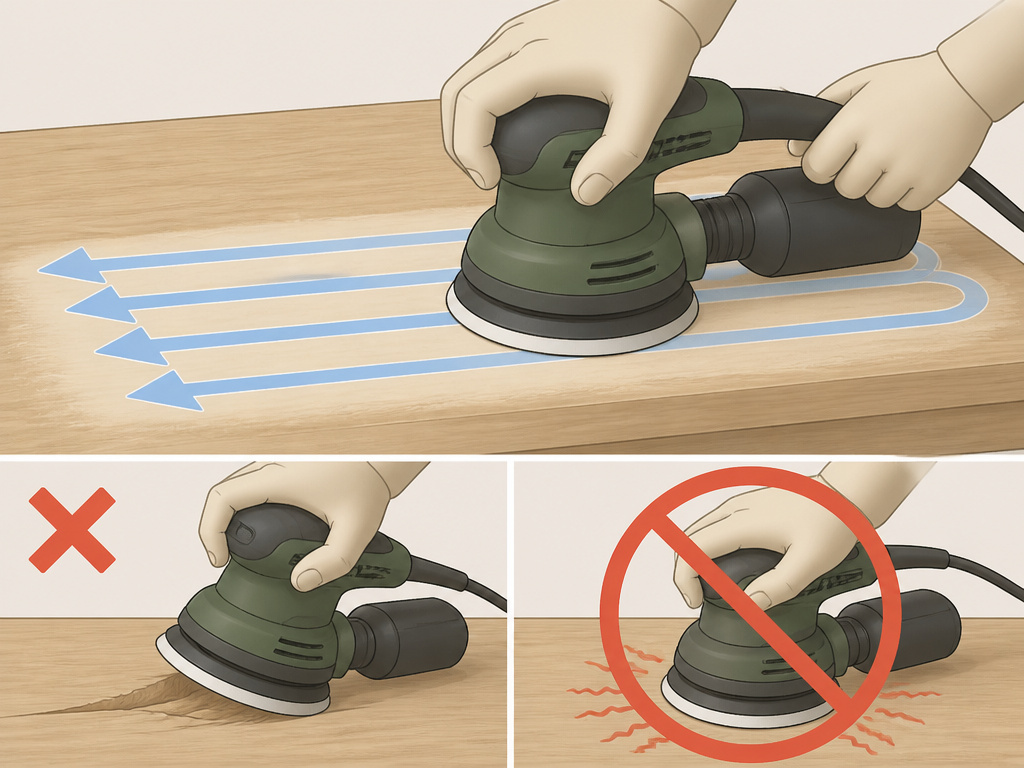
Once the sander is on and moving, the real work begins. The goal of how to use a random orbital sander is to let the machine do the work while you guide it. This isn’t a workout.
- Apply Light Pressure. The weight of the tool is often enough. The Milwaukee manual is clear: “A light pressure is recommended for fine work, moderate pressure for rough work. Excessive pressure does not allow the pad to rotate enough.” You’ll feel the difference. With the right pressure, the sander glides almost silently. Press too hard, and it labors with a strained, gritty whine. The pad stops its random orbit and just vibrates, which is how swirl marks happen.
- Keep the Pad Flat. Tipping the sander to use an edge seems like a way to get into corners. It’s a terrible idea. You’ll create an uneven, gouged surface and dramatically wear out one side of your expensive sanding pad. The entire face of the disc should be in contact.
- Move in Broad, Overlapping Strokes. This isn’t a small, circular scrubbing motion. Think of painting a fence. Use your whole arm to push the sander forward in a straight line. Overlap each pass to ensure uniform coverage. The 3M and Milwaukee manuals both stress “wide, overlapping strokes” to produce a uniform finish and avoid heating one spot.
- Never Stop Moving. If you linger, even for a few seconds, you’ll create a low spot or a divot. On finished wood, the Ryobi manual warns that “any finish or resin… may soften from the frictional heat.” You’ll see the finish get shiny and gummy, a sure sign you’ve ruined that area and now have to strip it completely.
Where this goes sideways: Stopping the sander in one spot to “get that one rough patch.” The friction heat softens the wood or finish quickly, creating a depression that requires removing a lot more material to flatten again.
Advanced Techniques & Grit Progression
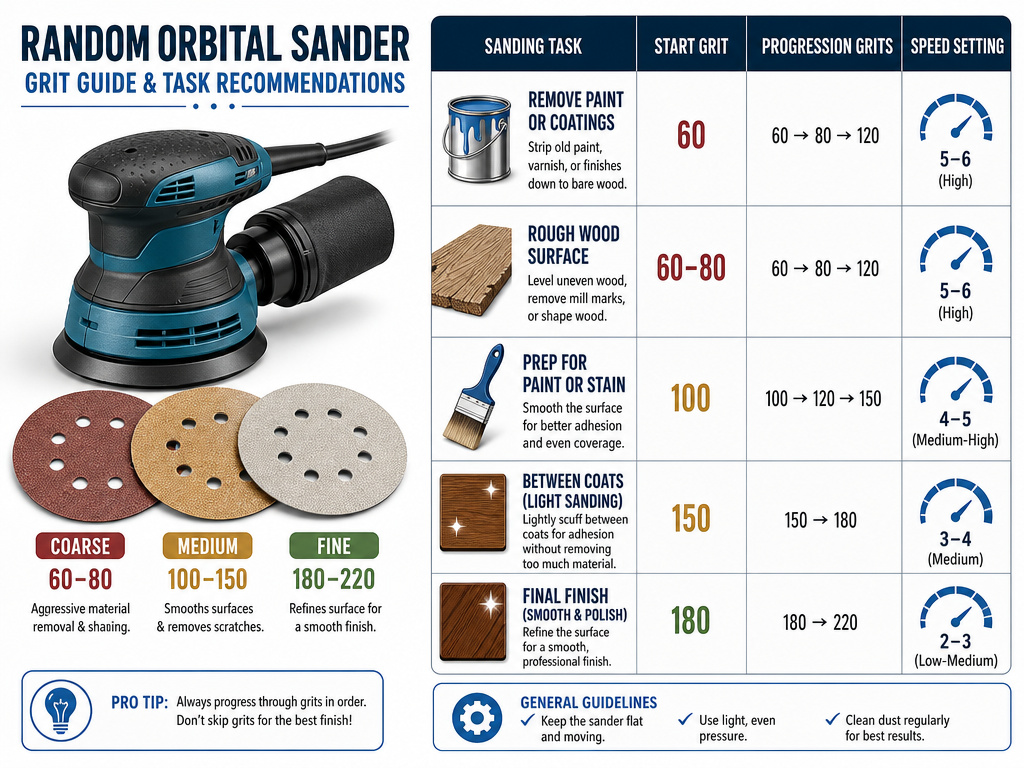
A smooth finish requires a disciplined march through progressively finer grits. Each grit removes the scratches left by the previous one.
You can continue to finer grits for a smoother finish if you’re applying a clear coat.
- Coarse Grit (80-100): This is for flattening and removing old finish, deep scratches, or mill marks. Don’t expect a smooth surface here. Your job is to make the surface uniformly scratched with the 80-grit pattern.
- Medium Grit (120-150): Once the surface is flat, switch to 120-grit. You’re now erasing the 80-grit scratches. You’ll know you’re done when you can’t see any of the deeper, wider scratches from the coarse paper. A trick: wipe the dust off with a tack cloth and shine a light across the surface at a low angle. The remaining scratches will catch the light.
- Fine Grit (180-220+): This stage prepares the surface for stain or paint. The 180-grit removes the 120-grit scratches. If you’re painting, 180 is usually sufficient. For a stained finish where every scratch shows, move to 220.
| Sanding Task | Start Grit | Progression Grits | Speed Setting (Typical) |
|---|---|---|---|
| Removing old paint/varnish | 80 | 120, 180 | High (4-6 on Milwaukee) |
| Flattening rough lumber | 80 | 120, 150, 180 | Medium-High (3-5) |
| Smoothing between paint coats | 220 or higher | N/A | Low (1-3) |
| Final finish sanding | 180 | 220, 320 | Low (1-2) |
When removing paint or varnish, the manuals add two critical steps. First, strip as much as possible with a chemical remover. Second, let the workpiece dry completely before sanding. Sanding over solvent residue is a fire hazard. Use a coarse grit (80) to prevent the old gunk from clogging the paper, and keep the sander moving to avoid heating and re-softening the coating.
Managing Dust and Troubleshooting Problems
Dust collection protects your lungs and lets you see your work. Connect a shop vacuum to the sander’s port if it has one. If it doesn’t, you’re working in a cloud. The “dust” from sanding wood is particulate matter that can cause serious respiratory issues over time. Wear that respirator.
Here’s how to diagnose common issues:
- Swirl Marks: These are the tiny, circular scratches that ruin a finish. Cause: Using too fine a grit too soon, excessive pressure (stopping pad rotation), or a dirty pad with stuck grit. Fix: Go back a grit and sand evenly until they disappear.
- Uneven Surface (Gouges): You tilted the sander or pressed too hard on an edge. Cause: Not keeping the pad flat. Fix: Return to a coarse grit and carefully flatten the area, then re-progress through the grits.
- The Sander is Overheating: The motor housing gets uncomfortably hot to the touch. Cause: Extended use, especially at low speeds on a tough material. The Makita manual warns that continuous low-speed operation can overload the motor. The Ryobi manual says if overheating occurs, turn it off, let the disc stop, remove it, and then run the sander free without a load to cool the motor.
- Poor Dust Collection: The port is clogged, or the vacuum filter is full. Cause: Neglected maintenance. Fix: Clean the ports after every use with a dry brush.
Choosing the Right Speed for the Job
Variable speed is more than a fancy dial. It’s a control for material and finish quality. High speed is for rapid stock removal on hard materials. Low speed is for delicate work, fine finishing, and preventing heat buildup.
The lesson is simple: match the tool’s action and speed to the task. Cranking a sander to max on a soft pine trim board will burn the wood and load the paper with pitch in seconds.
Cleaning, Maintenance & Safe Storage
A clean tool is a reliable tool. After each use, ensure the tool is powered off.
- Brush all dust from the vents, switch, and pad area.
- Clean the body with a damp cloth and mild soap. The Milwaukee manual explicitly warns against harsh chemicals: “Do not use gasoline, turpentine, lacquer thinner, paint thinner, chlorinated cleaning solvents, ammonia, or household detergents containing ammonia.” These can degrade plastics and insulation.
- Check the sanding pad for wear or debris stuck in the hook-and-loop. Replace it if it’s glazed or damaged.
- Store the sander in a dry place.
If something isn’t right, unusual vibration, a change in sound, a drop in power, stop. Don’t try to finish the job. Consult the manual for troubleshooting, or contact an authorized service center. Forcing a failing tool is how small problems become expensive repairs.
Parts of a Random Orbital Sander
Your sander has three main parts you’ll interact with. The palm grip is where you hold and control the tool. The sanding pad is the rotating disc that holds the abrasive paper; it must be kept flat on the workpiece. The switch or trigger controls power. Use only the sanding pad designed for your specific tool, as using one of the wrong size or weight can be dangerous. Always wear eye, ear, and respiratory protection when operating the sander.
Final Hand Sanding for a Perfect Finish
After using your sander with progressively finer grits, a final hand sanding step removes any faint swirl marks the machine might leave. Switch to a very fine grit sandpaper, higher than your last machine-sanded grit. Work by hand, sanding lightly. Some sources recommend following the wood grain for a final finish, while others state the sander can be moved in any direction. This light, controlled pressure ensures you don’t create new scratches. Keep the sanding block flat and use broad, even strokes. This final pass smooths the surface to a uniform finish, preparing it perfectly for staining or sealing.
Frequently Asked Questions
Do you push down on an orbital sander?
No. Let the tool’s weight and the abrasiveness of the paper do the work. Pushing down hinders the pad’s orbital rotation, reduces cutting efficiency, creates swirl marks, and can overheat the motor. Use light pressure for fine work, moderate pressure for rough work, per the Milwaukee manual.
What is the correct way to use an orbital sander?
The correct sequence is: 1) Don safety gear (eyes, lungs, ears). 2) Attach the correct grit sandpaper. 3) Place the sander on the workpiece. 4) Start the tool. 5) Apply minimal pressure, keep the pad flat, and move in wide, overlapping strokes without stopping. 6) Progress through grits from coarse to fine.
What do you use a random orbital sander for?
It’s your go-to tool for fine finish sanding on flat or gently curved surfaces. Common uses include smoothing wood before staining or painting, removing old finish, blending repairs on drywall, and polishing metals or plastics. It’s designed to avoid swirl marks, unlike a simple orbital sander.
Is there a difference between an orbital sander and a random orbital sander?
Yes. A standard orbital sander moves in a fixed circular pattern, which can leave visible swirl marks in the finish. A random orbital sander adds a second, randomized elliptical motion to its orbit. This random action is what prevents the telltale swirls, making it the preferred choice for fine finishing work.
The Bottom Line
Using a random orbital sander requires restraint and rhythm. The manufacturers have done the hard engineering; your job is to not fight it.
If you take away one thing, let it be the grit progression. Jumping from 80 to 220 might feel efficient, but you’ll spend triple the time trying to sand out the deep 80-grit scratches that the 220 paper can’t touch. Your arms will thank you, and your projects will look professional.
And when the manual says to avoid certain cleaners or warns about low-speed operation, they mean it. That’s not legal boilerplate. It’s the collective memory of every burned-out motor and melted plastic housing they’ve had to warranty. Your sander is a partnership between you and the engineers who built it. Read their instructions, then let the tool sing.
