
How to Avoid Swirl Marks With an Orbital Sander
This post contains affiliate links. As an Amazon Associate, we earn from qualifying purchases.
To avoid swirl marks with an orbital sander, you need to control three things: the tool’s operating conditions, the condition of the pad and abrasive, and your physical technique. For pneumatic random orbital sanders, the Woodworking Network states a firm rule: they need a minimum of 90 PSI of air pressure at the tool inlet; a drop below this threshold is a guaranteed path to pigtails.
That pressure number is a mechanical floor, not a suggestion. A sander running below its rated air supply or speed can’t complete its random orbit pattern cleanly. The pad drags instead of floats, and that drag leaves the tiny, circular scratches you see only after the stain hits. What follows breaks down each of those three control points with the specific numbers and failure modes the manuals actually list, which is the core of how to avoid swirl marks with an orbital sander. This section explains why your compressor might be lying to you, how to spot a dead pad before it ruins a project, and the one technique shift that makes more difference than any gear upgrade.
Key Takeaways
- Pneumatic random orbital sanders require at least 90 PSI at the tool; an underpowered compressor or water in the lines will drop pressure and cause swirls.
- Always start the sander in the air and lower it onto the workpiece; stopping on the surface imprints the orbit pattern into the wood.
- Inspect and replace the backing pad when the hook-and-loop grips wear down; a slipping disc creates swirls no matter how perfect your technique.
- Move the sander in slow, overlapping passes, letting the tool’s weight do the work, leaning on it slows the orbit.
- Follow a grit progression and never skip more than one grit grade; sanding to a higher grit doesn’t remove scratches left by a much coarser one.
The Most Common Swirl-Mark Culprits (And How to Diagnose Them)
Swirl marks aren’t a mystery. They’re a symptom with a short list of specific, mechanical causes. You can usually trace them back to a failure in the tool’s support system or its moving parts.
For pneumatic sanders, the Woodworking Network states a firm rule: they need a minimum of 90 PSI at the tool inlet. Your shop compressor might read 90 PSI at the tank, but that’s not the number that matters. The pressure at the sander, after the hose, quick-connect, and any filters, is what counts. An under-powered compressor that can’t maintain that pressure when another tool kicks on is a classic culprit, the sander slows mid-stroke, the orbit staggers, and swirls appear in sporadic patches.
An under-powered compressor that can’t maintain 90 PSI when other shop equipment is running can cause swirl marks. Water in the air supply reduces efficiency, potentially lowering pressure below the 90 PSI threshold.
That’s why a simple pressure gauge at the tool is a better diagnostic than the tank gauge. Listen to the sander, too. A healthy pneumatic random orbital has a consistent, high-pitched whir. If the pitch drops or gets choppy under load, your air supply is the first suspect.
Electric sanders have their own spec to watch: speed. The Woodworking Network calls for a minimum speed of 10,000 RPM for random orbital sanders, while the Ozito PXROS-125U manual lists a no-load speed range of 7,000–11,000 RPM. Compare that to the Ozito PXROS-125U manual, which lists a no-load speed range of 7,000–11,000 RPM. If your battery is dying or the motor is straining under pressure, you can dip below that effective threshold. The result is the same as low air pressure, an incomplete orbit.
| Symptom | Likely Cause | Immediate Fix |
|---|---|---|
| Swirls in random patches | Intermittent air pressure drop (compressor cycling, other tools on) | Isolate sander on its own airline; check compressor capacity. |
| Consistent swirls across entire surface | Chronic low air pressure or electric sander running too slow | Check pressure at tool with gauge; fully charge battery; service motor. |
| Swirls only in certain spots | Starting/stopping sander on workpiece, or tilting the pad | Start sander in air, lower onto surface; keep pad flat. |
| Swirls with fresh paper | Worn or damaged backing pad; clogged dust ports | Replace backing pad; clean pad and sander vents after each use. |
The other mechanical villain is hiding in plain sight: the backing pad. When the hooks on the hook-and-loop pad wear down, discs don’t seat fully. They slip and spin unevenly. You’ll feel it, the disc seems to shift under your hand. Maverick Abrasives notes that a pad should be replaced when discs stop holding firmly. A visual check is easy. Compare the grip of a new pad to yours. If the hooks are flattened and glossy, they’re done.
The Grit Sequence That Actually Works
Skipping grits is the great time-saver myth. The idea that you can jump from 80-grit to 220-grit and “sand longer” to remove the deep scratches is a fast track to frustration. Every abrasive leaves scratches at a depth relative to its grit size. A finer paper can’t reach down to remove the deeper valleys left by a much coarser one. You just polish the tops of the scratches, which then magically reappear when you apply a stain.
The Ozito generic manual provides a clear baseline for grit selection by material. It’s a commodity starting point, but it’s grounded in real data from a manufacturer. The Ozito generic manual provides a clear baseline: for coarse sanding of hardwood, it recommends 60-grit; for fine sanding, 180-grit. For paintwork, coarse is 180-grit and fine is 400-grit.
Where this goes sideways: Jumping from 80-grit to 150-grit because “it’s close enough.” The 150-grit abrasive will stop cutting long before it erases the 80-grit scratches, leaving you to either accept a subpar finish or backtrack and re-sand the entire sequence.
A practical, non-commodity rule is to never skip more than one full grit grade. A practical rule is to never skip more than one full grit grade. The goal at each step is to sand until the surface is uniformly dull with no visible scratches from the previous, coarser grit. The goal at each step is to sand until the surface is uniformly dull under good light, with no visible scratches from the previous, coarser grit. Then, and only then, do you move on.
Vacuum the workpiece and the sander pad between grit changes. A single grain of 80-grit debris caught under a 220-grit disc will carve a deep, solitary swirl that looks like a mistake in technique but is just a housekeeping fail.
Pad and Abrasive Maintenance: The Unsexy Essentials
Your sander’s manual isn’t thrilling reading, but it holds the keys to preventing basic failures. A 3M tool manual states: do not use back-up pads that have a Max RPM or Max OPM less than 12,000. Using an under-rated pad isn’t just a safety risk; at high speed, it can deform or fail to hold the abrasive flat, introducing wobble and swirl.
The same manual warns never to use pads with a weight or size different from what the tool was designed for, a key detail in how to avoid swirl marks with an orbital sander. An off-spec pad changes the sander’s balance and orbit geometry. It feels wrong in your hand, a subtle vibration or a hitch in the smooth rotation.
General maintenance is just as prescribed. The Ozito manual dictates a simple post-use ritual: blow air through the tool housing to clear dust, and keep the ventilation slots clean. Why? Because dust buildup makes the tool overheat. An overheated sander can warp internals or cause the pad to run off-axis. Clean the housing with a moist cloth only, solvents can degrade plastics or leave a film that attracts more dust.
The most direct sensory check is sound and feel. A healthy sander has a consistent hum or whine. A grinding noise, a clicking rhythm, or a new vibration means stop. Something is loose, worn, or damaged. A worn bearing doesn’t just fail eventually; it makes the pad orbit erratically now, scattering tiny swirls like confetti.
Technique: Letting the Tool Do the Work (Seriously)
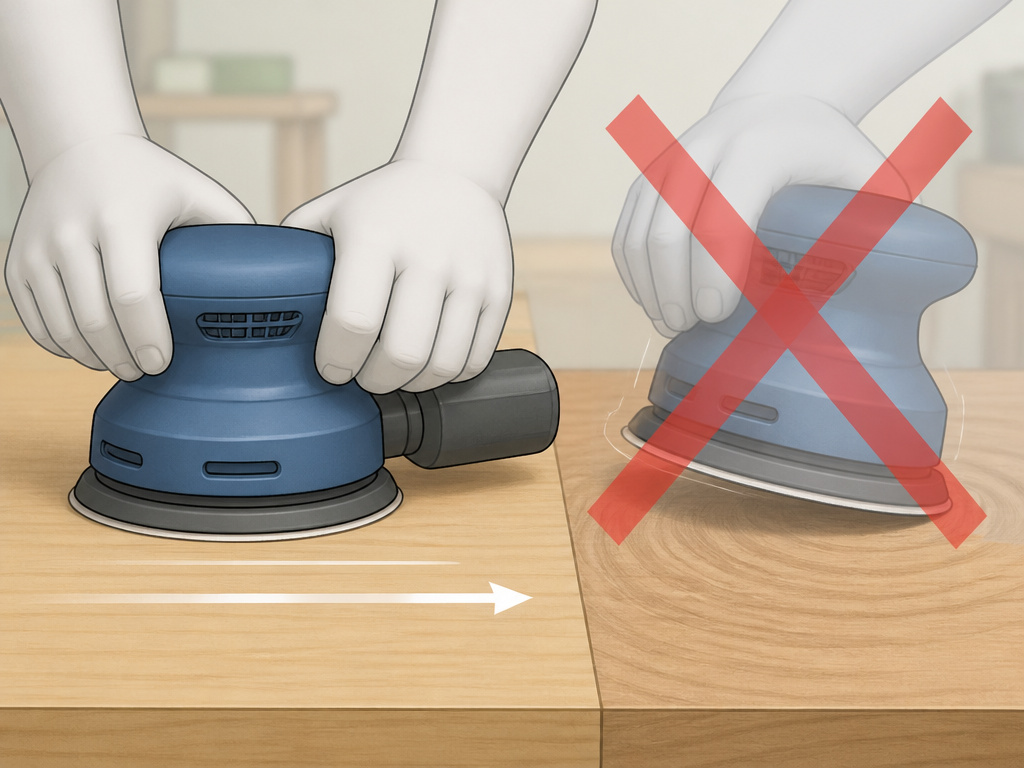
Everyone says “let the tool do the work,” which is the central tenet of how to avoid swirl marks with an orbital sander, but almost no one does it because it feels passive. The instinct is to push down, to steer, to hurry. Fight that instinct.
The DeWalt floor sander manual includes a golden line: “To prevent damage to the flooring and to reduce swirling, keep the machine in motion while the motor is running.” This principle scales down to a handheld orbital. The moment you dwell in one spot, you’re no longer sanding evenly, you’re grinding a low spot and overheating the surface. Keep the sander moving in slow, overlapping passes. Keep the sander moving at a slow, steady pace. Let the sander’s own weight provide the downforce; your hands are just for guidance.
I learned this the hard way on a maple tabletop. I was tired, leaning on the sander to “get through it.” The finish looked hazy even before staining. Under a raking light, the entire center was a galaxy of fine swirls. I’d basically buffed the scratches in rather than sanded them out. I had to drop back two grits and start over.
Starting and stopping technique is critical. Start the sander in the air, let it reach full speed, then gently lower it flat onto the surface. To stop, lift it straight off while it’s still running, then release the trigger. This one habit eliminates the most common user-made swirl mark: the perfect circular imprint at the start or end of a pass.
Finally, keep the pad flat. Tilting onto an edge, even slightly, focuses all the sander’s force onto a tiny area. It digs a dip and often tears the edge of the sanding disc. For edges or corners, use a detail sander or sand by hand. Don’t force the orbital where it doesn’t belong.
Electric vs. Pneumatic: A Quick-Start Technique Difference

This is a subtle but real distinction that most guides gloss over. With a corded or cordless electric orbital, you can often get away with a more direct start. The motor comes up to speed almost instantly. With a pneumatic sander, ensure it reaches full operating speed before contacting the workpiece to avoid imprinting an incomplete orbit pattern.
The fix is simple: be slightly more patient with the air tool. Hold it clear, hit the trigger, wait for the sander to reach its full operating speed, then begin your pass. This ensures the pad is orbiting randomly at the correct speed before it touches down, which is what the “start off the work” rule is really about.
There’s also the lubrication debate. The Ozito electric sander manual states plainly: “No lubrication is necessary as the tool has sealed bearings.” Conversely, the Woodworking Network article prescribes “2 drops of light machine oil for every 8 hours ran” for pneumatic sanders to prevent swirls from lack of lubrication. This is a clarification, not a contradiction. If you have a pneumatic sander, follow its lubrication schedule. If you have an electric model with sealed bearings, don’t introduce oil where it doesn’t belong.
How to Check for Swirl Marks Before Applying Finish
You won’t see subtle swirls under flat workshop light. After your final sanding step, take the piece to a window or use a bright lamp held at a low, raking angle across the surface. This highlights any remaining circular scratches. For an even more revealing check, wipe the surface with a clean rag dampened with mineral spirits. The liquid temporarily eliminates surface scatter, showing the true wood texture. Any swirls left from a worn pad, incorrect grit progression, or pausing the moving sander will become glaringly obvious. Catching them here means a quick re-sand; catching them after the stain dries means starting over.
Frequently Asked Questions
What’s the difference between swirl marks and regular sanding scratches?
Swirl marks are distinct, curved, circular scratches that follow the path of the sander’s orbit. Regular sanding scratches from a belt sander or hand-sanding are typically straight or slightly wavy lines. Swirls are a specific signature of a rotary or orbital motion gone wrong.
Why do my swirl marks only show up after I apply stain or finish?
The clear coat or stain pools in the microscopic scratches, making them visible. Under raw light on raw wood, they often look like a uniform haze. Applying a liquid finish acts like a highlight, revealing the texture. This is why inspecting with a raking light or wiping with mineral spirits before finishing is critical, it shows the scratches you need to remove.
Can I fix swirl marks without starting the whole project over?
Yes, but you must step back in grit. Identify the grit you were using when the swirls appeared. Go back at least one full grit level (e.g., from 220-grit to 150-grit) and re-sand the entire affected area until the swirls are gone. Then progress back up through your grit sequence properly. Don’t try to “buff out” swirls with the same or a finer grit.
Is a random orbital sander better than a standard orbital sander for avoiding swirls?
Generally, yes. A true random orbital sander combines a spinning action with an offset orbit, creating a randomized scratch pattern that is less likely to produce visible repeating swirls. A standard orbital (or “jitterbug”) sander moves in a simple elliptical pattern, which can leave a more pronounced, repeating mark if technique is off.
How often should I replace my sanding discs?
Replace them the moment they stop cutting efficiently. If you find yourself pressing harder to get the same result, or if the disc surface looks glazed and shiny, it’s loaded and dull. A fresh, sharp abrasive cuts cooler and cleaner, which is the first defense against swirls. Using quality, sharp discs is cheaper than repairing a ruined finish.
Before You Go
The core truth about avoiding swirl marks is that they’re a system failure, not a random flaw. The system is your air pressure, your pad, your abrasive, and your hands. Let one element slip, a tired pad, a weak compressor, a hurried pass, and the swirls appear.
If you take away one action step from this, make it this: before your next finishing project, do a system check. Put a gauge on your pneumatic sander. Inspect your pad hooks under magnification. Practice the start-in-the-air move on a scrap piece. That ten-minute audit will save you hours of rework.
And when a finish manufacturer provides a specific grit recommendation, trust it. They’ve formulated their product for that specific scratch depth. They’ve formulated their product to fill and seal at that specific scratch depth. Following their instruction beats generic sanding dogma every time. Your technique should serve the finish, not the other way around.
