
What Does RPM Mean on a Drill? Speed, Torque, and Material
This post contains affiliate links. As an Amazon Associate, we earn from qualifying purchases.
RPM on a drill is Revolutions Per Minute, the measure of how many full turns the chuck and drill bit make in sixty seconds. It’s the primary control for matching your drill’s speed to the material you’re cutting—too fast burns wood and dulls metal, too slow makes the bit skate and offers no control. The drill’s gear selector (typically 1 for low, 2 for high) changes the RPM range, trading raw speed for higher torque.
That number on the spec sheet tells you the ceiling, not the floor. A drill’s performance under load is what matters, and picking the wrong speed setting is how you burn through bits and ruin workpieces. This is why it’s important to understand what does rpm mean on a drill.
What follows is a breakdown of what those RPM numbers actually mean, how they interact with torque and material, and how to read the spec sheets from Milwaukee, Makita, and Ryobi to make an informed choice when you compare a what does rpm mean on a drill. By the end, you’ll know why a 2,000 RPM drill isn’t always better than a 1,400 RPM model, and how to avoid the three most common speed-related mistakes.
Key Takeaways
- Match low speed (Gear 1) for large holes, dense materials, and driving big screws; it delivers higher torque and prevents overheating.
- Match high speed (Gear 2) for small holes in wood or metal and driving small screws; it provides cleaner cuts in soft materials.
- No-load RPM is the maximum free-spin speed; under load, the actual RPM will be significantly lower, which is why torque matters more for tough jobs.
- Always start drilling at low speed with the bit contacting the workpiece to prevent the bit from bending or walking, as mandated by Milwaukee’s safety instructions.
- Using too high an RPM on hard materials like metal generates excessive heat that dulls the bit rapidly, a documented failure mode from power tool guides.
RPM vs Torque: The Trade-Off
You can’t have both at the same time. It’s a direct mechanical relationship built into your drill’s gearbox. When you select the high-speed gear (often labeled “2”), the internal gears are configured to spin the chuck faster. This comes at the expense of twisting force, or torque. Conversely, the low-speed gear (“1”) uses a different gear ratio that multiplies torque, allowing the drill to push harder against resistance, but it spins the bit more slowly.
This inverse relationship is why your drill bogs down and stops when you hit a knot while in high gear. The motor is spinning fast but doesn’t have the geared-down torque to break through. Switching to low gear gives it that muscle.
This isn’t an abstract concept. It’s why every manual includes specific speed recommendations. The Makita DHP490 manual is explicit: turn the tool off before changing the speed selector. The “1” position gives you 0-500 RPM under no load, but the higher torque. Position “2” gives you 0-1,900 RPM. You choose based on the job, not the spec sheet.
Common mistake: Leaving the drill in high speed for everything. For driving a 3-inch deck screw into pressure-treated lumber, high speed lacks the torque to seat the screw and will strain the motor. The fix is simple: switch to low gear. The screw drives in with authority, and the drill doesn’t sound like it’s screaming.
How RPM Affects Drilling Performance by Material
The ideal RPM isn’t a single number, which is a core part of what does rpm mean on a drill. It’s a range dictated by the bit’s diameter, the bit’s material (HSS vs. Carbide), and what you’re drilling into. The goal is to achieve an efficient cutting speed without generating destructive heat.
| Material | Bit Type | Recommended Speed | Why This Works |
|---|---|---|---|
| Softwood (Pine) | Twist Drill, Spade Bit | High Speed (Gear 2) | The soft fibers cut cleanly at higher speeds without burning. Low speed can cause the bit to grab and tear. |
| Hardwood, Dense Lumber | Twist Drill, Forstner Bit | Low Speed (Gear 1) | Higher torque is needed to drive the cutting edges through tough fibers. High speed would just create friction heat. |
| Masonry (Brick, Concrete) | Carbide Masonry Bit | Hammer Drill Mode, Low Speed | The hammering action does the fracturing; the rotation clears debris. High rotational speed without hammering just glazes and dulls the carbide tip. |
| Plastics, Composites | Standard Twist Drill | Medium to Low Speed | High speed melts plastic, causing it to gum up on the bit flutes. Slow and steady with light pressure yields a clean hole. |
The Milwaukee M18 manual makes a critical distinction: when drilling in wood, composition materials, and plastic, select the drill-only operating mode. When drilling in masonry, select the hammer drill operating mode. Using hammer mode on wood will shred the fibers around the hole. The wrong action mode combined with the wrong RPM is a sure way to ruin a bit and a workpiece.
Typical RPM Ranges by Drill Type
Not all drills spin at the same maximum speed. A heavy-duty corded hammer drill is built for sustained high-RPM work, while a compact cordless driver is optimized for torque in a smaller package. Here’s what the manufacturer spec sheets actually say.
Cordless Drill/Drivers
These are the workhorses of the DIY world. Their no-load RPM specs show a clear pattern: a high gear for speed, a low gear for power.
- Milwaukee M18 (2803-20): 0-550 RPM (Low), 0-2,000 RPM (High)
- Milwaukee M12 (2402-20): 0-450 RPM (LO), 0-1,700 RPM (HI)
- Makita DHP490: 0-500 min⁻¹ (Low), 0-1,900 min⁻¹ (High)
- Ryobi PSBDD01: 0-450/min (Low), 0-1,700/min (High)
- 20V MAX Cordless Drill (1239-153): 0–400 RPM / 0–1,400 RPM
Notice the clustering? Most pro-grade 18V tools top out between 1,800 and 2,000 RPM in high gear. The 12V-class tools and value brands like the 20V MAX model peak around 1,400-1,700 RPM. That difference isn’t about quality; it’s about motor design and intended use. The higher top speed is beneficial for small-diameter bits and prolonged drilling in soft materials where you want fast chip clearance.
Corded Hammer Drills
When you need relentless power and speed for masonry, a corded drill is the default. Their motors are not limited by battery voltage, so they can sustain higher RPMs under load.
The 7.8 AMP ½” Hammer Drill (Cat. No. 1240-000) is a benchmark. Its motor speed is listed as 0-1,000 & 0-2,700 RPM (no load). That high-gear number is higher than the high-gear speeds listed for the cordless drills in the fact sheet. This is why for drilling dozens of large-diameter holes in concrete or mixing thick compounds, a corded drill still has a place. It won’t sag under load the way a battery-powered tool might.
No-Load RPM vs. Under-Load Performance
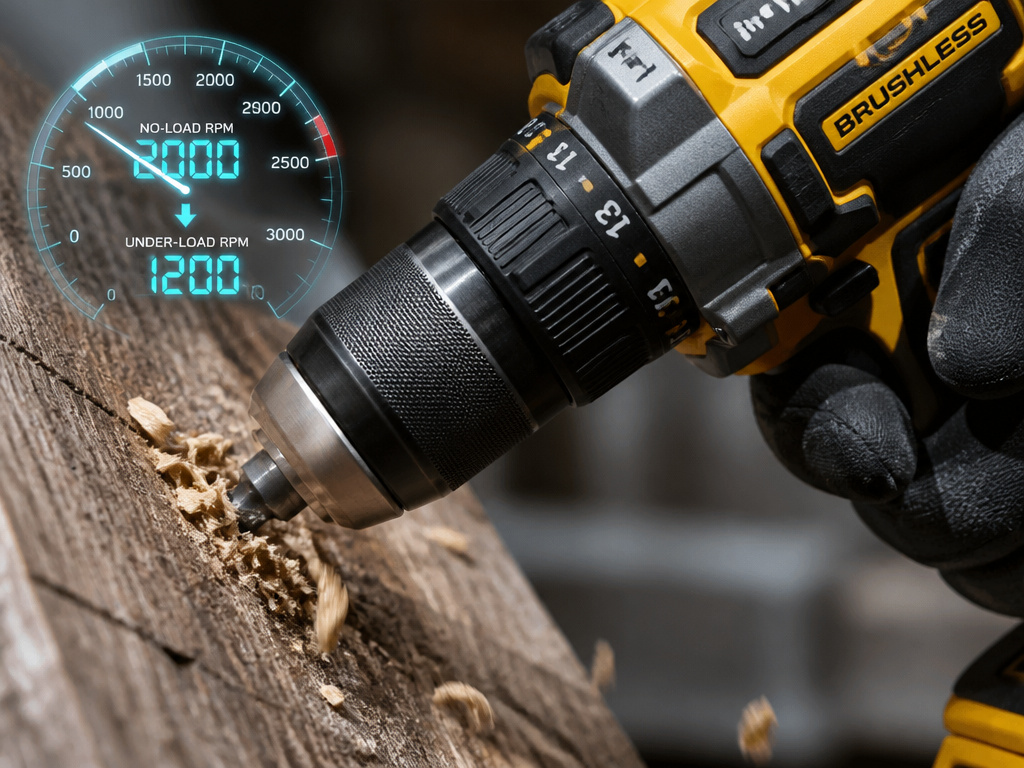
This is the part that marketing glosses over. The “0-2,000 RPM” on the box is a no-load speed. It’s what the chuck spins at when it’s free in the air, with no bit biting into material. The moment you press a drill bit into oak, the RPM drops—sometimes dramatically.
The real performance metric is how well the drill maintains useful speed and torque under that load. A drill with a weak motor might drop from 2,000 RPM to 400 RPM when drilling a ½” hole, while a robust one might only drop to 1,200 RPM, completing the job much faster. This is why two drills with identical no-load RPM specs can feel completely different in your hands. You’re feeling the difference in their ability to deliver power under workload, not just top speed.
Where this goes sideways: Assuming a higher no-load RPM rating means a more powerful drill. A drill with a high no-load RPM but a weak motor will bog down instantly under load, while a drill with a slightly lower no-load RPM but a stout motor will power through. Judge drills by their sustained performance, not their free-spin ceiling.
Diagnosing and Fixing RPM-Related Problems
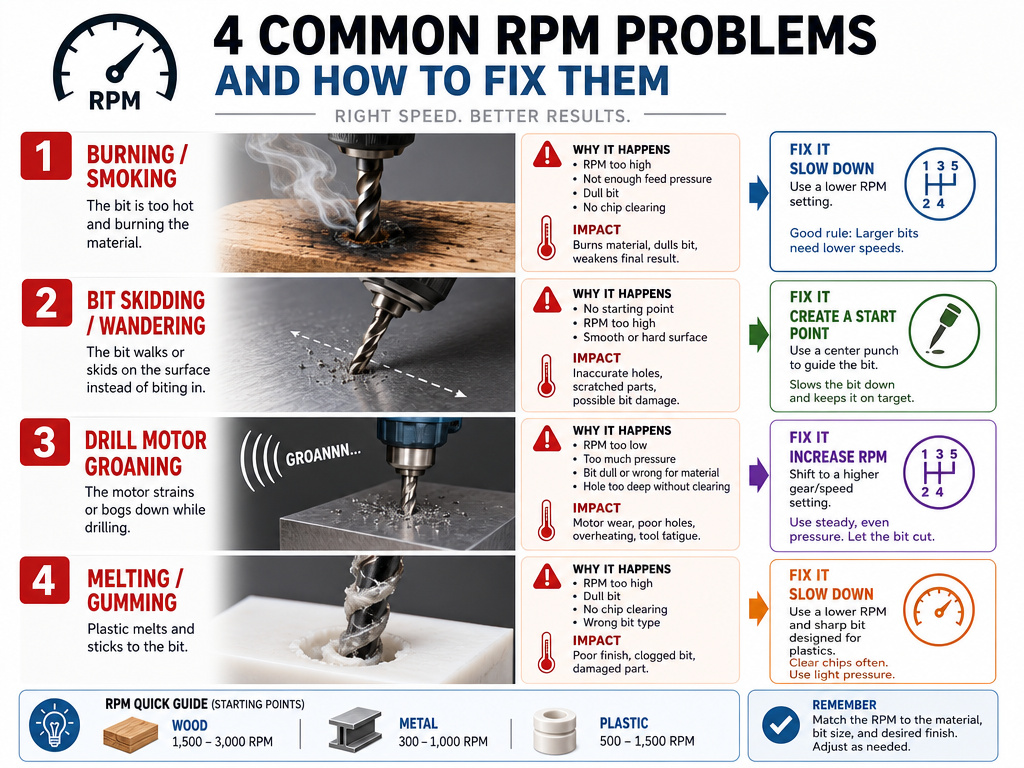
Your drill tells you when the speed is wrong. You just have to listen and look.
-
The bit is smoking or the workpiece is burning.
- Cause: RPM is too high for the material and bit size.
- Fix: Immediately stop. Switch to the low-speed gear (Gear 1). For metal, ensure you’re using cutting oil. For wood, use a sharper bit and apply firmer, steady pressure to help the bit cut instead of rub.
-
The bit is “walking” or skidding across the surface instead of biting.
- Cause: Starting with the bit not contacting the workpiece, or starting at too high an RPM. Milwaukee’s manual is clear: “Always start drilling at low speed and with the bit tip in contact with the workpiece.”
- Fix: Use a center punch to create a small dimple for the bit tip. Place the bit in the dimple, apply light pressure, and pull the trigger at low speed until the hole is started.
-
The drill is laboring, making a deep groaning sound, and not making progress.
- Cause: RPM is too low, or you’re using a small-diameter bit in low-speed gear. The bit isn’t achieving the necessary cutting speed.
- Fix: For holes under ¼”, switch to high-speed gear (Gear 2). For larger bits, ensure you’re using low gear and that the bit is sharp. A dull bit requires excessive torque and will stall any drill.
-
The material (especially plastic) is melting and gumming up the bit.
- Cause: RPM is too high, creating friction heat faster than the bit can clear material.
- Fix: Switch to low-speed gear. Use a very sharp bit and a “pecking” motion—drill for a second, pull out to clear melted plastic, repeat.
Safety and RPM: The Non-Negotiables
Speed isn’t just about efficiency; it’s a safety parameter. Running a tool outside its design limits is asking for trouble.
- Eye Protection is Mandatory: Every manual, like the 20V MAX Cordless Drill manual, states you must always wear eye protection that conforms with ANSI SAFETY STANDARD Z87.1 or CSA requirements. A spinning bit can snap, especially at high RPM under side load.
- Hearing Protection for Sustained Use: The same manual mandates ear protection, particularly during extended operation. A hammer drill impacting concrete at high Blows Per Minute (BPM) is loud enough to cause hearing damage over time.
- Never Exceed the Bit’s Max Speed: The Milwaukee M18 owner’s manual warns, “Never operate at higher speed than the maximum speed rating of the drill bit.” High-speed steel (HSS) bits have a maximum safe RPM; carbide masonry bits have another. A bit that fails at high RPM becomes a high-velocity projectile.
- Check for Hidden Utilities: Always “check work area for hidden pipes and wires before drilling,” as the Milwaukee manual advises. A high-speed bit going through a live wire or a water pipe is a life-altering event, not just a ruined bit.
How to Calculate RPM for a Drill Bit
While your drill has a maximum RPM, the optimal speed for a specific bit depends on the material you’re cutting and the bit’s diameter. The core formula relates Surface Feet per Minute (SFM), a recommended cutting speed for the material, to the bit’s diameter to find the ideal RPM. A smaller bit needs a higher RPM to achieve the same cutting speed as a larger bit spinning slower. Manufacturer manuals stress you should never operate at a higher speed than the maximum speed rating of the drill bit itself. For large bits or hard materials, high speed generates excessive heat that dulls the bit rapidly, so calculating a lower target RPM is key to good results and bit life.
What’s the Difference Between RPM and Cutting Speed?
RPM is how fast your drill’s chuck spins, but cutting speed, often called Surface Feet per Minute (SFM), is how fast the edge of the drill bit moves through the material. Think of it like a car tire: RPM is how fast the axle turns, while SFM is how fast the tread is moving over the road. A tiny drill bit needs a very high RPM to achieve a proper SFM, while a large bit at the same RPM would have a much higher, often damaging, SFM. This is why you use lower speeds for larger bits. High speed causes overheating and dulling on large or hard materials, so matching RPM to bit size controls the actual cutting speed.
How Does Bit Material (HSS vs. Carbide) Affect RPM?
The material your drill bit is made from dictates how much heat and speed it can handle, which directly impacts the RPM you should use. High-Speed Steel (HSS) bits are common for metal and wood but have limits; exceeding a bit’s max speed rating risks overheating and failure. Carbide-tipped bits, often used for masonry, are harder and more wear-resistant but also more brittle. They can typically handle the high RPMs used in hammer drilling, but a key safety rule is to never use water to settle dust or to cool the bit when using carbide bits in masonry. Always start drilling at low speed with the bit contacting the workpiece, regardless of material, to maintain control and prevent bit walk.
Frequently Asked Questions
What is a good RPM for a cordless drill?
There is no single “good” RPM. For a ⅛” drill bit in softwood like pine, a high speed (Gear 2) is typically ideal. For a ½” spade bit in softwood like pine, a low speed (Gear 1) is correct. Always start with your drill’s low-speed setting and only switch to high if the bit size is small and the material is soft.
How many RPMs is a standard drill?
Standard 18V cordless drill/driver’s no-load RPM varies by model; for example, the Milwaukee M18 (2803-20) offers 0-2,000 RPM on high, while the 20V MAX Cordless Drill offers 0-1,400 RPM. A corded drill might reach 0–2,700 RPM. These are maximums; operating RPM should be lower based on the task.
What drill has the highest RPM?
Among common drills, corded models often have the highest no-load RPM. The cited 7.8 AMP hammer drill has a high-speed range of 0–2,700 RPM. Some specialized rotary tools or die grinders can exceed 30,000 RPM, but they are not general-purpose drills.
What is the recommended RPM for drilling?
It depends entirely on the bit diameter and material. A general rule is larger diameter = lower RPM. For precise recommendations, consult a speed chart for a drill press, which matches bit size and material to optimal RPM, a principle that applies to handheld drills as well.
The Bottom Line
RPM is a dial, not a trophy. A higher number on the box isn’t inherently better. The skill is in knowing when to use that speed and when to trade it for the raw twisting force of a lower gear.
If you remember one thing, let it be this: start low. Your first instinct with any new material or bit size should be to select the low-speed gear on your drill. You can always speed up if the drill is clearly over-powered and the cut is clean. Starting too fast is how bits burn, walk, and break. The extra ten seconds it takes to switch gears saves you from ruined workpieces, damaged tools, and the frustration of doing a job twice. Understanding drill torque and how it works with RPM turns a guessing game into a predictable process. That’s the real power behind the number.
