
What Is Orbital Action on a Jigsaw? The 4-Setting Rule
This post contains affiliate links. As an Amazon Associate, we earn from qualifying purchases.
Orbital action on a jigsaw is an aggressive blade motion where the blade moves in a forward elliptical path on the upstroke and retracts on the downstroke. This setting, typically adjustable across four positions (0-3 or 1-4), cuts faster in soft materials like wood and plastic by clearing chips more efficiently. You turn it off for clean cuts in metal, laminates, or when making plunge cuts.
That forward-and-up swing is what separates a fast rough cut from a clean finish cut. It’s not a gimmick, it changes the tool’s entire personality. This is essentially what is orbital action on a jigsaw.
What follows is a breakdown of the four standard orbital settings, the materials each one is actually rated for, and the manufacturer warnings most guides skip when explaining what is orbital action on a jigsaw. You’ll also get the real-world fixes for when orbital action causes more problems than it solves.
Key Takeaways
- Orbital action is for speed, not finish. It makes the blade scoop material out on the upstroke, cutting faster but leaving a rougher edge.
- Metal and plunge cuts demand setting 0. Sources agree orbital action on metal is risky: Black+Decker warns never to use it, while This Old House advises setting 0 (non-orbital) for metal.
- Hardwood advice is contradictory. Black+Decker manuals say never to use orbital action on hardwoods, while pros (as noted by This Old House) may use higher orbital settings for faster, rougher cuts in thick lumber like stair stringers where finish isn’t critical.
- Higher numbers mean more aggression. On a typical 4-setting dial, position 1 (or 0) is non-orbital, and higher positions increase the elliptical swing for faster cutting in softer materials.
- Blade choice dictates orbital success. A coarse wood-cutting blade (low TPI) works with high orbital settings; a fine metal blade requires the precision of setting 0.
How Orbital Action Actually Works: The Elliptical Swing
A jigsaw blade in straight reciprocating mode moves up and down like a sewing machine needle. Turn on orbital action, and the blade holder tilts it forward slightly on the upstroke. The blade arcs into the material, taking a bigger bite. On the downstroke, it pulls back to clear the kerf.
This elliptical motion means the blade is only cutting and loading teeth on the upstroke. It’s not dragging through the cut on the way down, which reduces heat, friction, and the chance of the blade binding in green or resinous wood.
The benefit is raw speed, which is the core of what is orbital action on a jigsaw. For rough-cutting lumber, orbital action can feel like you’ve upgraded to a more powerful saw. The trade-off is control. That forward thrust can cause the blade to wander, especially in thinner stock, and it leaves a noticeably rougher surface with more tear-out on the top face of the workpiece.
The first time I used a high orbital setting on thin plywood for a cabinet back, the cut was very fast. It also looked like it had been chewed through by a beaver. I had to spend ten minutes sanding the edge.
Orbital Action Settings Decoded: From 0 to 4
Not all orbital dials are labeled the same, but the principle is consistent: higher numbers equal a more pronounced elliptical swing. Based on one Black+Decker manual, a four-setting system (with three orbital positions) breaks down like this.
| Dial Position | Orbital Action | Best For | The Risk If You Misuse It |
|---|---|---|---|
| 1 (or 0) | Non-orbital (straight up/down) | Metal, plastics, laminate, plunge cuts, fine scrollwork | Using this on thick wood is slow. |
| 2 | Low orbital swing | Slower, controlled cuts in softwoods and for starting curved cuts. | The cut will be slower than necessary for the material, bogging down the saw. |
| 3 | Medium orbital swing | General-purpose cutting in most construction lumber. | Using this on hardwoods or for finish cuts leads to excessive tear-out. |
| 4 | High orbital swing | Fast, aggressive rip cuts in softwoods where finish doesn’t matter. | Maximum blade wander and tear-out; can snap fine-tooth blades not designed for the stress. |
The Black+Decker JS660 manual references a Smart Select dial with seven positions, showing that more advanced models offer finer gradations. The core rule remains: start low and increase only if the saw struggles or you’re willing to sacrifice finish for speed.
Common mistake: Assuming “0” and “1” are the same. On many saws, “0” is truly zero orbital action. “1” is often the first orbital step. Check your manual, cutting metal on “1” instead of “0” is a sure way to ruin a blade.
When to Use Orbital Action (And When to Absolutely Avoid It)
Orbital action is a material-specific switch. Getting it wrong doesn’t just make a bad cut; it can damage your blade, your workpiece, or the saw itself.
Use Orbital Action For:
- Rough lumber cutting. Dimensioning 2x4s, cutting plywood for subfloors, or trimming deck boards. Speed is the goal.
- Softwoods and soft materials. Softwoods and soft materials like wood or plastic cut faster with orbital action engaged.
- Thick stock. The increased chip clearance helps prevent blade binding in thick stock.
Turn Orbital Action OFF (Set to 0) For:
- Cutting any metal. Per Black+Decker’s instruction manual: “Metal or hardwoods should never be cut in orbital action.” The orbital swing can catch on metal, bending or snapping the blade.
- Plunge cuts. The Home Depot’s guide recommends setting the orbit adjustment to “0” for plunge cutting. You need the blade’s precise up-and-down action to establish the starting point.
- Laminates, veneers, or finished surfaces. The aggressive forward motion will splinter the delicate top layer.
- Scroll cuts and tight curves. You need the blade to track precisely, not push off your line.
This is where the real confusion lives. The same Black+Decker manual that says never to cut hardwoods with orbital action is contradicted by professional practice.
The disagreement isn’t about physics; it’s about application. The manufacturer’s warning is for a clean, finish-grade cut. The pro’s exception is for a fast, rough cut that will be hidden. If the cut shows, listen to the manual.
The Blade and Orbital Action Partnership
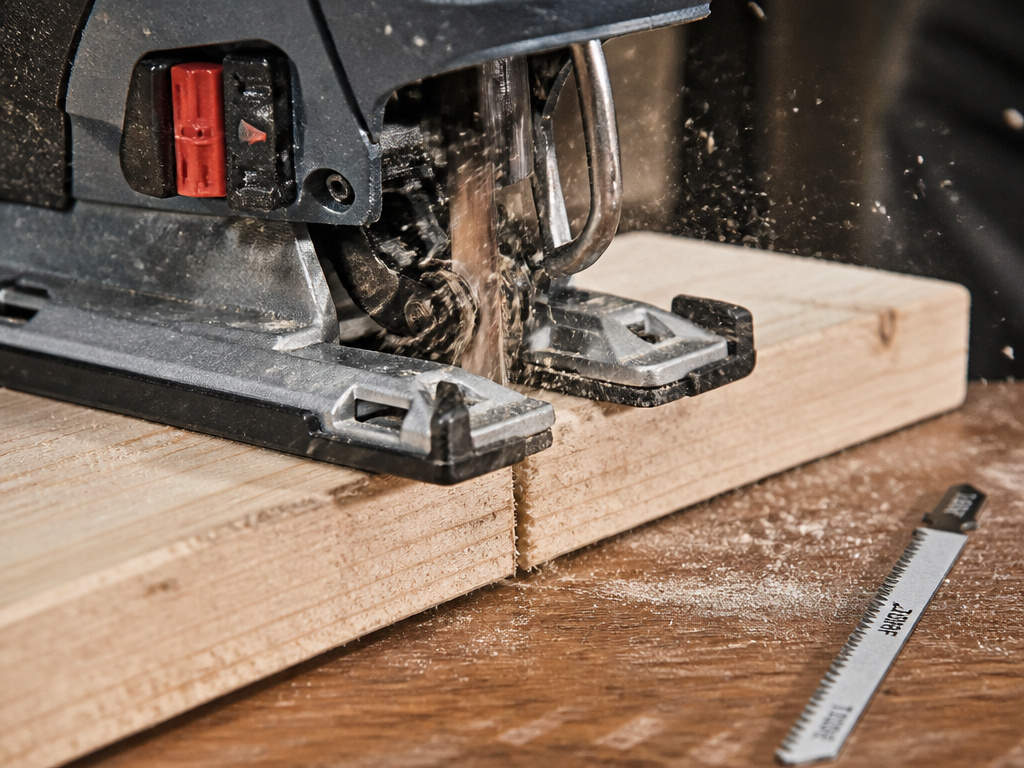
Orbital action and blade selection are a package deal. A high orbital setting with a fine-tooth metal blade is a recipe for disaster. The blade can’t handle the aggressive, scooping stress.
- High Orbital (Settings 3-4): Pair with a coarse, low-TPI (Teeth Per Inch) blade for wood. Think coarse, low-TPI blades. These blades have big gullets to clear the large chips the orbital action produces.
- Low/No Orbital (Settings 0-2): Use with fine-tooth blades designed for metal or finish wood. These blades make many small cuts and need the precision of a straight stroke.
A coarse wood-cutting blade is a classic pairing for orbital cutting in lumber. For metal, a fine metal blade needs the stability of setting 0. The wrong combo feels like the saw is fighting itself.
Where this goes sideways: Using a dull blade with orbital action. The saw compensates for a dull edge by working harder, increasing vibration and heat.
Troubleshooting Common Orbital Action Problems
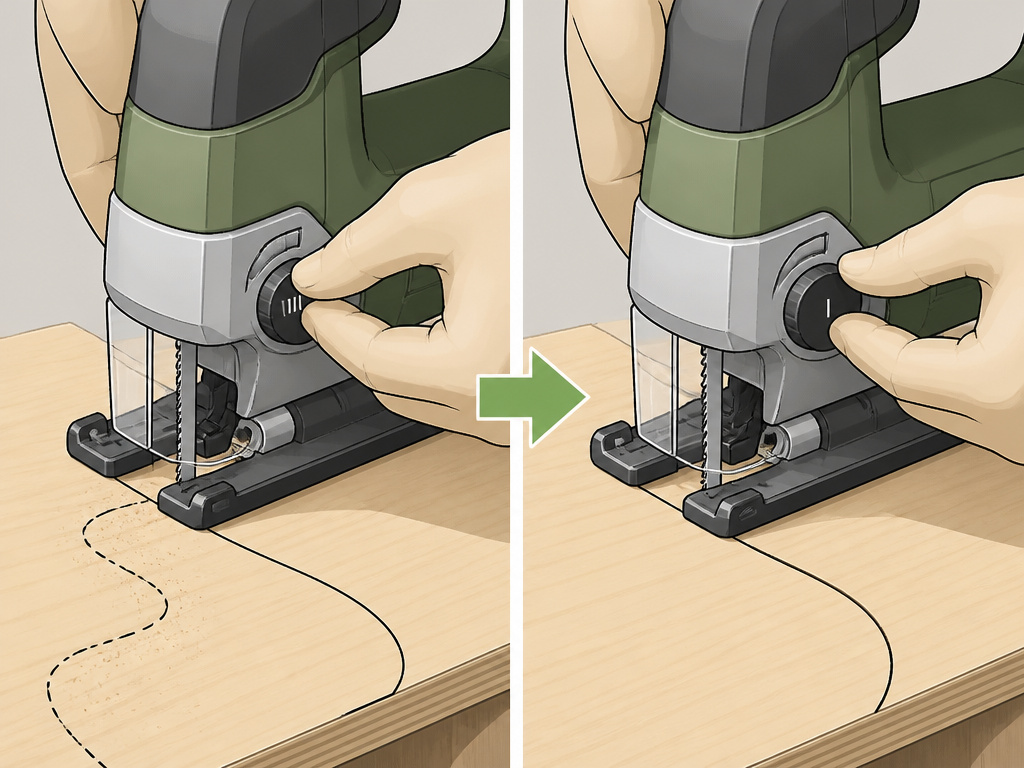
Orbital action introduces variables. When your cuts go wrong, this checklist usually points to the cause.
Problem: The blade wanders off the line, especially on curves.
- Likely Cause: Orbital setting is too high for the blade or material thickness.
- Fix: Dial back the orbital action. For curves, use setting 1 or 0. Ensure you’re using a sharp blade designed for curves (a narrower blade designed for curves).
Problem: Excessive vibration and a rough, chattered cut.
- Likely Cause: Worn or incorrect blade, or the shoe plate isn’t flat against the workpiece.
- Fix: Swap in a new, sharp blade suited to the material. Check that the shoe plate is tightened and hasn’t been bent from a drop. Let the saw’s weight do the work, don’t press down.
Problem: The blade binds and the saw motor strains.
- Likely Cause: Orbital action is ON in material that requires it OFF (like metal), or the chip clearance is blocked.
- Fix: For metal, confirm you’re at setting 0. In thick wood, ensure you’re using a coarse blade and consider cutting slightly slower to let the chips clear.
These fixes aren’t in the manual. They come from the workshop floor,
Orbital Jigsaw vs. Standard Reciprocating Saw: A Key Distinction
Don’t confuse a jigsaw’s orbital action with a reciprocating saw’s aggressive stroke. They solve different problems.
A jigsaw is for precision cutting, curves, notches, cutouts. Its orbital action is a fine-tuning knob for speed within that precision task. A reciprocating saw (Sawzall) is for demolition: tearing out walls, cutting pipe, pruning branches. Its blade stroke is long and powerful by default, designed for pure aggression, not a clean edge.
You’d use an orbital jigsaw to cut a sink opening in a countertop. You’d use a reciprocating saw to cut that old countertop into pieces for disposal. A jigsaw vs circular saw comparison is more relevant for straight-line cutting choices.
Orbital vs. Regular Jigsaw Action Comparison
A jigsaw in regular reciprocating mode moves the blade straight up and down. This is ideal for clean cuts, intricate scrollwork, and cutting metal. Orbital action changes the motion, tilting the blade forward on the upstroke so it arcs into the material for a more aggressive bite. This makes cutting through soft materials like wood or plastic much faster. The trade-off is that the faster, more aggressive orbital cut leaves a rougher edge with more potential for splintering. For precise, clean cuts or when working with metal, you should switch back to the straight, non-orbital setting.
Frequently Asked Questions
Should orbital action be on or off for wood?
For wood, it depends on the cut. Turn orbital action ON (to a higher setting) for fast, rough cuts in softwoods or construction lumber where finish doesn’t matter. Turn it OFF (setting 0 or 1) for fine finish cuts, scrollwork, or when cutting hardwoods where you want to minimize tear-out.
What is the difference between an orbital jigsaw and a regular jigsaw?
All modern jigsaws are “orbital jigsaws”, it’s a standard feature. The term “regular jigsaw” is outdated. The difference is between using the orbital function (on) or not (off). Older, true “regular” jigsaws only offered straight up-and-down motion.
What number should my jigsaw be on to cut metal?
Your jigsaw should be set to 0 (zero orbital action) to cut metal. Black+Decker warns never to use orbital action on metal, while This Old House advises setting 0 for metal cutting. Use a fine-tooth, bi-metal blade designed for metal, and let the saw’s speed (not orbital swing) do the work.
Does orbital action dull blades faster?
Yes, generally. The aggressive forward digging motion puts more lateral stress on the blade teeth than a straight reciprocating cut. You trade blade life for cutting speed. This is most apparent when using high orbital settings (3-4) on dense materials.
Before You Go
Orbital action isn’t a mystery. It’s a simple speed control. For hidden, structural, or rough cuts, crank it up. For anything that shows or involves metal, turn it all the way down.
The one spec that matters more than the orbital dial is your blade choice. A sharp, correct blade on setting 0 will always beat a dull, wrong blade on setting 4. Start every job by matching the blade to the material, then let the orbital setting fine-tune your pace. That’s how you get clean, fast cuts without the headache.
