
How to Change Bits on an Impact Driver: Step-by-Step
This post contains affiliate links. As an Amazon Associate, we earn from qualifying purchases.
Changing bits on an impact driver requires three things: a 1/4″ hex shank bit, a secure hold on the quick-change collet sleeve, and the tool’s direction selector in the center-lock position. Pull the collet sleeve forward, pull or insert the bit, then release the sleeve, the bit clicks into place or slides free.
That “click” is the sound of the internal ball bearings locking into the bit’s power groove, a distinct metallic snap you can hear and feel. The process is consistent for the SKIL and Kobalt models covered here, but one manufacturer, JCB, has a critical rule that differs. This is important to know when learning how to change bits on an impact driver.
What follows: a five-step breakdown of the universal method for how to change bits on an impact driver, three brand-specific quirks you must know, a troubleshooting guide for when the bit won’t budge, and the one maintenance step that keeps the chuck working for years.
Key Takeaways
- Always set the direction selector to center-lock before touching the bit, this physically locks the trigger and prevents accidental starts.
- Pull the collet sleeve forward fully before inserting or removing the bit; a half-pull won’t release the internal ball bearings.
- Use only 1/4″ hex bits with power grooves; standard 25mm (1-inch) bits require a holder for some models like the JCB 21-18ID.
- The bit can be hot enough to burn after prolonged use; wear gloves or let it cool before handling.
- If the chuck feels gritty or bits slip, clean the collet with compressed air, grit and metal dust jam the mechanism.
The Universal 5-Step Process to Remove and Install a Bit
The quick-change chuck isn’t magic. It’s a spring-loaded sleeve that, when pulled forward, retracts a ring of ball bearings out of the bit’s groove. Let go, and the springs push the sleeve back, forcing the bearings into the groove to lock the bit. That’s the whole mechanism for how to change bits on an impact driver. Miss any step, and the bit either won’t seat or won’t release.
Here is the sequence, pulled directly from the SKIL and Kobalt manuals. Every step has a consequence.
- Lock the Trigger. Place the direction-of-rotation selector in the center position. On the SKIL 20V, the manual calls this the “OFF (center-lock) position” and states the tool will not run unless the selector is fully left or right. This is a physical safety lock.
- Grip the Collet Sleeve. With one hand, firmly grasp the textured, knurled ring just behind the chuck. This is the quick-change collet sleeve (SKIL) or retaining collar (JCB).
- Pull the Sleeve Forward. Pull the sleeve toward the front of the tool, away from the motor. You’ll feel a definite click or stop. Hold it there. The Kobalt manual is explicit: pull the sleeve “away from the tool and hold it in place.”
- Insert or Remove the Bit. For installation: insert a 1/4″ hex bit straight into the collet as far as it will go. You should feel it seat against the back. For removal: simply pull the bit straight out.
- Release the Sleeve. Let the sleeve snap back. For installation, you’ll hear and feel a solid click as the bearings lock. Give the bit a gentle pull to confirm it’s secure.
To install the bit: Pull the locking sleeve forward, insert the bit as far as it will go into the collet, and release the locking sleeve to lock the bit. To remove the bit: Pull the locking sleeve forward. Pull the bit from the collet and release the sleeve. – SKIL 20V 1/4” Hex Impact Driver Manual
Where this goes sideways: Releasing the sleeve before the bit is fully seated. The ball bearings catch on the shank’s edge, not in the groove. The bit will feel tight at first but will slip under load, stripping the fastener head or flying out of the chuck. It happens in under a second.
The One Rule That Isn’t Universal: JCB’s 25mm Bit Warning
Most impact drivers accept any 1/4″ hex bit. The SKIL and Kobalt manuals only specify “use only bits with power grooves.” The JCB 21-18ID manual throws a wrench in that assumption.
Its warning is unambiguous: “Do not insert standard 25mm long hex bits directly into the chuck as they are unsuitable for use in impact driver chucks.” That’s roughly a 1-inch long bit, a common size for compact screwdriver bits. The manual says these bits “can instead be fitted into a hex bit tool holder.”
| Brand / Model | Bit Rule | Direct Insertion Allowed? |
|---|---|---|
| SKIL 20V Series | Use bits with power grooves. Other bits need a universal bit holder with power grooves. | Yes, for power-groove bits. |
| Kobalt 24V Series | Use only bits with power grooves. Or use a universal bit adapter with power grooves. | Yes, for power-groove bits. |
| JCB 21-18ID | Do not insert standard 25mm long hex bits directly. Use a hex bit tool holder. | No. Requires a holder. |
The why-layer here is physical. A standard 25mm bit has a shorter shank; when the impact hammer engages, the bit can wobble or tilt inside the deeper chuck cavity, transferring shear forces to the bit’s neck. This can snap the bit or damage the chuck’s internal stops. A bit holder extends the shank, providing a longer, more stable engagement with the collet bearings.
So the universal rule isn’t universal. For the SKIL and Kobalt models covered here, you can insert any bit with a power groove. If you own a JCB 21-18ID, you need a hex bit tool holder for standard 25mm bits.
What Does Your Impact Driver’s LED Light Tell You?
Modern impact drivers use the LED work light for more than illumination. It’s a diagnostic tool. The Kobalt 24V manual provides a clear key for its LED work light signals.
- Steady Light: The tool is on and running normally.
- Slow Flash: The battery charge is very low. Recharge the pack.
- Rapid Flash: The tool has overheated or been overloaded and has shut down automatically. The manual instructs you to “wait for the tool to cool down, at which point it can be started again.”
That rapid flash is critical. It means the electronic protection circuit has kicked in. Continuing to pull the trigger does nothing, you must wait. The cause is often blocked ventilation slots. The Kobalt troubleshooting guide lists “ventilation slots are obstructed” as a cause for motor overheating and states: “Do not cover ventilation slots with hand during operation.”
A hot bit is a separate issue. Both SKIL and Kobalt manuals carry the same warning: “Use protective gloves when removing the bit from the tool, or first allow the bit to cool down. The bit may be hot after prolonged use.” You’ll feel the heat through the collet sleeve.
When the Bit Gets Stuck (And How to Free It)
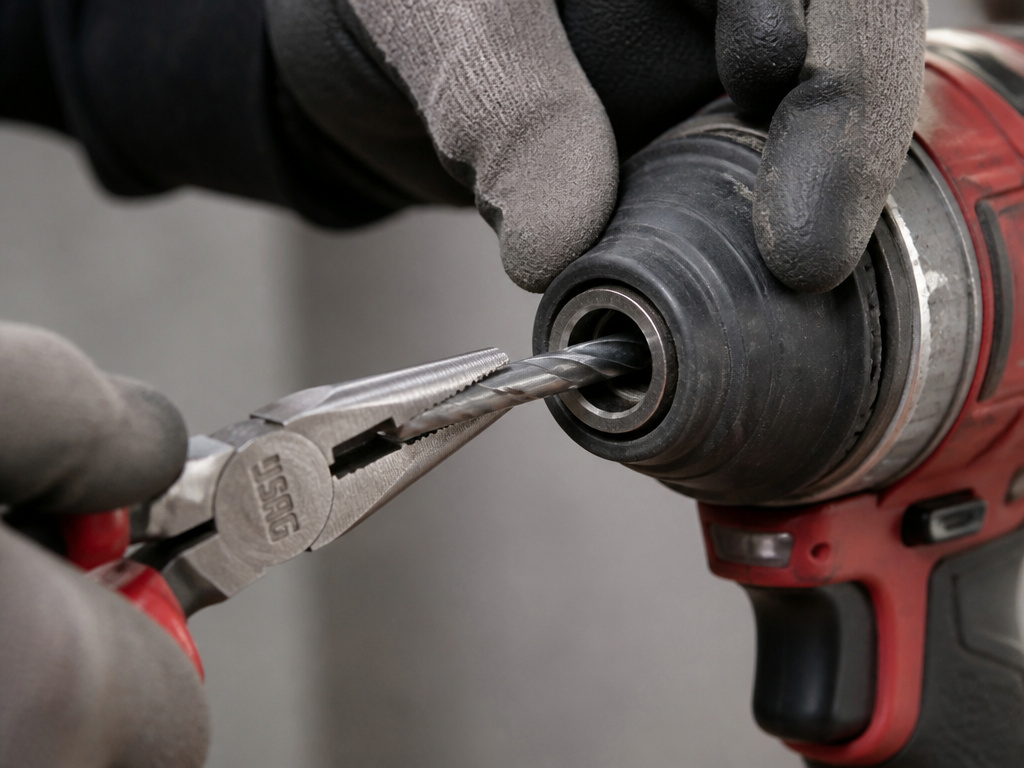
A bit that won’t come out usually means one of three things: debris in the chuck, a damaged bit shank, or the collet sleeve isn’t being pulled back far enough.
First, ensure the tool is locked and you have a firm grip. Sometimes a second hand pulling the sleeve while the first hand pulls the bit provides the extra millimeter of travel needed. If that fails, try this sequence:
- Tap it Out. With the sleeve pulled, hold the driver vertically and tap the chuck end firmly against a block of wood. The vibration can dislodge a jammed bit.
- Clean the Collet. Use a can of compressed air to blow out the hexagonal socket. Metal shavings and grit from demolition work can pack behind the bit, jamming it against the collet walls.
- Use Pliers. Carefully. If the bit is partially exposed, grip the shank (not the fluted working end) with needle-nose pliers. Pull straight out while holding the sleeve back. Never twist or use excessive force; you can deform the collet.
- Inspect the Bit Shank. Remove the bit and look for deep gouges, mushrooming, or a twisted shank. The SKIL manual explicitly says, “Do not use bits that have a damaged shank.” A deformed shank can get stuck and damage the ball bearings.
Common mistake: Forcing a stuck bit by hammering the sleeve or using vise-grips on the chuck. The aluminum or steel collar can crack, turning a simple jam into a $40 chuck replacement. Patience and the right simple tools fix 90% of stuck bits.
If bits consistently feel loose or slip, the spring mechanism inside the chuck may be worn or the ball bearings damaged. At that point, the chuck assembly may need servicing or replacement.
Essential Safety Rules Beyond the Basic Swap
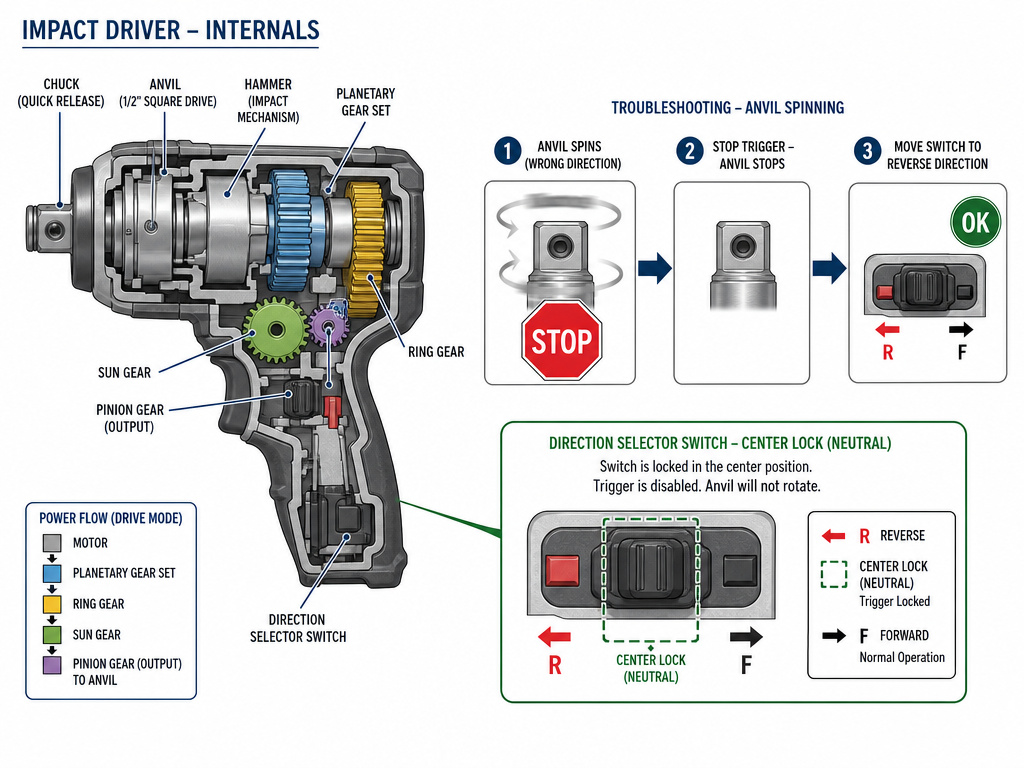
Changing a bit seems trivial, but the manuals embed critical safety steps within the procedure. Skipping them doesn’t just risk a broken bit, it risks injury.
- Let the Tool Stop Before Reversing. The SKIL manual states: “To prevent gear damage, always allow the impact driver to come to a complete stop before changing the direction of rotation.” The internal hammer mechanism needs to settle. Flipping the direction selector while the anvil is still spinning stresses the gear train.
- Center-Lock After Use. Both the SKIL and JCB manuals stress this. JCB says: “Remember to set the Direction Selector Switch to the central position when you have finished using the impact driver, in order to prevent accidental starting.” It’s a habit that takes two seconds and prevents the tool from firing if the trigger is bumped in a crowded tool bag.
- Check Your Holder. The JCB manual adds: “Before engaging the ON/OFF Variable Speed Trigger, check that the hex bit tool holder is correctly fitted in the bit holder chuck.” A poorly seated holder can spin or eject under impact force.
- Mind the Temperature. These tools have operating limits. The SKIL 20V’s recommended working temperature is 14 ~ 104°F (-10 ~ 40°C). Using it in freezing cold or extreme heat can affect battery performance and plastic durability.
These aren’t suggestions. They are the documented failure modes that void warranties and lead to repair bills.
Choosing and Maintaining Your Bits and Chuck
Your impact driver is only as good as the bits you feed it. This is where the real cost hides.
Bit Selection: Always use impact-rated bits. They are made from tougher, more ductile steel (like S2 alloy) to withstand the hammering action that would shatter a standard black-oxide bit. Look for the words “impact rated” on the package.
Chuck Maintenance: The quick-change mechanism is simple but needs care. Every few months, or if you work in dusty conditions, clean it. Pull the sleeve and blow out the hexagonal collet with compressed air. A tiny drop of lightweight lubricant (like Tri-Flow) on the sleeve’s sliding surface can keep it moving smoothly, but avoid getting lubricant inside the collet where it will attract more grit.
The Right Adapters: For driving sockets or using standard drill bits, never use a cheap, wobbly adapter. Use a quality impact-rated universal bit adapter or a dedicated impact drill bit adapter. The adapter itself must have a power groove for the chuck to grip. A sloppy adapter multiplies the impact force, leading to rounded fasteners or broken adapters.
Are Impact Driver Bits Universal Across Brands
Impact driver bits are generally universal across different tool brands. The key is the collet size, which is almost always a standard quarter-inch hex shank. This means a bit from one manufacturer will physically fit into the chuck of another brand’s impact driver. However, universal fit does not mean universal performance. Always check your tool’s manual for specific bit requirements. Some drivers require bits with special power grooves for the locking mechanism to engage properly. If your bits lack these grooves, you can use a universal bit holder that has them. Never use bits with a damaged shank, as this can cause them to slip or become stuck.
Frequently Asked Questions
Can I use regular drill bits in my impact driver?
You can, but you must use a keyless chuck adapter rated for impact use. Standard drill bits have round shanks, not hex shanks. The adapter converts the hex collet to a three-jaw chuck. Be warned: the hammering action is brutal on drill bits meant for steady rotational force. For frequent drilling, impact-rated drill bits are the better choice.
Why won’t my new bit lock into the impact driver?
The most common reason is that the bit lacks a power groove. This is the ring machined around the hex shank where the ball bearings lock. Some cheaper bits or older stock have a smooth shank. The chuck physically cannot grip it. Check for the groove. If it’s present, ensure you’re pushing the bit in all the way before releasing the sleeve.
My impact driver’s chuck is very stiff to pull. Is that normal?
New chuck should be firm but smooth. If it becomes excessively stiff or gritty, debris is likely jammed inside. Clean it with compressed air. If it’s still stiff, the internal spring may be misaligned or the sleeve damaged. For a tool under warranty, contact the manufacturer. For an older tool, a chuck replacement is often a straightforward fix.
Is there a difference between impact driver bits and regular bits?
Yes, and it’s a material difference. Impact driver bits are forged and heat-treated to absorb shock and resist torsion. Regular bits are hardened for wear resistance but are more brittle. Using a regular bit in an impact driver often ends with the bit snapping at the base of the tip. We cover the key differences between impact vs regular bits in detail.
How do I change a bit on a corded drill or drill/driver?
The process is different. Most corded drills and combi drills use a keyless chuck that you tighten by hand. You hold the drill’s body with one hand and rotate the chuck collar with the other. For a full step-by-step, see our guide on how to change a drill bit. Never confuse the two mechanisms, forcing an impact driver’s collet sleeve to twist will break it.
The Bottom Line
Changing a bit is the most basic impact driver skill, but getting it wrong costs time, money, and safety. Lock the trigger, pull the sleeve fully, and only use bits your specific model is designed to grip. Remember the JCB rule: 25mm bits need a holder.
Keep the chuck clean and pay attention to the LED’s warnings, that rapid flash means stop, not force it. And finally, match the bit to the job. A high-quality impact screwdriver bit will drive hundreds of screws where a generic bit strips the tenth. The tool is just a motor; the bit is where the work actually gets done. Invest there first.
The process is quick when you follow the correct steps. Miss one step, and you may struggle with a stuck bit or cause damage. Now you know the rules. Go make that swap.
