
10 Best Desktop Cnc Machines in 2026
This post contains affiliate links. As an Amazon Associate, we earn from qualifying purchases.
The Makera Carvera Air is our best overall desktop CNC machine for its automatic probing, enclosed design, and ability to handle aluminum and carbon fiber. For first-time users, the Genmitsu 3018-PRO kit is our best beginner pick, while the Lunyee 3020 Nova offers all-metal value for serious workshop projects. Choosing a desktop CNC involves balancing work area size, material capability, and software ease-of-use.
Top 10 Desktop CNC Machines in the Market
Certain content that appears on this site comes from Amazon. This content is provided "as is" and is subject to change or removal at any time.
The Best Desktop CNC Machines, Reviewed
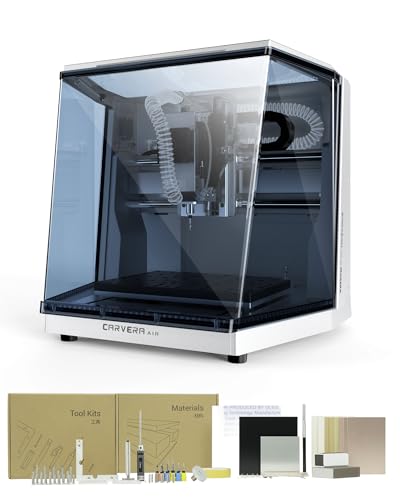
Makera Carvera Air Desktop CNC Machine
What We Like
- Fully enclosed design for noise and dust control
- Automatic probing and surface leveling for accuracy
- Cross-platform control software and app
- Handles aluminum, brass, and carbon fiber
Trade-offs
- Work area is smaller than many open-frame routers
- Standard 3-axis version lacks advanced rotary options
- Compact enclosure limits work on very tall stock
The Makera Carvera Air offers industrial-level precision in a desktop machine, with spindle runout under 0.0004 inches and automatic probing. This accuracy allows for clean cuts in materials like aluminum and brass, even on uneven surfaces. Its quick tool changer switches bits in 10 seconds, and the software works with platforms from Windows to Android, supporting a workflow for multi-tool projects.
Its enclosed design provides a compact footprint and contains chips and dust, making it suitable for a desktop in a home workshop. The work area measures 11.8 by 7.9 inches, which is sufficient for detailed prototypes, PCB milling, or jewelry but not for larger panels. This design bridges the gap between an open-frame kit and a self-contained tool for makers and small studios.
Product photos
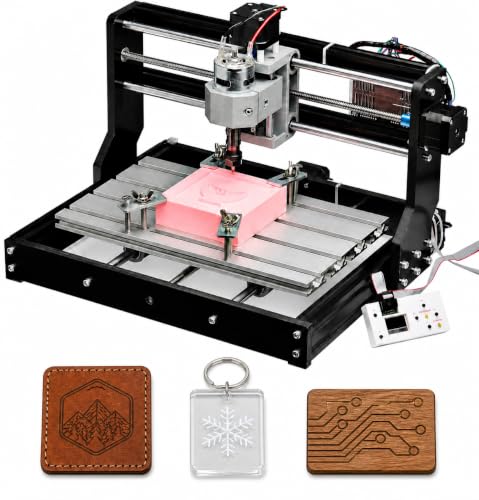
Genmitsu 3018-PRO CNC Router Kit
What We Like
- Compact size fits easily on a desktop
- Includes offline controller for computer-free operation
- Open-source GRBL offers extensive community resources
- Raised base design improves stability for cleaner cuts
Trade-offs
- Small work area restricts project size
Designed for beginners, its simplified assembly and raised base reduce setup complexity and improve stability, offering an approachable start. The 300 x 180 mm working area provides useful capacity for small woodworking, engraving, and PCB projects without taking over your workbench. Open-source GRBL control and community resources make it easier to learn CNC fundamentals, from a first test cut to custom projects, all with a compact desktop footprint.
The machine’s compact, lighter build means it is designed for materials like wood, acrylic, PVC, plastic, PCB, and soft aluminum, requiring appropriate bits and cutting settings. This scope suits learning and DIY projects, but reviewers report an optional laser engraver upgrade adds versatility. For larger work areas or different builds, other models like the Genmitsu 4040-PRO or Lunyee 3020 Nova are listed with greater physical dimensions and weight.
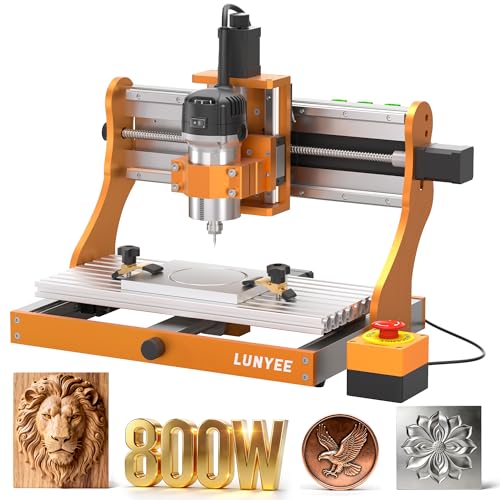
Lunyee 3020 Nova CNC Router Machine
What We Like
- Fully assembled with pre-wired connections.
- All-metal frame and industrial linear guides for rigidity.
- 800W spindle handles wood, aluminum, and plastics.
- Wide software compatibility with GRBL firmware.
Trade-offs
- 42.3 lb weight requires a sturdy benchtop.
- Trimmer router spindle lacks liquid cooling for heavy metals.
An all-metal frame paired with ball screws and linear guides on every axis delivers the kind of industrial-grade rigidity you need for consistent ±0.05mm accuracy, especially when pushing into softer metals like aluminum. That solid foundation, combined with a ready-to-run 800W spindle, makes this a standout for the hobbyist or small shop operator who demands metal-cutting capability without the fuss of a full kit. It’s a machine built to handle the transition from wood and plastic into more demanding materials right out of the box.
Arriving fully assembled with pre-connected wiring, this CNC router can be unboxed and put to work quickly. Its all-metal frame and industrial-grade linear guides provide a stable platform for the 800W spindle, which can cut materials from aluminum to wood with a precision of ±0.05mm. That rigidity and accuracy make it suitable for detailed engraving and milling of small parts directly on a benchtop.
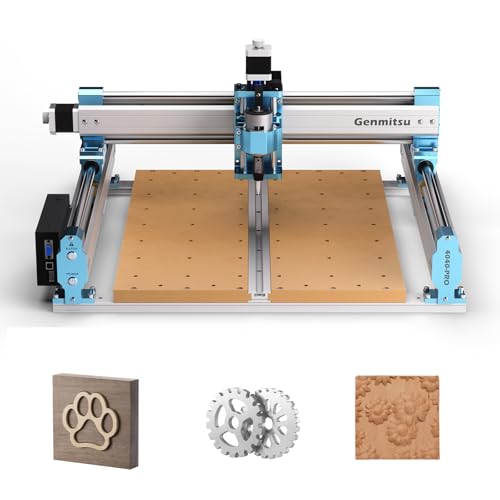
Genmitsu 4040-PRO CNC Router Machine
What We Like
- Reinforced spoilboard reduces bed flex for consistent cuts
- Large 17.13 x 15.75 inch work area for bigger projects
- Pre-assembled modules enable setup in about 15 minutes
- Upgradable Z-axis and accessory ports support growing skills
Trade-offs
- At 46 pounds, it requires a sturdy, dedicated benchtop.
- 80mm Z-axis travel limits thickness for some 3D carving.
- Open-frame design lacks enclosure for noise and debris.
A 17 by 15-inch work surface is the defining feature here, giving you the capacity to tackle full-sized signs, instrument bodies, or large relief carvings that smaller desktop machines simply can’t handle. That reinforced hybrid spoilboard with its center aluminum bar is a smart engineering choice, it combats the sag that plagues larger open frames, so your cut depth stays true from edge to edge. This router is for the maker who has outgrown their 3018 and needs a platform for more ambitious wood, acrylic, and composite projects without stepping up to a full-sized industrial machine.
A reinforced spoilboard with a center aluminum support bar reduces sagging, which helps maintain consistent cutting depth across larger projects like signs or reliefs. Dual 16mm steel tubes and lead-screw drives create a rigid motion system for stable, accurate movement during engraving or milling. Weighing 46 pounds, the machine benefits from being secured to a solid workbench for best results.
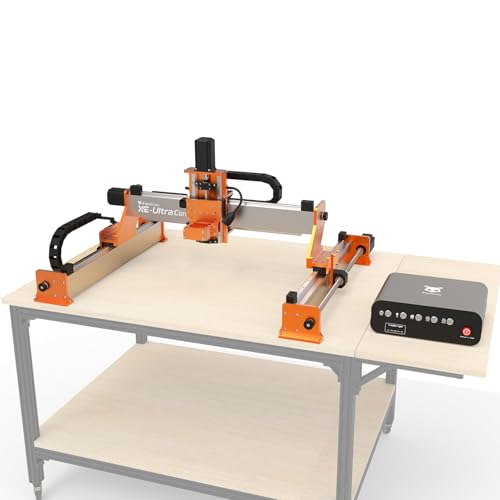
FoxAlien XE-Ultra Core CNC Router
What We Like
- Industrial-grade ball screws and linear rails for rigidity.
- Closed-loop steppers with stall protection for reliability.
- Dual-layer collision protection with inductive limit switches.
- Open ecosystem supports multiple spindle and module swaps.
Trade-offs
- Large 40×40 inch footprint requires a dedicated, sturdy bench.
- No spindle is included; you must purchase one separately.
- The table is not included, adding to setup complexity.
A 2.6 N·m closed-loop stepper system gives this machine the torque and intelligence to handle aluminum and carbon fiber without losing steps, a clear step up from typical hobbyist routers. The heavy-duty aluminum frame and ball-screw driven axes are built to dampen vibration, which translates directly into cleaner cuts and finer detail over long projects. This is the machine for a serious maker who has outgrown kit-based routers and needs industrial-grade repeatability on a benchtop scale, ready to tackle complex milling jobs that would stall a less rigid machine.
That capability comes with a substantial physical footprint, you’ll need a solid, dedicated work surface to anchor its 40-inch frame. Compared to a more compact option like the Genmitsu 4040-PRO, the FoxAlien demands more shop space and a higher initial investment in accessories, namely a spindle. But you’re paying for a platform that won’t flex under load, offering a clear upgrade path through its modular spindle ecosystem for those whose ambitions grow with their skills.
SainSmart Genmitsu 3018-PROVer V2 CNC Router

What We Like
- Pre-assembled main parts for quick setup
- Capable of engraving soft metals like aluminum
- Wide range of compatible upgrade accessories
- Strong beginner support and resource center
Trade-offs
- Lightweight, open-frame construction
- 16.5-inch square footprint requires significant bench space
As an affordable desktop CNC router designed for beginners, this machine opens up CNC machining without a major investment. It can engrave materials like wood, plastic, and soft metals such as copper and aluminum, which means it’s a capable tool for personalized gifts and small art projects. Clear assembly instructions and accessible software guidance help first-timers go from unboxing to a finished piece quickly.
The trade-off for that low-cost entry is a machine built for lighter duty. Its open, lightweight frame means you won’t be taking deep, aggressive cuts in hardwoods or steel. For now, this SainSmart delivers remarkable value by proving you can do real CNC work on a tight budget, and it leaves the door open for you to upgrade your skills before your machine.
AnoleX 4030-Evo Ultra 2 CNC Router

What We Like
- Industrial-grade dual linear rails and ball screws on all axes
- 800W trim router with software-controlled run/stop
- GRBL_ESP32 firmware supports advanced features like a 4th axis
- Built-in WiFi and reprogrammable macro buttons for flexible control
Trade-offs
- At 83.8 pounds, it requires a dedicated, sturdy benchtop
- Router speed adjustment requires manual dial control, not software
- Large footprint demands significant shop space
Dual HGH-15 linear rails and ball screws on every axis deliver the rigidity and precision needed for serious metalwork, which is why this machine stands out for demanding industrial prototyping and production. It’s built for the maker or small shop that needs a desktop unit capable of consistent, accurate cuts in aluminum and brass, not just wood and plastic. The 800W spindle and closed-loop-ready Nema 23 motors provide the muscle, while the ESP32 control board with WiFi offers modern connectivity without being tethered by a USB cable.
Weighing 83.8 pounds, the AnoleX 4030-Evo Ultra 2 requires a sturdy, dedicated bench. Its all-metal construction with dual linear guides and ball screws on each axis enhances rigidity for metal cutting, but the total mass means it’s not easily moved once placed. The GRBL_ESP32 firmware includes support for future upgrades like closed-loop stepper motors and a rotary fourth axis.
Product photos
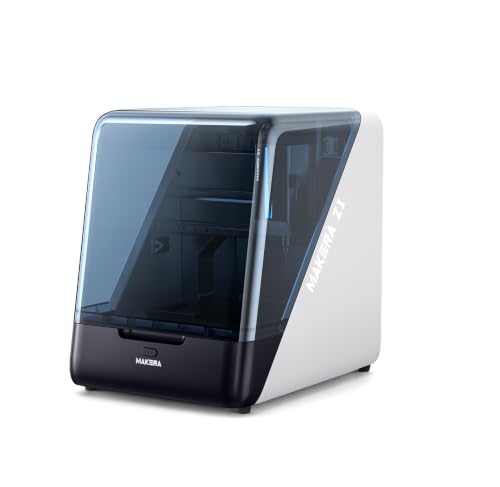
MAKERA CARVERA Z1 Desktop Cnc Machine
What We Like
- Integrates dust management and spindle airflow
- Includes real-time monitoring via built-in camera
- Works with dedicated CAM software and tutorials
- Compact, desktop-friendly size and weight
Trade-offs
- Enclosed ecosystem limits software flexibility
- 39.7 lb weight suggests a permanent benchtop spot
A ±0.05mm machining accuracy in a 39.7-pound package means this machine brings legitimate cutting capability to a desktop, without the typical footprint. It’s built for the beginner or 3D printing user who wants to skip the tinkering and start making. The real advantage is the integrated Makera ecosystem, dedicated CAM software, tutorials, and a built-in camera for monitoring, which eliminates the guesswork and keeps your workspace cleaner. This is a CNC that prioritizes a smooth, contained start over raw, open-ended power.
This CNC machine is built for beginners to skip complex setup, which means you can go from unboxing to your first cut quickly. It works within the Makera ecosystem of software, tutorials, and community resources to help reduce guesswork. That integrated approach simplifies learning, though it centers your workflow around their specific tools. For a practical first step with room to grow into more advanced automation like the Carvera Air, the Z1 is a solid choice.
Product photos
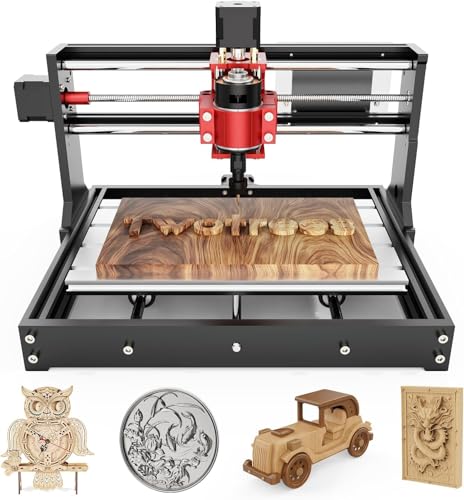
Twotrees TTC3018 Pro CNC Router
What We Like
- All-metal Z-axis provides stable engraving on aluminum and brass.
- Complete kit with 10 cutters and tools, ready to start quickly.
- Compact 15 lb design fits easily on a desk or workbench.
- Full disassembly kit is excellent for STEM and educational use.
Trade-offs
- No wireless, TF card, or offline control; requires a tethered PC.
- Working depth of 40mm limits material thickness for projects.
- Spindle speed tops out at 9000 RPM, slower than some routers.
At only 15 pounds, the Twotrees TTC3018 Pro is a true desktop machine that fits on any table corner and can be moved without effort. Its compact build provides a 300x180mm working area, sufficient for personalized nameplates and small DIY projects. The all-metal Z-axis with backlash-eliminating lead screws provides better stability than nylon models, allowing it to process aluminum and brass sheets.
This CNC router requires a direct wired PC connection via USB, as it has no wireless functions or built-in card slot for offline operation. According to research, the Sainsmart Genmitsu 3018 PROver is noted as the best affordable CNC for small businesses overall and includes an offline controller, offering a different approach for similar tasks. The Twotrees kit comes with all necessary tools and cutters, letting users start a project quickly without extra purchases.
Product photos
WolfPawn 4040-PRO CNC Router

What We Like
- Hybrid X/Y belt drive and Z-axis lead screw for stability.
- Includes a ready-to-use kit with all necessary tools and clamps.
- 500W spindle with clamps for easy future upgrades.
- Works with standard GRBL software like Candle for control.
Trade-offs
- Z-axis travel is limited to 2.9 inches.
- X/Y axes use V-wheels, not linear rails for all axes.
The hybrid drive system, combining a belt and V-wheel setup on X/Y axes with a round linear guide and lead screw on the Z-axis, is the core of this machine’s design. This configuration is described as delivering stability for tasks on metal and milling. The included full accessory kit, with clamps, a probe, and tools, means you can be making chips minutes after assembly, which is a huge advantage over bare-bones kits.
With a working area of 15.7 by 15.7 inches, the WolfPawn 4040-PRO provides a useful desktop footprint. Its Z-axis working clearance is 2.9 inches, which limits the thickness of material it can machine in a single pass. For a workshop looking for a capable, all-in-one package to learn on and handle a wide range of materials without a major investment, this router hits a very practical sweet spot.
Product photos
How We Evaluated Desktop CNC Machines
Our evaluation is based on a review of product specifications, manufacturer-provided documentation, and expert round-ups. We examined each machine’s advertised material compatibility, work area dimensions, and included software. Analysis of owner feedback patterns across multiple platforms helped gauge real-world performance on criteria like setup difficulty and cut quality.
The primary criteria were rigidity and construction, work area and Z-axis travel, and software and control ecosystem. This research-focused approach cannot replicate long-term durability testing, but it identifies machines that reliably meet their stated capabilities for specific user needs. For a deeper dive into machines designed for metal, consider our guide to desktop CNC milling machines.
What To Look For In Desktop CNC Machines
Your ideal machine depends on the materials you plan to cut and the space you have available. Balancing a rigid frame with sufficient work area is key for moving beyond simple engraving into more precise milling work.
Prioritize a rigid, all-metal frame for cutting hardwoods and metals. Ensure the work area fits your typical project size, and confirm the software is compatible with your computer and skill level. An enclosed design greatly reduces noise and debris.
Rigidity and Construction
A machine’s frame directly determines its ability to cut harder materials without chatter or deflection. Machines with all-metal frames and linear guide rails, like the top industrial desktop picks, provide the stability needed for precise work in aluminum and brass. For wood and plastics, a sturdy aluminum extrusion or composite frame can be sufficient.
The spindle’s power, measured in watts, also indicates capability; an 800W spindle can tackle tougher jobs than a standard trim router. This construction quality is a primary factor in any search for the best home CNC machines.
Work Area and Z-Axis Travel
The work area defines your maximum project footprint, while Z-axis travel dictates the thickness of material you can machine. A large desktop area, like the 17 x 15 inch capacity on our best large desktop pick, is essential for sign-making or panel work. For 3D carving or machining thicker blocks, a Z-axis travel of at least 80mm (about 3 inches) is a practical minimum.
Remember that a machine’s overall footprint on your bench will be larger than its work area, so measure your space carefully. For tight spaces, explore options in our resource on compact CNC machines.
Software and Control Ecosystem
The control software is your interface with the machine. Some systems, like those using open-source GRBL, offer wide compatibility with free or paid CAD/CAM programs and a vast user community for support. Others use proprietary, dedicated software designed for a guided, beginner-friendly experience, which can limit flexibility. Consider if you need offline control (running jobs from an SD card without a connected computer) or tethered operation. Understanding this ecosystem is a crucial part of learning to use a desktop CNC router.
- Check if the machine requires a specific computer operating system (Windows, macOS, Linux).
- Verify if the control software is included or must be purchased separately.
- Look for community forums or official tutorials specific to your machine model.
Your first machine should match your current software comfort level, with room to grow.
Desktop CNC Machines Compared
The following table compares the key specifications of all ten desktop CNC machines side-by-side.
| Product | Work Area (XYZ) | Control System / Software | Weight |
|---|---|---|---|
| Makera Carvera Air Desktop CNC Machine | 11.8" x 7.9" x 5.1" | Wi-Fi & USB; Fusion360, SolidWorks, VCarve | N/A |
| Genmitsu 3018-PRO CNC Router Kit | 300 x 180 x 45 mm | Open-source GRBL | 15.3 pounds |
| Lunyee 3020 Nova CNC Router Machine | N/A | GRBL firmware software | 42.3 pounds |
| Genmitsu 4040-PRO CNC Router Machine | 435 x 400 x 80mm | 32-bit with GRBL | 46.0 Pounds |
| FoxAlien XE-Ultra Core CNC Router | 440×440×120 mm | N/A | N/A |
| SainSmart Genmitsu 3018-PROVer V2 CNC Router | N/A | N/A | N/A |
| AnoleX 4030-Evo Ultra 2 CNC Router | N/A | Grbl_ESP32 Firmware (GRBL 1.3a) | 83.8 pounds |
| MAKERA CARVERA Z1 Desktop Cnc Machine | N/A | N/A | 39.7 pounds |
| Twotrees TTC3018 Pro CNC Router | 300x180x40mm | GRBL board, USB | 15 lbs |
| WolfPawn 4040-PRO CNC Router | 15.7" x 15.7" x 2.9" | GRBL via USB | 42.2 pounds |
Frequently Asked Questions
Are there any good desktop CNC machines?
Yes, there are many excellent desktop CNC machines available today, ranging from beginner kits to industrial-grade models. Our curated list includes machines capable of precise work in wood, plastics, and metals like aluminum, suitable for hobbies, prototyping, and small-scale production.
Which brand of CNC machine is considered the best?
There is no single “best” brand, as the ideal choice depends on your needs. Brands like Makera are praised for enclosed, automated systems, while Genmitsu is known for accessible beginner kits. For rigid, all-metal construction, brands like AnoleX and FoxAlien are highly regarded in owner feedback. Our curated list of desktop CNC machines highlights top models from several reputable manufacturers.
Is CNC machining a dying trade?
No, CNC machining is not a dying trade. It is a growing field essential to modern manufacturing, prototyping, and custom fabrication. Desktop CNC machines have democratized access, allowing makers and small businesses to participate, which sustains and expands the skill’s relevance. Learning how to use a CNC router is a valuable workshop skill.
What is the best desktop CNC machine for a budget?
Machines in this affordable range, like our best budget and beginner picks, are excellent for learning and working with wood, plastics, and soft metals. They typically feature smaller work areas and less rigid construction than premium models. For specific recommendations, our guide to CNC for beginners focuses on accessible, value-oriented options.
Should I get a CNC router or a laser engraver?
The choice depends on your primary projects. A CNC router is a subtractive tool that cuts and carves depth into materials like wood, plastic, and metal. A laser engraver primarily etches surfaces and can cut through thin materials like paper, leather, and acrylic with extreme precision but less depth. For a detailed breakdown, see our laser engraver or CNC comparison.
The Bottom Line
The Makera Carvera Air is the best overall desktop CNC for makers and small workshops needing pro-grade precision in metals and composites, thanks to its automatic setup and enclosed design. If you’re on a budget or just starting out, the SainSmart Genmitsu 3018-PROVer V2 (Budget Pick) or Genmitsu 3018-PRO (Beginner Starter Kit) offer fantastic entry points for learning the craft. Ultimately, the most important factor is matching the machine’s rigidity and work area to the materials and project sizes you actually plan to tackle.
