
7 Best Beginner Cnc Machines in 2026
This post contains affiliate links. As an Amazon Associate, we earn from qualifying purchases.
Our best overall beginner CNC machine is the Genmitsu 3018-PROVer V2 for its straightforward setup and reliable performance. For quick tool changes, the MAKERA Carvera Air excels, while the RATTMMOTOR 3018-PRO Hobby CNC Router is our best budget pick. Choosing your first CNC can feel daunting. You need a machine that fits your workspace, handles the materials you want to use, and doesn’t overwhelm you with complexity.
Top 7 Beginner CNC Machines in the Market
Certain content that appears on this site comes from Amazon. This content is provided "as is" and is subject to change or removal at any time.
The Best Beginner CNC Machines, Reviewed
Genmitsu 3018-PROVer V2 CNC Milling Machine

What We Like
- Semi-preinstalled for 35-minute setup
- Upgraded drivers for quiet, accurate operation
- Comprehensive accessory ecosystem for future upgrades
- User-friendly software support for beginners
Trade-offs
- A 1.6-inch Z-axis limits material thickness
- Requires separate purchase for laser engraver upgrade
Setting up the Genmitsu 3018-PROVer V2 takes about 35 minutes thanks to its semi-preinstallation, so beginners can start their first project quickly. It works with user-friendly software like Carveco and Easel, while upgraded Toshiba drivers and a redesigned Z-axis aim for quiet operation and accurate engraving. This combination makes the machine a top choice for beginners looking to explore CNC machining.
The machine’s compact footprint fits on a desktop, but its physical size suggests it’s designed for smaller-scale work. As skills advance, users can look to larger models like the Genmitsu 3030-PROVer Ultra for bigger projects. For the initial learning phase, the package provides a complete start, backed by the brand’s customer service support.
MAKERA Carvera Air Desktop CNC Machine
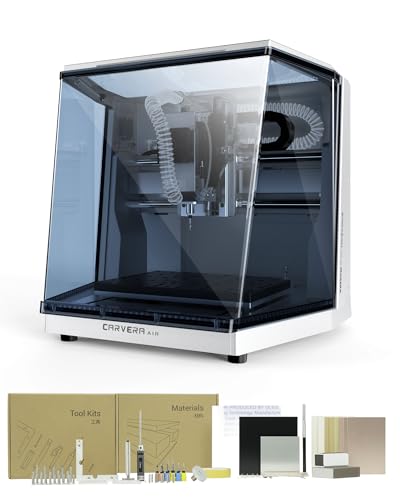
What We Like
- Enclosed design reduces noise and contains debris.
- Automatic probing and leveling for precise cuts.
- Cross-platform controller works on iOS, Android, and desktop.
- Handles materials from wood and acrylic to aluminum.
Trade-offs
- Standard work area is smaller than some desktop routers.
- Fully enclosed footprint requires a 17.7-inch cube of space.
Changing tools in ten seconds fundamentally changes a beginner’s workflow. This machine removes the most tedious part of multi-step projects, letting you move from engraving to drilling to cutting without manual recalibration. That speed, combined with automatic probing and leveling, means you spend your time creating, not fussing with setup. It’s a smart pick for a hobbyist ready to tackle complex, detailed work in mixed materials who values a streamlined process over a massive work envelope.
The trade-off for that automation and compact, enclosed safety is workspace size. The Carvera Air gives you a professional-grade tool in a desktop package, but its 11.8 by 7.9 inch bed can’t handle the larger panels a machine like the FoxAlien Masuter Pro can. You’re buying precision and convenience, not bulk capacity. For intricate jewelry, detailed PCBs, or small mechanical parts, this setup is hard to beat. For a beginner wanting to carve large signs or furniture components, the size will feel limiting.
Product photos
Genmitsu 3030-PROVer Ultra CNC Router
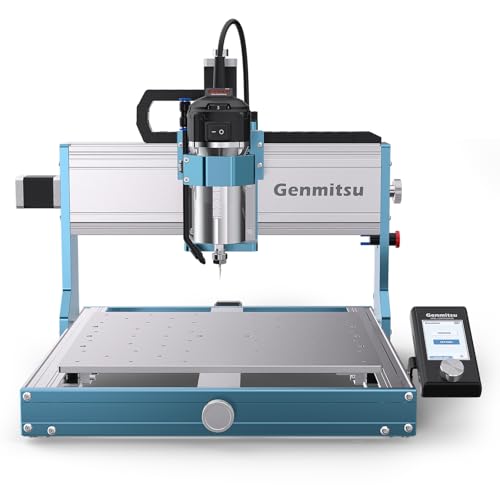
What We Like
- Powerful 710W spindle for serious metal cutting
- Industrial-grade linear rails and ball screws on all axes
- Real-time digital spindle display prevents overheating
- Pre-assembled modules enable 10-minute setup
Trade-offs
- At 50.7 pounds, it requires a dedicated, sturdy bench
- The 20.6-inch work area limits very large single-piece projects
- More substantial footprint than compact models like the Genmitsu 3018-PROVer V2
A 710W digital spindle is the engine that sets this machine apart, giving beginners the reserved power to confidently tackle aluminum and acrylic without stalling. That muscle is backed by a thick all-metal frame and industrial dual linear guides, which eliminate chatter so your finishes stay smooth. This combination of raw power and rigid construction makes it the clear pick for a newcomer whose projects demand metal-cutting capability right out of the gate. You get professional-grade precision in a package that assembles in about ten minutes, letting you focus on the work, not the wrench.
Weighing 50.7 pounds and measuring 20.6 inches per side, this CNC router requires a dedicated, sturdy workspace rather than being a portable desktop unit. Its all-metal chassis and industrial components contribute to this substantial build, which is designed for rigidity during metal cutting. For projects focused solely on engraving smaller pieces in softer materials, this level of construction could be more than necessary.
RATTMMOTOR 3018-PRO Hobby CNC Router

What We Like
- Includes an offline controller for standalone operation
- Simple assembly designed for DIY beginners
- Can engrave soft metals like aluminum and copper
Trade-offs
- Cannot engrave hard materials like glass or steel
- Spindle is a basic 775 DC motor, not a quiet router
A working area just over seven inches square means this machine is for small, precise projects like PCB boards, jewelry molds, or detailed wooden inlays. It’s the logical first step for anyone who wants to learn G-code and CNC fundamentals without a major financial commitment.
You trade size and power for that accessible entry point. The 775 spindle motor is adequate for wood, plastics, and soft metals like aluminum, but it lacks the torque of a dedicated router spindle. For users who need a larger working area, the Genmitsu 3018-PROVer V2 provides a bigger footprint.
FoxAlien Masuter Pro CNC Router Machine
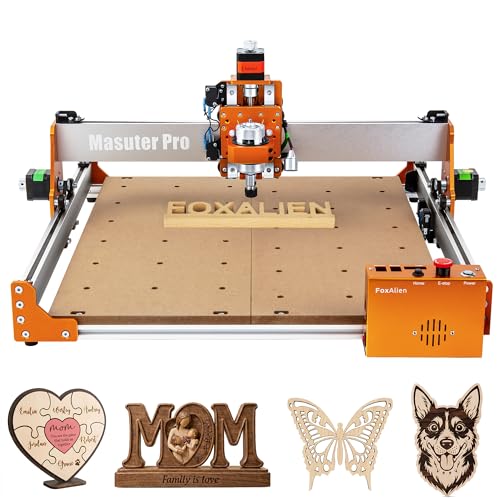
What We Like
- All-metal frame provides solid, vibration-resistant base.
- Pre-wired controller and pre-assembled parts slash setup time.
- Dual spindle clamps allow immediate use with common hobby spindles.
- Optional Y-axis extension kit enables larger project capacity.
Trade-offs
- Workpiece height limited to 2.36 inches, restricting thicker stock.
- Requires separate purchase for a 69mm spindle clamp.
- At 28.7 pounds, it's less portable than smaller 3018-style machines.
A 15-minute assembly time means you’re carving wood, not wrestling with instructions. The FoxAlien Masuter Pro lands on your bench ready for action, with its pre-wired controller and pre-assembled structure getting you from box to bit in one coffee break. That focus on quick, tool-free setup is a genuine boon for a beginner who wants to learn CNC operation, not mechanical assembly. Its generous 400mm square work area and all-aluminum frame give you a stable platform for serious hobby projects right out of the gate.
Beginners will find the 2.36-inch Z-axis clearance ample for flat engraving, signs, and inlays on sheet goods. This depth can become a constraint, however, if you plan to carve deep reliefs or work with thick material blocks. Compared to the more compact Genmitsu 3018-PROVer V2, the Masuter Pro offers a significantly larger and more rigid workspace. This makes it a logical step up for hobbyists who have outgrown a desktop-sized machine and need room to grow.
Product photos
CNCTOPBAOS 1610 PRO Mini CNC Router

What We Like
- Ultra-compact footprint fits on any desk
- Upgraded GRBL board adds emergency stop and probe ports
- Supports engraving on wood, acrylic, and soft metals
- Includes 4G USB drive with software and manuals
Trade-offs
- A 7.08×3.93 inch work area limits project size
- 120W spindle lacks power for hardwoods or steel
An 18 by 10 centimeter working area defines this machine’s purpose, fitting projects like small plaques or circuit boards onto a truly desktop footprint. It suits beginners learning CNC fundamentals on a compact scale. The upgraded control board adds practical ports for an emergency stop and tool setting, features that aid safe setup for new users. It can engrave plastic, wood, and acrylic, and handle soft metals like copper and aluminum for light work.
That compact size comes with inherent limits. The 120W spindle reaches up to 10,000 rpm, a design for lighter engraving rather than deep cuts in hard materials. Research mentions the Sainsmart Genmitsu 3018 PROver as a capable, affordable machine for small businesses that handles a variety of materials. The 1610 PRO serves its role as an accessible, ultra-compact entry point into CNC routing.
Product photos
RATTMMOTOR 3018-PRO MAX CNC Router

What We Like
- Includes GRBL1.1 board with emergency stop and limit switches
- Simple assembly designed for DIY beginners
- Capable of engraving soft metals like aluminum and copper
Trade-offs
- Cannot engrave hard materials like glass or steel
- Spindle is a basic 775 DC motor, not a high-power spindle
Its design prioritizes simple assembly and operation, so you can go from the box to your first engraving on wood or acrylic with minimal fuss. The inclusion of safety features like limit switches and an emergency stop button on the GRBL1.1 control board is a thoughtful touch for new users, providing crucial safeguards as you learn. It’s a solid entry point for anyone wanting to dip their toes into CNC principles without a major space or financial commitment.
This machine’s compact size comes with a limited working envelope, which is unsuitable for carving large signs or complex parts. Its 775 spindle motor and light-duty frame are best suited for softer materials like wood, plastic, and soft metals such as copper and aluminum. That makes it ideal for detailed plaques or PCB prototypes, positioning it as a tool for learning in a safe, manageable package rather than for aggressive milling or production work.
Product photos
How We Evaluated Beginner CNC Machines
We compiled specifications from manufacturers and analyzed expert round-ups and owner feedback patterns. Our primary criteria were ease of setup, the machine’s work envelope and power for different materials, and the quality of the included software and accessories. We focused on what new users genuinely need to succeed, like clear instructions and community support. Our research highlights what these machines can do, but we cannot replicate long-term durability testing in a home workshop environment.
What To Look For In Beginner CNC Machines
Your first CNC should make learning enjoyable, not frustrating. Prioritize a machine that matches your project ambitions and available space.
Look for a machine with straightforward assembly, a work area that fits your common project sizes, and a spindle powerful enough for your intended materials like wood or soft metals. Good software support and an active user community are invaluable for troubleshooting.
Work Area & Footprint
The work area, or envelope, is the maximum size of the material you can machine. It’s defined by travel in the X, Y, and Z axes. A compact model like the CNCTOPBAOS 1610 PRO has a small footprint ideal for a desk, but its 7.08 by 3.94 inch work area limits project size.
Conversely, a larger machine requires a dedicated, sturdy bench. Consider if you’ll primarily make small plaques or need to carve larger panels. Our research into small CNC machines shows that for many beginners, a standard 3018-size router offers a practical balance.
Spindle Power & Material Compatibility
The spindle’s wattage determines what materials you can cut effectively. A basic 120W motor is fine for engraving softwoods and plastics, while a 710W spindle can tackle aluminum. Machines often specify compatible materials like wood, acrylic, and soft metals. A higher-power spindle, like those on our picks for metal and power, also typically runs quieter than a basic DC motor. If woodworking is your main goal, our guide on the best wood CNC machines explores this capability in more depth.
Ease of Setup & Software
For a beginner, time spent assembling and configuring software is time not spent making. Look for features like pre-wired controllers, semi-preinstalled components, and comprehensive accessory ecosystems. The software should be user-friendly. Some machines include an offline controller for standalone operation, while others rely on free, community-supported GRBL software. Understanding the basics of how to use a CNC router is easier with a machine that has clear documentation and an active online user community. This is a noted strength of several brands in our roundup of starter CNC machines.
- Check the estimated assembly time from owner reviews.
- Verify the included software is compatible with your computer’s operating system.
- Research whether the manufacturer or user community provides clear tutorial files.
A good rule of thumb: if the setup process intimidates you, a more pre-assembled model is worth the investment.
Beginner CNC Machines Compared
The following table compares the core specifications of our seven picks to help you see the differences at a glance.
| Product | Work Area | Spindle Type / Power | Machine Weight |
|---|---|---|---|
| Genmitsu 3018-PROVer V2 CNC Milling Machine | N/A | N/A | 20.4 pounds |
| MAKERA Carvera Air Desktop CNC Machine | 11.8" x 7.9" x 5.1" | N/A | N/A |
| Genmitsu 3030-PROVer Ultra CNC Router | N/A | 710W digital spindle | 50.7 pounds |
| RATTMMOTOR 3018-PRO Hobby CNC Router | 18x10x4.5CM | 775 spindle, 10000r/min | 14.8 Pounds |
| FoxAlien Masuter Pro CNC Router Machine | 15.75" x 15.75" x 2.36" | N/A | 28.7 pounds |
| CNCTOPBAOS 1610 PRO Mini CNC Router | 7.08×3.93×1.77 inches | 45mm, 10000rpm max, 120W | N/A |
| RATTMMOTOR 3018-PRO MAX CNC Router | 18x10x4.5CM | 775 motor, 10000r/min | N/A |
Frequently Asked Questions
Which CNC machine is best for a beginner?
The best beginner CNC machine offers a balance of easy setup, clear software, and enough capability to learn on. Our top pick, the Genmitsu 3018-PROVer V2, is specifically designed for this, with a 35-minute setup process and comprehensive support for new users.
What are some good entry-level CNC machines?
Good entry-level machines include the Genmitsu 3018 series, the FoxAlien Masuter Pro for quick assembly, and the compact CNCTOPBAOS 1610 PRO. These models are commonly recommended in guides for beginner CNC routers due to their approachable learning curves.
Is CNC machining a dying trade?
No, CNC machining is not a dying trade. The proliferation of affordable desktop CNC machines for home workshops and small businesses indicates growing, not shrinking, adoption. The technology is evolving, making these skills more accessible and in-demand for custom fabrication and prototyping.
What is the best budget CNC machine for beginners?
Our best budget pick is the RATTMMOTOR 3018-PRO Hobby CNC Router. It includes an offline controller for standalone operation and can engrave soft metals, providing a complete, low-risk kit to learn CNC basics without a large initial investment.
What’s the difference between a CNC router and a CNC mill?
A CNC router is typically designed for cutting softer materials like wood, plastics, and light metals on a larger work area, often using a router-style spindle. A CNC mill is more rigid and precise, built for machining harder metals. For most beginners in woodworking, a router is the appropriate choice, but understanding the CNC router vs mill distinction helps when planning future projects.
The Bottom Line
The Genmitsu 3018-PROVer V2 is the best overall beginner CNC machine for its reliable, semi-preinstalled design that gets you from box to first cut with minimal frustration. If your budget is tight, start with the RATTMMOTOR 3018-PRO Hobby CNC Router; if you need to cut metals from day one, upgrade to the Genmitsu 3030-PROVer Ultra.
Before you choose, honestly assess the largest project you want to make and ensure the machine’s work envelope can handle it. A machine that fits your space and ambitions will provide a far more rewarding introduction to CNC.
