
What Is Kickback Control on a Power Tool?
This post contains affiliate links. As an Amazon Associate, we earn from qualifying purchases.
Kickback control is an electronic safety system in power tools that detects the rapid, uncontrolled rotation of the tool housing, the “kickback”, and stops the motor within milliseconds to prevent user injury. It works by monitoring angular velocity and motor current, and it’s a reactive backup, not a substitute for proper technique.
We should be honest about that last part. A system that reacts in 100 milliseconds is an engineering marvel, but it’s still a last-ditch backup. Your hands and brain are the primary safety system. Understanding what is kickback control on a power tool is key to using it effectively.
What follows is a breakdown of the sensors, the patents, and the specific numbers that define this feature. We’ll look at when it’s worth paying for, when it can be a nuisance, and how to use your tool’s clutch in tandem with it to avoid false triggers. By the end, you’ll be able to read any spec sheet and know exactly what “kickback control” promises, and where it might fall short.
Key Takeaways
- Kickback control must act within approximately 100 milliseconds to be effective, as defined by a European patent.
- The system uses a rotational motion sensor to detect housing spin and a motor current sensor to help determine if a detected kickback condition is likely false, such as in no-load or hammer-only modes.
- It is not a substitute for a riving knife on a table saw or proper drilling technique; think of it as an airbag for your wrists.
- You can often disable the feature for tasks like large hole sawing, where binding is expected and the system would constantly trip.
- If the motor cuts out but the bit isn’t bound, you may have experienced a false positive; this can sometimes occur if sensor readings mimic a kickback event.
What Kickback Actually Is (And Why It’s Dangerous)
A kickback isn’t just the tool jumping in your hand. It’s a specific, violent transfer of energy. When a drill bit binds or a saw blade pinches, the tool may experience a rapid reduction in blade speed or uncontrolled rotation of the housing, which is precisely what is kickback control on a power tool is designed to detect. The motor’s rotational energy has to go somewhere. If the bit or blade can’t turn, the next easiest thing to rotate is the entire tool, and your arm along with it.
The result isn’t a gentle nudge. For a split second, the tool becomes a lever with the bit as the fulcrum, and the motor’s full torque tries to spin the housing out of your grasp. On a high-torque tool, kickback can cause a sudden, forceful rotation that risks user injury. On a table saw, kickback can be severe and cause the workpiece to be thrown violently. This is why kickback prevention starts with technique, not electronics.
Common mistake: Assuming kickback control makes a tool “safe” to use one-handed. The system reacts after the bind occurs. A secure, two-handed grip is what prevents the bind from turning into a dangerous rotation in the first place.
How Kickback Control Works: The 100ms Rule
The engineering challenge behind what is kickback control on a power tool is to detect that an uncontrolled kickback has occurred based on rotational motion and initiate protective operations. According to the European patent EP3197650, a full kickback event may last roughly 250 milliseconds. To mitigate it, the system must activate protective measures within approximately 100 milliseconds from the start.
That’s faster than a human blink. How is that even possible?
A controller samples the blade rotation speed at 1000 samples per second (1 sample per millisecond). The current average blade speed is computed from the last 400-500 samples (400ms-500ms worth of data). If a sufficient proportion of recent samples indicate kickback, for example, at least 10 samples out of the previous 15 (66%) according to one patent, a kickback is confirmed and the motor is deactivated.
Source: European Patent Office document EP3197650
This is the core of the non-destructive method described in the patent. The system isn’t guessing. It’s running a high-speed statistical analysis on blade or motor RPM, looking for a signature of a bind. When it sees that signature, it doesn’t ask for permission. It acts.
The Sensors That Make It Happen
Two main sensors work in concert, a dance detailed in patents like US10589413B2. The first is the rotational motion sensor. This isn’t a simple accelerometer. The Black & Decker Inc. Patent 7410006 describes a rotational rate sensor with a resonating mass. When the tool housing starts to spin laterally, this mass gets displaced, generating a signal proportional to the rotational speed.
The second is the motor current sensor. Its job is to be the voice of reason. If the rotational sensor indicates a kickback but the motor current sensor suggests the tool is in a no-load or hammer-only mode, the system may determine the indication is likely false. This happens in “no-load” or “hammer-only” modes, where false kickback indications are likely. The current sensor provides data so the control system can determine if a detected kickback condition is likely false.
| Sensor | What It Measures | Its Role in Kickback Control |
|---|---|---|
| Rotational Motion Sensor | Angular velocity (spin) of the tool housing | Detects the primary symptom of a kickback: uncontrolled rotation. |
| Motor Current Sensor | Amperage drawn by the motor | Prevents false positives by confirming the motor is under load (i.e., the bit is actually bound). |
| Grip Sensor (in advanced systems) | Force applied to the tool handle | Adjusts the kickback sensitivity threshold based on how firmly the user is holding the tool. |
This multi-sensor approach is key. Different manufacturers, like Milwaukee and Bosch, have patented different kickback detection and control systems. They’re all solving the same physics problem, but their patent-protected algorithms for weighing sensor data create different user experiences.
Brand Names: Milwaukee Anti-Kickback, Bosch ERC, DeWalt E-CLUTCH
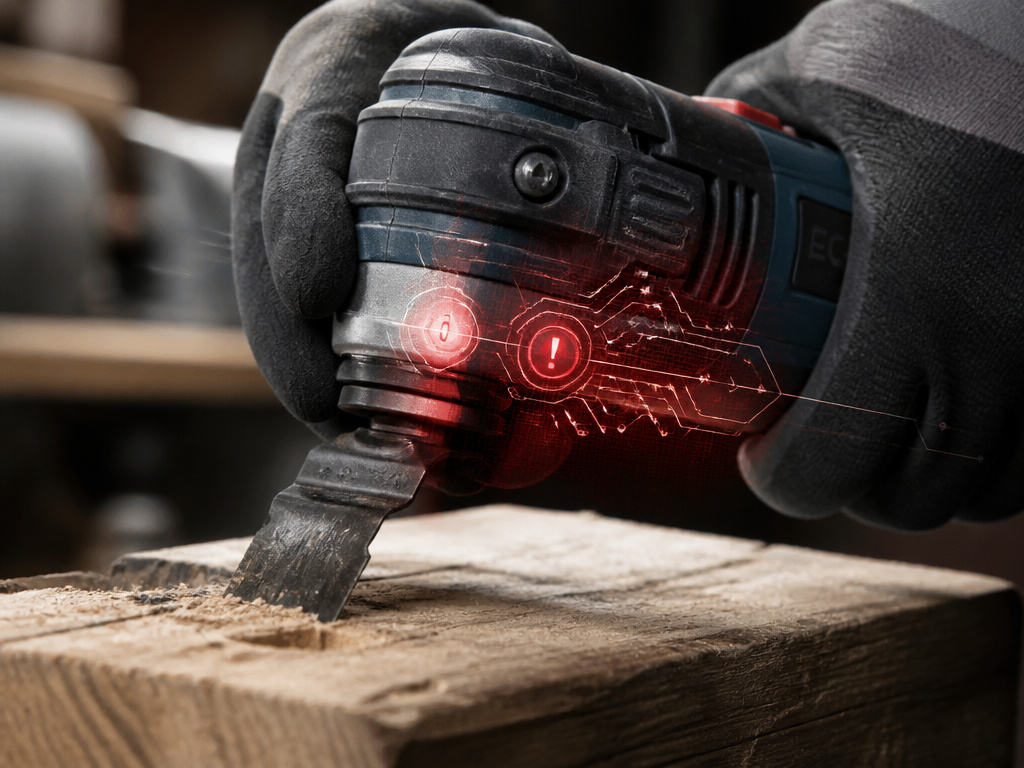
When you see these terms on a spec sheet, they’re marketing names for implementations of the systems we just described. Don’t overthink this. They all aim to do the same thing, but a brand’s specific power tool terminology can hint at its focus.
- Milwaukee Anti-Kickback: Often integrates with their “ONE-KEY” digital platform. The system can use a sequence of angular velocity measurements. If a certain number of readings exceed a threshold within a time window, the motor stops. Some of their newer patents even discuss a grip sensor, adjusting the system’s sensitivity based on how hard you’re holding the tool.
- Bosch ERC (Electronic Rotation Control): Bosch’s patents, like US11571831, focus heavily on blade speed profiling in saws. Their system continuously computes a running average RPM and looks for sudden deviations. The “reaction” might be a rapid power cut or a pulsed braking.
- DeWalt E-CLUTCH (Electronic Clutch): This is their branding for the protective operation. When a kickback is detected, the system doesn’t just kill power. It can pulse the motor or engage an electronic clutch to decouple the motor from the output, stopping the rotation more smoothly than a hard stop.
The bottom line? These aren’t just stickers. They represent real R&D and patent portfolios. But for the user, the intended outcome is similar: the tool initiates a protective operation upon detecting a kickback event.
The Protective Operations: What Happens After Detection
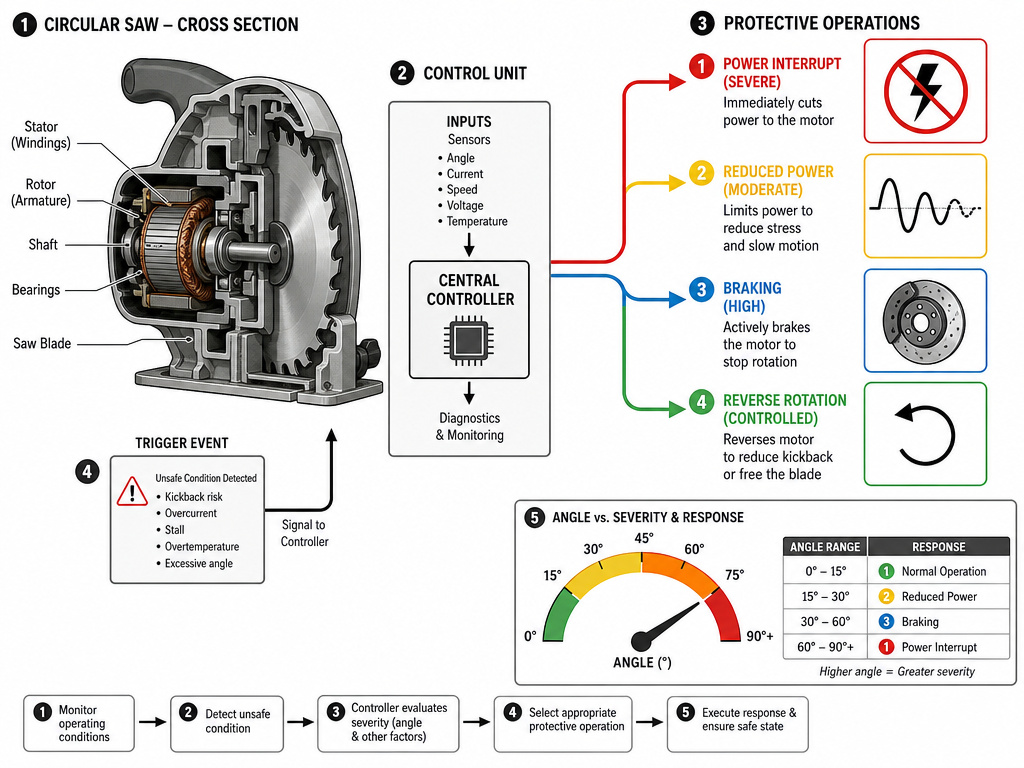
So the system detects a kickback. What does “protective operations” actually mean? It’s not always a full shutdown. Patents list a range of responses, and the chosen one often depends on the severity of the rotation.
- Power Interrupt / Motor Cessation: The most direct. The controller cuts all power to the motor. The tool stops dead. This is common in systems prioritizing absolute safety.
- Reduced Power / Pulsing: Instead of a full stop, the motor power is rapidly pulsed on and off. Reduced power or pulsing the motor is one type of protective operation that may be initiated upon kickback detection.
- Braking / Electronic Clutch: Some systems can engage a brake or an electronic clutch to physically halt the output shaft.
- Reverse Rotation: A more advanced (and rare) response. Upon detecting a kickback, the system might control the motor to rotate in a reverse direction at a reduced speed. This is mentioned in some patent filings as a way to regain control.
The Black & Decker patent 7410006 even ties the response to the degree of rotation. If the tool twists less than 31 degrees, the operator is presumed to have control and no protective operations are initiated, according to one patent. According to one patent, when angular displacement is between 30° to 90°, the control scheme may initiate a pulse mode. According to one patent, when angular displacement is greater than 90°, a protective operation such as disconnecting power to the motor may be initiated.
When You Don’t Need Kickback Control (And When You Do)
This feature isn’t a universal good. It adds cost and complexity. For many tasks, it’s overkill.
You probably DON’T need it for:
- Light-duty DIY: Driving screws into drywall, assembling furniture, or other low-torque tasks.
- Precision drilling: When you’re using a drill press or carefully piloting holes, the risk of a sudden, violent bind is low.
- Any tool where you control the feed rate: If you’re using a hand plane, a chisel, or a rotary tool, kickback control is irrelevant, you are the control.
You SHOULD want it for:
- High-torque drills and impact drivers: Especially when using large auger bits, hole saws, or driving long lag bolts into dense wood.
- Circular saws and miter saws: Any saw that can pinch is a candidate. Remember, this is a backup to a riving knife, not a replacement.
- Angle grinders: These are notoriously prone to grabbing, and a kickback can be severe.
- Heavy-duty professional use: When fatigue sets in on the job site, and your grip or focus might waver, an electronic safety net is valuable insurance against common injuries.
Here’s the rub: if you’re only buying one cordless drill for occasional home use, the money might be better spent on a better battery or a nicer chuck. But if you’re running a crew or tackling big projects, it moves from a “nice-to-have” to a legitimate tool for injury prevention.
Troubleshooting and Limitations
Kickback control is smart, but it’s not psychic. You’ll encounter two main issues: false positives and learned dependency.
False Positives: The tool stutters or shuts off even though the bit isn’t bound. This is often a grip issue. If you’re holding the tool loosely or at a weird angle, the natural torque reaction can be enough to trip the rotational sensor. The fix? A firm, straight grip. Also, remember the motor current sensor? If you’re “dry-firing” a drill (running it without a bit engaged), the vibration can sometimes mimic a kickback. The system should ignore this, but cheaper implementations might get confused.
Learned Dependency: This is the human factor. The most dangerous thing a safety feature can do is make you careless. You start believing the tool is “safe” and get sloppy with your safety rules. You might push a circular saw faster than you should, thinking the system will catch a pinch. It might. Or it might not react fast enough because you’ve created a scenario more severe than its design parameters.
Where this goes sideways: Using a hole saw larger than 1.5 inches without disabling kickback control. The large surface area almost guarantees some binding as it cuts. The system will trip constantly, making the job impossible. The manual will tell you to turn it off for this task, listen to it.
How It Feels vs. A Tool Without It
If you’ve never used a tool with kickback control, the first time it activates is startling. You’re driving a screw, there’s a slight hesitation in the material, and brrrp, the tool simply stops. The LED might flash. Your finger is still on the trigger, but nothing happens. You release, squeeze again, and it works normally.
The sensation is completely different from a traditional clutch slipping. A clutch gives a rhythmic clicking. A kickback stop is a sudden, silent arrest. There’s no warning chatter. It’s a definitive “no.”
A tool without this feature, when it kicks back, has a very distinct feel. The housing jerks violently in your hand. Your muscles tense to counteract it. With kickback control, you might feel that initial jerk for a split second, but it’s cut short before your brain even registers the danger. You’re left with the electronic equivalent of a tap on the shoulder: “Hey, that was close. Be careful.”
Does kickback control actually work?
Modern electronic kickback control systems are engineered to be highly effective. They work by using sensors to detect the specific rotational motions and speed changes that signal a true kickback event, differentiating them from normal use. For a system to be effective, it must initiate protective operations, like cutting power or applying a brake, within a very short timeframe from the start of the event. These systems are designed to act autonomously, stopping the motor even if the operator continues to hold the trigger. The technology is precise, using multiple checks to avoid false triggers during normal operation, ensuring it intervenes only when a genuine, uncontrolled kickback is detected.
Frequently Asked Questions
What torque setting should my drill be on to work with kickback control?
The kickback control system is independent of your torque ring setting. It monitors physical rotation and current, not clutch position. However, for best results, set your clutch to a higher torque setting or the drill mode when you need maximum power and are worried about binding. Using too low a clutch setting means the clutch will slip before the bit binds, so the kickback system never sees the dangerous condition.
Is kickback control a substitute for a riving knife on a table saw?
Absolutely not. A riving knife is a preventive device. It keeps the kerf open behind the blade so the wood can’t pinch the blade and cause a kickback. Kickback control is a reactive system. It tries to stop the saw after the pinch has already happened. Always use a riving knife if your saw has one. Think of kickback control as an airbag and the riving knife as your seatbelt.
Can kickback control wear out or fail?
The electronic components can fail, like any circuit. A drop onto concrete could damage a sensor. Most systems have an indicator light that shows the feature is active and powered. If that light doesn’t come on, or if the tool fails to stop during a clear bind, assume the system is inoperative and revert to strict fundamental power tool safety.
Why did my drill stop even though the bit wasn’t stuck?
This is likely a false positive. Check your grip, were you holding the tool loosely or off-axis? Were you drilling into a very hard material that caused a lot of vibration? The system might have interpreted that vibration as the start of a rotation. Try a firmer, straighter grip and see if it happens again. If it persists on a specific task, consult the manual; you may need to disable the feature for that application.
Before You Go
Kickback control is a legitimate safety advance, a tiny airbag for your workshop. Its value scales directly with the torque of your tool and the consequences of a mistake.
The flashing light and the sudden stop are there for the moments your focus drifts, your grip tires, or the material throws you a curveball. It’s not magic. It’s just very, very fast physics. Respect it, understand its limits, and it becomes one more layer between you and a trip to the clinic.
