
10 Best Laser Engravers in 2026
This post contains affiliate links. As an Amazon Associate, we earn from qualifying purchases.
Our best overall laser engraver is the xTool M2 10W for its enclosed safety, precise camera alignment, and beginner-friendly operation. We also highlight the LONGER Ray5 for a large work area and the BlazeX M3 as the best beginner kit. Choosing the right machine involves balancing power, work area, safety, and material compatibility. We researched this list by analyzing specifications, manufacturer documentation, expert assessments, and patterns in owner feedback to guide you to a confident choice.
Top 10 Laser Engravers in the Market
Certain content that appears on this site comes from Amazon. This content is provided "as is" and is subject to change or removal at any time.
The Best Laser Engravers, Reviewed
xTool M2 10W Laser Engraver
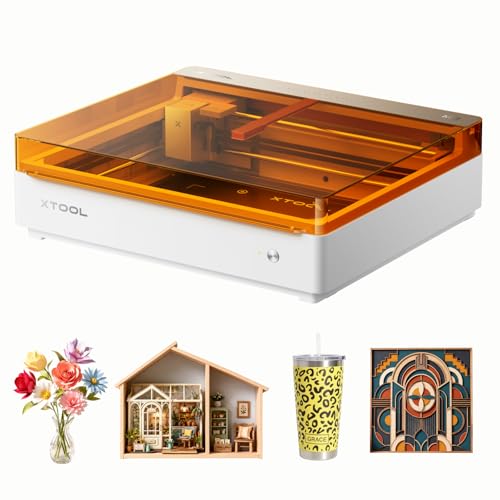
What We Like
- Fully enclosed Class 1 safe design for home use
- Dual cameras enable precise 'Place & Go' alignment
- Beginner-friendly software with hundreds of templates
- Dual-mode architecture for future add-on versatility
Trade-offs
- Full-color printing requires a separately sold inkjet module
- Standard 10W laser lacks IR capability for direct metal engraving
- Accessories like the rotary tool are not included
A built-in dual-camera system is what sets this machine apart, giving you a real-time preview and eliminating the guesswork of material placement. That smart ‘Place & Go’ accuracy, combined with its fully enclosed Class 1 safety, makes the xTool M2 a standout for home crafters and DIY makers who value a safe, waste-free start. Its beginner-friendly software and the potential to add a full-color inkjet module later offer a clear path from simple personalized gifts to more complex, multi-material projects.
Its 10W diode laser engraves and cuts wood, leather, felt, fabric, and paper. For fine engraving on bare metal or plastic, the optional 3W IR laser module is required. This modular approach makes the M2 a platform that can adapt to new projects with add-ons.
LONGER Ray5 10W Laser Engraver
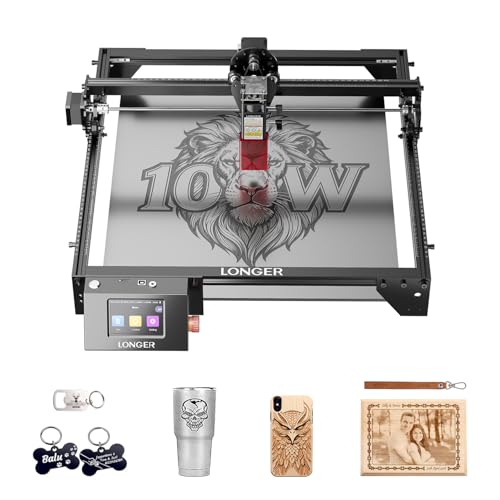
What We Like
- High-speed 24,000 mm/min engraving capability
- Smart 3.5-inch touchscreen for easy control
- Multiple safety features including emergency stop
Trade-offs
- 10W power may struggle with thick, dense materials
- Open-frame design lacks an enclosed workspace
The 400 × 400 mm working area provides generous space for larger signs, home décor, or batch-processing multiple smaller items like tumblers or personalized gifts. Powered by an ESP32 processor, one controller can operate multiple machines, which is useful for workshops or small business production. It includes a 3.5-inch touchscreen for real-time progress monitoring and quick adjustments, supporting connectivity via USB, TF card, Wi-Fi, and apps.
The open-frame design requires users to arrange their own fume extraction and utilize the included safety goggles and protective covers. It features emergency stop, motion protection, and overheat detection for operational safety. This setup prioritizes a large, accessible workspace for materials like wood, leather, and acrylic, which suits hobbyists and makers focused on detailed, wide-format projects.
BlazeX M3 10W Laser Engraver
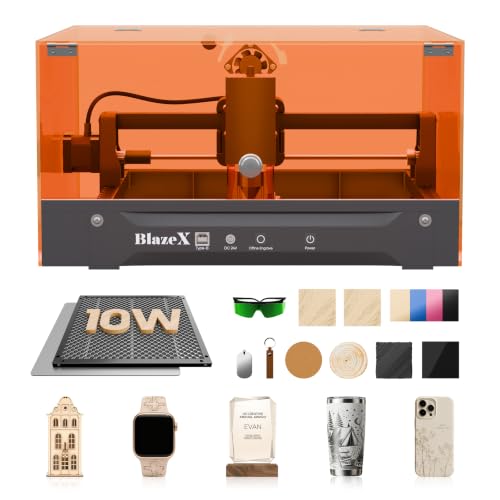
What We Like
- Comprehensive starter kit with materials and enclosure
- Class 1 safety rating with automatic stop sensors
- Broad software compatibility across multiple OS
- Extensive accessory ecosystem for upgrades
Trade-offs
- 10W power restricts cutting depth on dense materials
- No built-in camera for alignment assistance
The complete starter kit is the single biggest reason to consider the BlazeX M3. It arrives with a protective enclosure, a honeycomb bed for stability, and thirteen different materials to practice on, which means you can start a project minutes after unboxing without a separate shopping trip. That, combined with its Class 1 safety rating and automatic shutoff if the lid opens, makes it a genuinely low-friction first step into laser work. It’s built for the hobbyist who wants to learn the craft on small, personalized items like jewelry or keychains without getting bogged down in setup and safety concerns.
The trade-off for that plug-and-play convenience is a very compact work area. The 10W diode laser handles engraving on its listed 300-plus materials well, but cutting through thicker wood or acrylic will be slow. If your ambition is to engrave large plaques or cut out intricate shapes from big sheets, you’ll outgrow this machine quickly.
xTool F2 Dual Laser Engraver
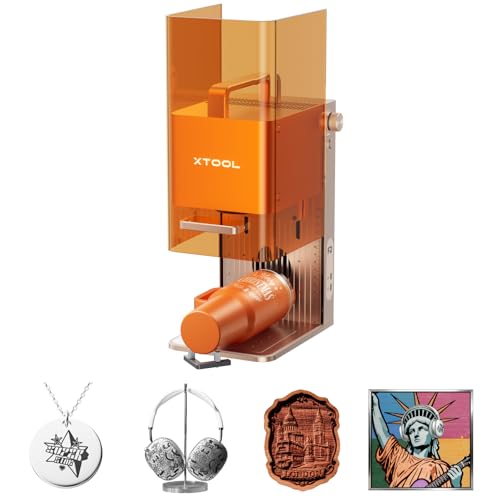
What We Like
- Dual laser handles 300+ materials
- 50MP camera for 0.1mm alignment accuracy
- Fully enclosed, portable 10-pound design
- Slide Extension enables true batch processing
Trade-offs
- Small 6.9×9.3 inch base work area
The combination of a 15W diode and a 5W infrared laser in one compact machine is what sets the xTool F2 apart. That dual-source design means you can switch from deep, dark color marking on a stainless steel water bottle to 3D embossing on wood without changing tools. It’s built for the maker or small business owner who needs a single, portable unit for on-site customization at markets or pop-up shops, safely handling both metal and non-metal jobs. The 50MP camera and 6000mm/s speed turn small-batch production into a quick, precise operation.
You trade a larger work area for that portability and dual-laser versatility. For bigger sheet projects, you’d look at a machine like the Creality Falcon2 Pro S with its 40W diode and larger bed. The xTool F2’s strength is its focused capability, it’s the specialist for mixed-material, high-detail work where setup speed and material flexibility matter more than sheer cutting size.
Creality Falcon2 Pro S 40W Laser Engraver
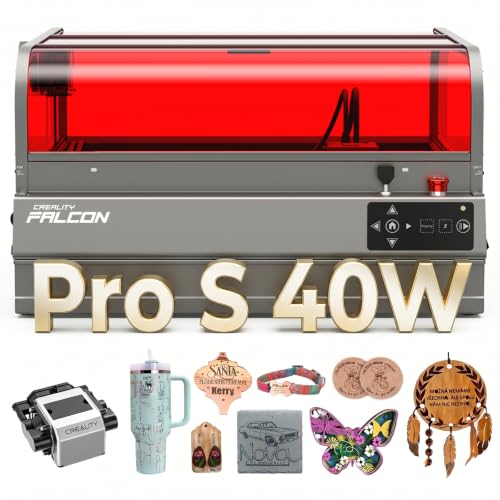
What We Like
- Fully enclosed Class 1 safety with multiple protections.
- Built-in camera enables precise automatic positioning.
- Integrated debris drawer simplifies cleanup.
Trade-offs
- At 50.5 pounds, it's a substantial desktop unit.
- The 26×22 inch footprint requires significant bench space.
- Complex feature set demands initial software learning.
With a 40W optical output, the Falcon2 Pro S can cut through 20mm basswood in one pass, which is a practical advantage for batch production over lower-power desktop lasers. Its 600mm per second speed directly supports high-volume work, while the fully integrated enclosure contains the process for a workshop. Features like auto-focus and camera positioning are designed to streamline setup for repeated jobs.
That capability requires a dedicated space, as the machine weighs over 50 pounds and needs a solid surface. It ships mostly assembled for a quick start, but reviewers report that mastering its advanced software for the camera and auto-cut functions takes time. The Class 1 certified, fully enclosed design prioritizes contained safety and reduced cleanup over the portability of an open-frame model.
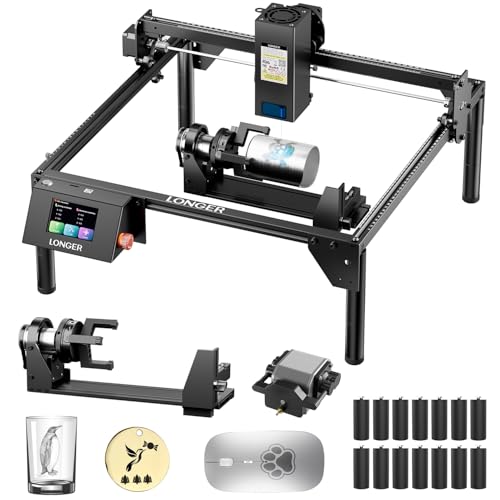
LONGER RAY5 20W Laser Engraver
What We Like
- Powerful 20W laser for thick material cutting
- One computer can control multiple machines in parallel
- Supports offline operation via TF card or WiFi
- Includes 3-in-1 rotary attachment for cylindrical objects
Trade-offs
- No built-in enclosure for fume or spark containment
Parallel control from one computer lets you run several units simultaneously, which can significantly improve output for a small workshop. Its 20W optical output cuts 15mm pine wood in a single pass, reducing the time needed for many batch jobs. These features, along with support for continuous operation, make it suitable for commercial environments like professional offices or factories.
This is a capable machine, but it operates as an open-frame diode laser. You need to provide your own air pump for the reserved air-assist interface to achieve cleaner cuts, and managing smoke is the user’s responsibility. It demands a workspace prepared for an open machine and its necessary accessories.
Product photos
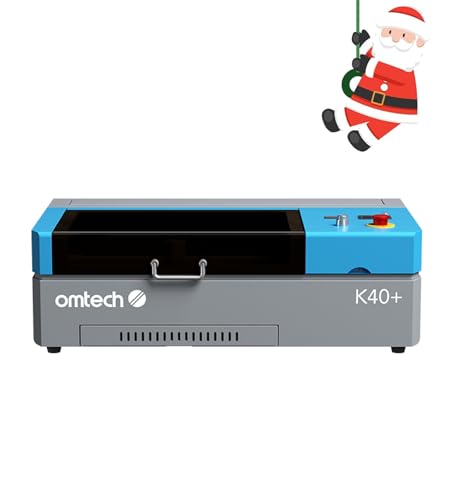
OMTech K40+ 45W CO2 Laser Engraver
What We Like
- Enhanced 45W power for faster, deeper cuts
- High-speed engraving handles bulk orders efficiently
- Built-in air assist improves cut quality and safety
- Flexible workspace with optional rotary axis support
Trade-offs
- Compact 12×8 inch bed limits larger sheet projects
- Requires dedicated ventilation and water cooling setup
With a 45W CO2 laser that cuts through 10mm acrylic and 8mm wood, this machine delivers the power needed for professional results on thicker materials. Its engraving speed reaches 300 mm/s, which helps manage bulk orders or complex designs more efficiently. This combination makes it a tool suited for small commercial use or a hobbyist ready to expand their project scope.
This CO2 laser requires a dedicated, well-ventilated workspace, unlike more portable diode options. Research mentions position it as a strong choice for a desktop CO2 system, particularly for those wanting to launch a side business. Its built-in air assist and safety features, like door protection and an emergency stop, support longer, safer cutting sessions on woods and acrylics.
Product photos
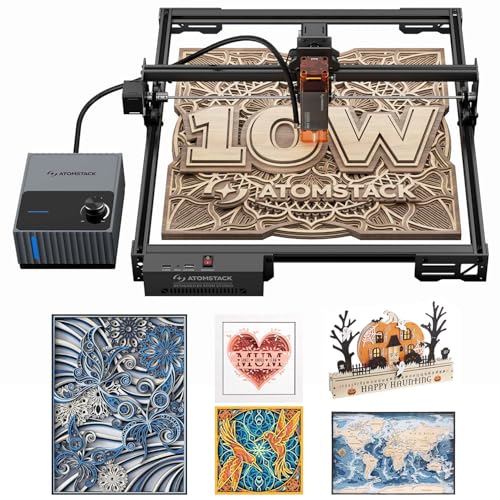
ATOMSTACK A10 PRO V2 10W Laser Engraver
What We Like
- Fast 400mm/s engraving speed for productivity
- Powerful 60L/min auto air assist for clean cuts
- Wide software compatibility including Lightburn
Trade-offs
- Open-frame design lacks enclosure for safety and fume containment
That generous real estate makes this machine a pragmatic choice for the hobbyist or small shop ready to scale up their output without constantly repositioning material. It combines a fast 400 mm/s engraving speed with a powerful 60L/min air pump. The design is built for those who value a spacious, open work surface and the control that comes with wide software support.
The open-frame design lacks a built-in enclosure, so you must arrange separate ventilation and safety measures for fumes and debris. Its 10-inch cube dimensions require a stable, dedicated surface, unlike more compact units. This setup trades immediate containment for an accessible, open work area.
Product photos
Carverall K15 Pro 10W Laser Engraver
What We Like
- Truly offline operation via TF card
- Free software with AI design generation
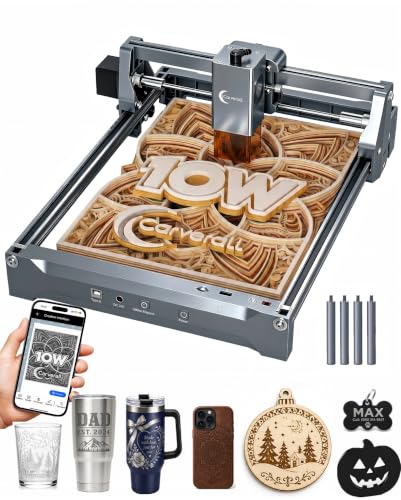
- Compact A4 footprint fits under a desk
- Upgradeable with optional IR laser head
Trade-offs
- A4 work area limits larger sheet projects
- 10W diode cannot engrave bare metal without optional IR head
The ability to run batch jobs from a memory card without a connected computer is its defining feature. This makes the K15 Pro a standout for crafters who want to set up a project and walk away, or for those who prefer not to tether a laptop to their workspace. It’s a genuinely beginner-friendly package with free, intuitive software and a quick three-minute assembly. For someone setting up a small home studio or tackling a stack of personalized gifts, this laser removes the technical friction and lets you focus on production.
You trade a larger work area for that compact, portable form factor. It handles the majority of common projects like coasters and jewelry blanks, but you won’t be engraving a large cutting board in one pass. Its upgrade path is a smart touch, allowing you to add metal engraving capability later instead of buying a whole new machine.
Product photos
VEVOR 20W Laser Engraver
What We Like
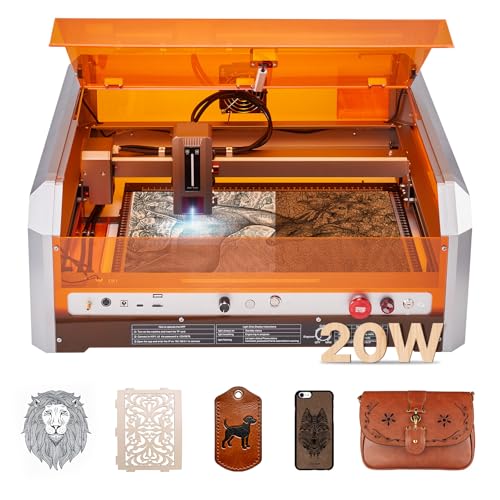
- Full protective enclosure for Class 1 safety.
- Large 15.7-inch square work area.
- Supports versatile materials like wood and leather.
Trade-offs
- Cannot cut or engrave bare metals like aluminum.
- Heavy at 33.7 pounds, less portable.
- Wi-Fi support limited to the CutLabX app.
Its Class 1 safety rating and protective enclosure allow confident use in a home workshop, as the design filters laser light and blocks smoke. A 20W output power and a 15.7 by 15.7 inch work area provide solid capacity for projects like signs, handling materials such as wood and leather. The machine supports software like LightBurn and offers an auto positioning feature, which reviewers report aids in aligning designs.
Material options are limited, as it cannot engrave raw metals like gold or copper, nor can it process transparent acrylic without a black coating. While it cuts 0.3-inch basswood in one pass, machines like the Creality Falcon2 Pro S list a higher 40W output for different performance. For a home user prioritizing a secure, enclosed system over maximum material versatility, this laser’s built-in safety features remain a key practical benefit.
Product photos
How We Evaluated Laser Engravers
Our research focused on specifications from manufacturers, insights from expert round-ups, and consistent patterns in user feedback. We prioritized four core criteria: laser type and power for material capability, work area size for project scope, safety features for home or shared workspace use, and software usability for a smooth workflow.
This evaluation is based on product specifications and research to identify which machines deliver on their promised features and which trade-offs are most relevant for different buyers. For more information, explore our comprehensive laser engraver guide.
What To Look For In Laser Engravers
Your ideal engraver depends on the materials you use, the size of your projects, and where you’ll set it up. Balancing these factors is key to finding a machine that fits your workflow.
The three most important factors are the laser type, the work area dimensions, and the safety enclosure. A diode laser handles wood and leather, while a CO2 laser cuts acrylic cleanly. A large bed suits big sheets, and a full enclosure is essential for home safety.
Laser Type & Power
The laser type dictates what you can work on. Diode lasers, common in our list, are excellent for wood, leather, and dark acrylic but cannot engrave bare metal without an optional infrared module. For cutting thicker wood and acrylic of any color, a CO2 laser like the OMTech K40+ is more capable. Power, measured in watts, affects cutting depth and speed; a 10W diode is fine for engraving, but cutting dense materials requires 20W or more. Understanding this distinction is the first step in our CNC router comparison.
Work Area & Footprint
The work area, or bed size, determines your maximum project dimensions. A machine like the ATOMSTACK A10 PRO V2 offers a large format for big signs or sheets, while the compact Carverall K15 Pro fits under a desk but limits you to A4-sized projects. Consider both the machine’s physical footprint and the usable engraving area to ensure it fits your space and ambitions. If portability is a priority, our guide to compact laser engravers can help narrow your search.
Safety & Enclosure
A fully enclosed design with a Class 1 safety rating is non-negotiable for home use or shared spaces. It contains light, fumes, and potential sparks. Machines like the xTool M2 and VEVOR 20W offer this protection, while open-frame models require dedicated, well-ventilated workshops. Look for additional safety features like lid sensors, emergency stops, and fire detection systems. For those starting a home workshop, reviewing options for home laser engravers is a smart safety-first step.
- Verify the enclosure material is sturdy and seals properly.
- Check for compatibility with external exhaust systems for fume extraction.
- Ensure the software includes safety interlocks that disable the laser when the lid is open.
- Look for certifications like FDA Class 1.
- Consider machines with built-in air assist to reduce scorching and fire risk.
Always prioritize a fully enclosed machine if you will use it anywhere near living areas.
Laser Engravers Compared
The following table compares key specifications across all ten laser engravers to help you see the differences at a glance.
| Product | Laser Power | Safety Class | Working Area |
|---|---|---|---|
| xTool M2 10W Laser Engraver | 10W Diode | Class 1 Enclosed | N/A |
| LONGER Ray5 10W Laser Engraver | 10W dual-beam | N/A | 400 × 400 mm |
| BlazeX M3 10W Laser Engraver | 10W | Class 1 | N/A |
| xTool F2 Dual Laser Engraver | 15W Diode & 5W IR | Class 4 | N/A |
| Creality Falcon2 Pro S 40W Laser Engraver | 40W optical | Class 1 enclosed | N/A |
| LONGER RAY5 20W Laser Engraver | 20W optical output | N/A | 400 x 365mm |
| OMTech K40+ 45W CO2 Laser Engraver | 45W CO2 | N/A | 12" × 8" |
| ATOMSTACK A10 PRO V2 10W Laser Engraver | 10W (60000 mW) | N/A | 410 x 380 mm |
| Carverall K15 Pro 10W Laser Engraver | 10.36-10.58W | Class 1 | 11.8×7.9 inches (A4) |
| VEVOR 20W Laser Engraver | 20W (20000mW) | Class 1 | 15.7 x 15.7 in |
Frequently Asked Questions
What is the best brand of laser engravers?
There isn’t a single “best” brand, as different manufacturers excel in different areas. Brands like xTool are known for user-friendly, safe designs ideal for beginners and home use, while companies like OMTech offer powerful CO2 lasers for more industrial applications. Your choice should be based on the specific machine’s features that match your material needs and workspace.
Which is better, xTool or LaserPecker?
This depends on your primary use case. XTool machines generally offer larger work areas, more power, and full enclosures, making them better for versatile workshop projects on materials like wood and acrylic. LaserPecker models are often more portable and streamlined for quick, small-scale engraving on items like phones or jewelry. For a detailed look at portable options, see our resource on laser engravers for hobbyists.
What is the best at-home laser engraver for metal?
For engraving bare, uncoated metals at home, you need a machine with a specific laser type. The xTool F2 Dual Laser Engraver in our list includes an infrared laser capable of marking metals, making it a strong choice. Standard diode lasers cannot mark bare metal; they require an optional IR head or a dedicated fiber laser, which are generally more suited to industrial settings than home workshops.
Are cheap laser engravers worth it?
Inexpensive, open-frame diode lasers can be worth it for a hobbyist who understands their limits and has a safe, ventilated workspace. They are capable of engraving wood, leather, and acrylic but often lack safety features, cutting power, and precision. For most users, especially beginners, investing in an enclosed, safer model from our list of beginner-friendly models provides a much better and more reliable experience.
What can I make with a laser engraver?
You can create personalized gifts like engraved wooden signs, leather coasters, and acrylic keychains. They are also excellent for customizing tech accessories, making home decor, and producing small-batch products for a side business. The material you can use depends on your laser type; diodes work on organic materials and plastics, while CO2 lasers excel at cutting acrylic and wood. For project ideas, check our guide on combined laser machines.
The Bottom Line
The xTool M2 10W Laser Engraver is our best overall pick for its outstanding combination of safety, precision, and ease of use, making it ideal for most DIYers and home crafters. If your budget is tight or you need a complete starter package, look to the BlazeX M3, while users needing to mark metal should consider the xTool F2.
Ultimately, the single most important factor is matching the laser type to your materials. A standard diode won’t touch bare metal, and a CO2 laser requires serious ventilation. Choose a machine that not only fits your projects but also your space and safety requirements.
