
How to Rebuild a Power Tool Battery Pack: Step-by-Step
This post contains affiliate links. As an Amazon Associate, we earn from qualifying purchases.
Rebuilding a power tool battery pack means replacing the worn-out lithium-ion cells inside the plastic housing while reusing the original battery management system (BMS), shell, and terminals. It is a cost-saving DIY repair that directly contradicts the safety manuals of brands like DeWalt, Milwaukee, and Husqvarna, which explicitly warn against disassembly and state there are no user-serviceable parts.
We should start by acknowledging the warnings directly. DeWalt, Milwaukee, and Husqvarna manuals are not subtle: “Do not disassemble,” “no user serviceable parts inside,” and “sonic welded shut.” They cite risks of electric shock, fire, and chemical exposure. A community guide like RenewSpark’s DeWalt DCB205 rebuild tutorial exists in direct opposition, providing a detailed path for owners willing to accept those risks to save a pack. Your decision hinges on understanding the disagreement: the official prohibition from manufacturers like DeWalt and Milwaukee versus the practical, if hazardous, procedure described in anecdotal guides like RenewSpark’s that a segment of users follows. A key resource in this space is a guide on how to rebuild a power tool battery pack.
What follows is a clear-eyed look at the entire process: the tools you’ll need, a step-by-step walkthrough grounded in a real pack teardown, and the critical troubleshooting steps for when a how to rebuild a power tool battery pack project doesn’t work. We’ll also compare the stances side-by-side so you know exactly what you’re stepping into.
Key Takeaways
- Manufacturers prohibit disassembly. DeWalt, Milwaukee, and Husqvarna manuals explicitly state battery packs contain no user-serviceable parts and warn that incorrect reassembly risks fire or shock.
- Diagnosis is 90% of the job. A pack that runs for seconds then dies may have one weak cell group; testing each group’s voltage with a multimeter can help identify the culprit before you open anything.
- Spot welding is essential. Soldering heat can damage cell internals; a spot welder delivers energy in milliseconds, leaving the cell body cool and the safety vent intact.
- Cell matching is everything. New cells must be charged and confirmed within 0.05V of each other before assembly; mixing a tired cell into a fresh pack recreates the original failure.
- The BMS is fragile. The battery management system board must be handled with care; a disconnected balance wire or thermistor lead will cause the charger to refuse the pack immediately.
The Official Warning vs. DIY Reality: A Side-by-Side Table
Before touching a screwdriver, you need to know the landscape. The manufacturer’s position is a blanket prohibition. The DIY community’s position is a calculated risk based on understanding the pack’s internal architecture. This isn’t a minor disagreement; it’s a fundamental clash over safety, liability, and repairability.
| Aspect | Manufacturer Stance (DeWalt, Milwaukee, Husqvarna) | DIY Community Reality (Guides like RenewSpark) |
|---|---|---|
| Disassembly | Do not disassemble. No user-serviceable parts inside. Sonic welded. | Packs are opened with Torx bits; shells are reusable. |
| Repair Path | Return to authorized service center or recycle via RBRC. | User rebuilds are possible with new cells, nickel strip, and a spot welder. |
| Primary Risk Cited | Electric shock, fire, exposure to battery chemicals from incorrect reassembly. | Risk of cell puncture, short circuit, or thermal runaway if procedures are not followed precisely. |
| Cell Handling | Never attempt to open the battery pack. | Deeply discharged cells (under 2.0V) must be retired, not recharged. |
| Outcome for a Depleted Pack | Recycle. | Rebuild with new, matched cells for a fraction of new-pack cost. |
The table outlines the disagreement between official manufacturer stances and DIY community practices on how to rebuild a power tool battery pack. If you proceed, you are operating outside the manufacturer’s safety framework and assuming full responsibility for the outcome.
Essential Tools and Safety Gear You Cannot Skip
You cannot rebuild a pack with a soldering iron and hope. The tool list is specific because the failure modes are physical. A weak weld drops voltage under load. A misplaced insulator causes a short. Heat-gunned plastic re-seals a pack you can’t reopen.
Before you start: Lithium-ion cells contain flammable electrolyte and store significant energy. A short circuit, from a tool touching both terminals, or nickel strip folding over a cell, can cause rapid heating, venting, or fire. Work on a non-conductive surface, keep a Class D fire extinguisher or sand bucket nearby, and never leave cells unattended while welding.
Here’s what you actually need, in priority order:
- A Digital Multimeter: For diagnosing the old pack and verifying the new one. You’ll measure pack voltage (should be ~18V nominal) and each individual cell group.
- A Spot Welder: Not a soldering iron. Spot welding delivers its energy in a few milliseconds, leaving the cell body cool. Soldering dumps sustained heat into the cell end where the safety vent lives, risking internal damage.
- Small Torx Driver Set: Including security Torx (with a hole in the middle). Pack screws are often security Torx, and using the wrong bit will strip them.
- Plastic Pry Tools: For separating the shell halves without cracking them. A metal screwdriver will gouge the plastic and weaken the case.
- Side Cutters & Needle-Nose Pliers: For trimming nickel strip and manipulating small wires.
- Personal Safety Gear: Safety glasses, nitrile gloves (to protect from skin contact with battery chemicals), and a fire-resistant surface.
You’ll also need the rebuild consumables: new 18650 cells (matched to your tool’s amp draw), pure nickel strip (0.15mm thick is typical), and insulating rings or paper for each cell. Kits that include a new BMS and shell are available, which simplifies sourcing.
Diagnosing Your Pack: Is Rebuilding Even Worth It?
Not every dead pack is a rebuild candidate. The economics only work if the housing, terminals, and, critically, the BMS are still functional. You’re replacing the consumable parts (the cells), not the computer that manages them.
The most common failure is a single weak group in a series configuration. Take a DeWalt DCB205: it’s a 5S2P pack (five groups in series, two cells in parallel per group). The BMS monitors all five groups and cuts power if any one hits the low-voltage cutoff (around 3.0V per group). So, one degraded pair can kill the whole pack while the other four groups hold a charge.
How to test before you open:
- Fully charge the suspect pack.
- Use your multimeter to measure the voltage between the main positive and negative terminals. A healthy 20V MAX pack will read ~21.0V off the charger.
- Let it sit for an hour, then measure again. If it’s dropped significantly (say, to 18V or below), you likely have a self-discharging or weak cell group.
- If you can access the balance connector (the small multi-pin port beside the main terminals), probe each pin relative to the negative terminal. You should see five ascending voltages (B1, B2, B3, B4, B5). A group reading under 3.0V is your culprit.
If the pack is completely dead (0V), the BMS may have locked out due to a deeply discharged cell. A cell group reading under 2.0V is considered deeply discharged and poses a copper-shunt risk if recharged, it should be retired. This is where a guide on testing a power tool battery with a multimeter becomes your first essential read.
Step-by-Step Rebuild Walkthrough (Using a DeWalt DCB205 as the Example)
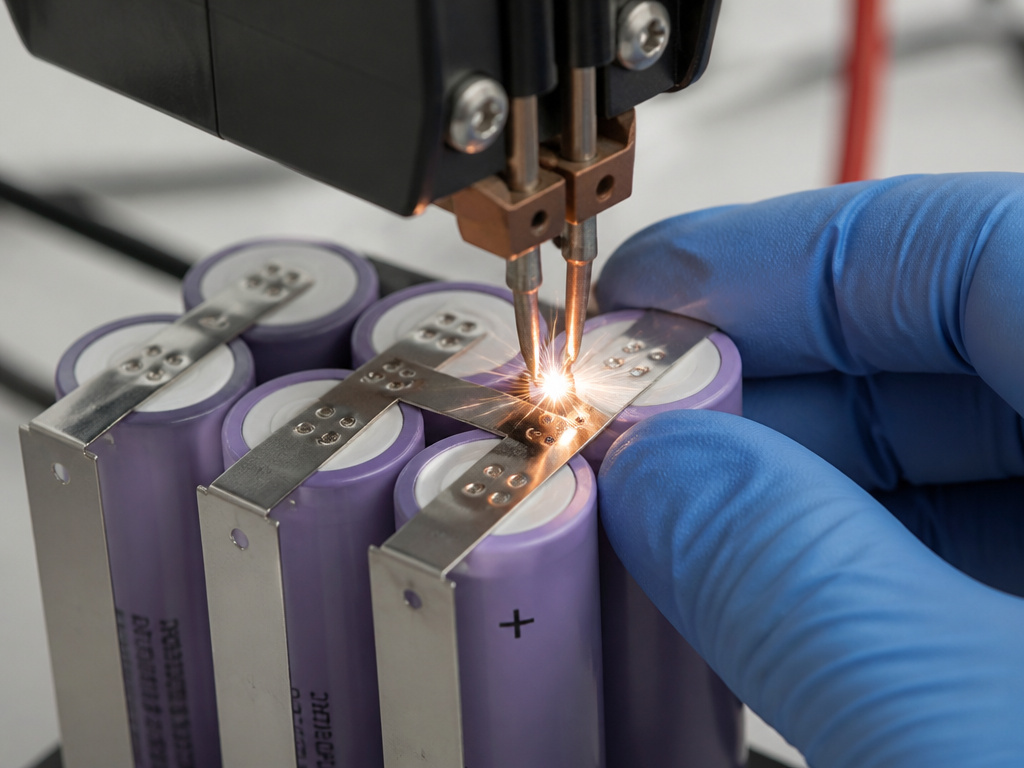
This assumes you’ve diagnosed a pack with one bad cell group and have a set of ten new, matched 18650 cells and a rebuild kit (or nickel strip and insulators).
1. Open the Housing.
Find all the Torx screws on the bottom of the pack. One is often hidden under the label. Use the correct bit; if it seats but spins, look for a central pin, indicating a security Torx. Gently separate the shell halves with plastic tools. Skip prying at the seam: you’ll crack the plastic latches. The goal is to harvest the BMS board and terminal block intact.
2. Document and Disconnect.
Take clear photos of the cell arrangement and all wire connections to the BMS before touching anything. The BMS typically has multiple wires connecting to each cell group; photographing the original connections before disassembly is crucial. Label them if needed. Desolder or carefully cut the nickel strip connections to free the old cell stack.
3. Test and Match New Cells.
Charge all your new cells individually and confirm each sits within 0.05V of the others. This matching is the single biggest factor in long-term pack balance. A cell at 4.18V paired with one at 4.10V will drift apart under use.
4. Build the New Stack.
Recreate the original 5S2P layout. Place an insulating ring over the positive terminal of every cell before adding nickel strip. This prevents the strip from shorting against the cell’s negative can. Spot weld the series connections first (these carry the full pack current), then the parallel connections. Keep the nickel path short and direct.
5. Reconnect the BMS.
Solder the BMS wires back to the correct cell group tabs in the exact order they were originally. A flipped B5 and B4 connection will cause an immediate fault. Reconnect the thermistor (temperature sensor) if your pack has one; a disconnected sensor can cause charging issues.
6. Final Assembly and First Charge.
Fit the new cell stack and BMS into the housing. Before closing, check the pack voltage at the main terminals, it should read close to 18.5V (nominal). Snap the shell together, insert screws, and place it on the charger. A completed charge should read 21.0V. Let the pack rest for an hour, then measure each cell group through the balance port. All five within 0.03V of each other indicates a well-balanced pack that should stay stable.
Choosing the Right Replacement Cells

Not all 18650 cells are created equal. A high-capacity cell rated for laptops may not deliver the 20-amp bursts your circular saw demands. You need high-drain cells.
Look for high-drain cells with a continuous discharge rating suitable for power tools; consult cell specifications for your tool’s requirements.
- Capacity: This determines runtime. Common sizes are 2500mAh (like the original DeWalt DCB205 cells); ensure the capacity matches your pack’s original configuration. Higher capacity often means slightly lower discharge rating, so balance your needs.
- Brand: Stick with reputable manufacturers like Samsung (30Q, 25R), Sony/Murata (VTC6), or Molicel (P28A). Avoid no-name cells with exaggerated ratings.
Remember, you’re building a pack, not a flashlight. The BMS and tool are designed for a specific voltage curve. Using cells with a different chemistry or voltage profile can confuse the fuel gauge or protection circuits.
Troubleshooting a Rebuild That Doesn’t Work
So you closed it up, and the charger blinks red, or the tool pulses but won’t run. Don’t panic. The most common failures are simple connection errors.
| Symptom | Likely Cause | Fix |
|---|---|---|
| Charger refuses pack immediately. | Balance connector seated wrong; thermistor disconnected. | Open pack, check all BMS wire connections and the thermistor. |
| Tool won’t run, but pack reads 21V. | BMS in a protection latch. | Cycle pack on charger; if no change, the BMS may be faulty. |
| Pack voltage reads ~3.7V low. | One cell group open (failed series weld). | Identify the dead group and re-weld the nickel strip connection. |
| Cuts out under load, recovers at rest. | Undersized nickel strip or a weak weld. | Replace with heavier-gauge nickel (0.2mm) and re-weld with more energy. |
| Cell groups drift apart within weeks. | Mismatched cells; a reused weak cell. | Replace all cells with a new, matched set. |
These are the practical, mechanical reasons a rebuild fails. They’re almost never a mystery if you methodically check connections and measurements. For more on reviving packs that won’t take a charge, our guide covering methods to revive a dead power tool battery covers the pre-rebuild diagnostics.
When to Recycle Instead of Rebuild
Rebuilding isn’t always the right answer. You should recycle the pack if:
- The plastic housing is cracked or melted (DeWalt’s manual says to return it for recycling if the housing breaks).
- The BMS board shows visible burn damage or popped components.
- You lack the specific tools, especially a spot welder.
- The cost of new, quality cells approaches or exceeds a new battery sale price.
Proper battery disposal is not optional. Lithium-ion packs should go to a dedicated recycling center, like those run by the Rechargeable Battery Recycling Corporation (RBRC), as Milwaukee’s manual specifies. Throwing them in the trash is an environmental and fire hazard.
Frequently Asked Questions
Can any power tool battery pack be rebuilt?
In theory, yes, if you can open it and source replacement cells that match the original configuration (series/parallel layout and voltage). In practice, packs that are potted (filled with epoxy) or use proprietary cell formats (like Milwaukee’s M12 packs) are extremely difficult or impractical for a DIYer to rebuild. Common 18V/20V MAX packs from DeWalt, Makita, and Ryobi using standard 18650 cells are the primary candidates.
Is it cheaper to rebuild a battery or buy a new one?
It depends. A rebuild with quality cells may cost less than a new battery, not counting your time or the tool investment (spot welder). The savings come from doing multiple packs, or when a specific, discontinued battery is unavailable. For a single, common pack on sale, buying new is often simpler and safer.
What’s the difference between rebuilding NiCd and Lithium-ion batteries?
The chemistry changes everything. NiCd (Nickel-Cadmium) cells are more tolerant of deep discharge and can often be reconditioned with a high-current pulse. Li-ion packs require a functioning BMS to manage each cell group. Rebuilding NiCd is generally considered lower risk, but the principles of proper battery storage and handling still apply. For a deeper dive, see our guide on battery storage and chemistry.
How do I handle the battery management system (BMS)?
The BMS is the brain. Handle it gently. Before disassembly, photograph all wire connections. When reassembling, ensure every balance wire goes to the correct cell group tab. The BMS must be kept dry and free of solder bridges. If you’re using a new BMS from a kit, ensure it’s designed for your pack’s specific configuration (e.g., 5S for an 18V pack).
Why won’t my rebuilt battery charge?
The most common reasons are a disconnected thermistor, an incorrectly seated balance connector, or a BMS in permanent protection lockout. First, verify all BMS connections. If those are good, the BMS itself may have been damaged during the rebuild or was faulty from the start. This is a core focus of any guide on common reasons for power tool battery charging failures.
The Bottom Line
Rebuilding a power tool battery is a technically demanding repair that sits in a legal and safety gray area. The manufacturer’s manual is your first and most important source, it says don’t do this. The DIY community’s detailed guides show you how it can be done, with specific warnings about cells under 2.0V, the necessity of spot welding, and the fragility of the BMS.
If you choose to proceed, treat it with the seriousness of working on a live electrical system. Match your cells, respect the BMS, and understand that the moment you open that sonic-welded shell, you assume full responsibility for the results. For everyone else, proper battery disposal and buying a new pack is the sanctioned, safe path. The right tool for this job isn’t always in your workshop; sometimes it’s knowing when to walk away.
