
How to Use a Sandblast Cabinet: Step-by-Step Guide
This post contains affiliate links. As an Amazon Associate, we earn from qualifying purchases.
To use a sandblast cabinet, you connect a dry air supply rated for at least 125 PSI, load dry, quality abrasive media, and operate the gun at a 45–60 degree angle 6 inches from the workpiece. All work must be done with the cabinet sealed, the dust collector running, and while wearing a NIOSH-approved respirator.
The critical thread connecting those steps is moisture. It’s the single point of failure that turns a straightforward job into a clogged, frustrating mess. Your air supply, your media, and your parts all need to be bone dry before you even plug in the machine.
What follows is the full sequence, from unboxing to finished part. We will cover the essential safety steps, the specs that actually matter for your compressor, and how to match media and pressure to the job, whether you’re stripping rust or etching glass, which is the core of how to use a sandblast cabinet. By the end, you’ll have a repeatable process that gets results without wasted time or media.
Key Takeaways
- Wear a NIOSH-approved respirator, silicosis from silica sand dust is a fatal lung disease, and other media produce toxic particulates.
- Keep everything dry. Moisture in the air supply, media, or parts causes instant clogs in the metering valve and hopper.
- Match pressure to your media and cabinet. For example, the Foredom manual limits glass beads to 60 PSI and aluminum oxide to 85-87 PSI, while other cabinets may allow higher pressures.
- Angle the gun between 45–60 degrees. Holding it at 90 degrees wears out the nozzle and viewing window faster and slows work.
- Check the nozzle every 10–12 hours. Rotate it a quarter turn if it shows uneven wear to extend its life dramatically.
Understanding Your Cabinet’s Core Systems
A sandblast cabinet isn’t just a box with a gun. It’s a sealed recycling loop. You need to understand three things to run it effectively when learning how to use a sandblast cabinet: the air system, the media delivery system, and the dust collection system. Getting one wrong stops the whole operation.
The air system starts at your compressor. Its job is to provide a steady, clean, dry stream of high-volume air. The media delivery system, the hopper, metering valve, and gun, mixes that air with abrasive and blasts it onto your workpiece. Finally, the dust collector pulls the spent media and debris through a filter, separating reusable abrasive from fine, hazardous dust. When this loop is balanced, the cabinet hums. When it’s not, you get clogs, poor visibility, and wasted media.
The siphon system inside a typical cabinet uses a vacuum created by high-velocity air flowing past a pickup tube in the hopper. This draws media into the airstream, mixing it in the gun nozzle before it exits. An inadequate air supply (low CFM) breaks this vacuum, causing inconsistent media feed or none at all.
Your first sign of trouble is often sound. A healthy blast has a consistent, gritty hiss. If you hear sputtering or the gun pulses while learning how to use a sandblast cabinet, the media feed is starving, check for moisture clumps or a restricted air line.
The Non-Negotiables: Safety First
Be realistic. This isn’t a drill press. You are launching tiny, sharp particles at high speed in an enclosed space, creating fine dust that can permanently damage your lungs. The safety rules aren’t suggestions; they are the price of admission.
Before you start: You must wear a NIOSH-approved dust mask or respirator. The Redline Stands and JME Sales manuals explicitly state that everyone in the blasting area needs this protection. Silica sand can cause silicosis, a fatal lung disease. Other media may contain toxic substances. An air-supplied respirator is the gold standard, but at minimum, use a well-fitted NIOSH-approved mask. Also wear safety glasses or a face shield, ricochets happen.
The other half of safety is the cabinet itself. Every manual, from Global Industrial to Foredom, states the same rule: never operate with any cabinet door open. The dust collector must be running to contain particulates. After blasting, the Foredom manual advises waiting at least 10 seconds before opening the lid to let airborne dust settle. Ground the cabinet to prevent static shock, and always disconnect the power before servicing gloves or replacing the window film.
Common mistake: Skipping the respirator because you’re “just doing a quick job.” Harmful dust remains suspended in the air long after you stop. One manual notes you should use an air monitor to determine if the atmosphere is safe before removing your mask.
Choosing the Right Media for the Job
Your media is your cutting tool. Picking the wrong one is like using a chainsaw to carve a turkey, you’ll ruin the meal and the tool. The basic rule is simple: harder media cuts faster but can damage soft substrates; softer media cleans or finishes without removing base material.
| Media Type | Best For | Pressure Limit | Key Warning |
|---|---|---|---|
| Aluminum Oxide | Aggressive cutting, rust removal, surface profiling. | 85–87 PSI (Foredom) | Avoid on soft metals like aluminum unless using low pressure. |
| Glass Beads | Deburring, peening, creating a satin finish without cutting. | 60 PSI (Foredom) | Shatters at higher pressure, losing effectiveness and creating more fine dust. |
| Crushed Glass | A less aggressive, recycled alternative for cleaning and stripping paint. | Varies; start low. | Ensure it’s free of contaminants. |
| Plastic Media | Stripping coatings from composites, fiberglass, or delicate parts. | Low pressure (40–60 PSI) | Can melt if pressure is too high. |
| Walnut Shells | Polishing and cleaning without any risk of embedding in soft metal. | Low pressure. | Must be absolutely dry; absorbs moisture rapidly. |
Do not use media containing free silica. This warning is in capital letters in multiple manuals for a reason. Silica sand is a common, cheap abrasive, but the dust it creates is a known carcinogen and causes silicosis. It’s banned from most cabinet use for a reason.
Moisture is the enemy of all media. The JME Sales manual is blunt: “Moisture will cause the media to not flow and will clog metering valve and hopper.” Store your media off concrete floors on a wooden skid, and screen and dry it if it gets damp. If the humidity is excessively high, it may not be advisable to blast at all.
For a deep dive on your options, see our guide on choosing sandblasting abrasive.
Air Supply: Compressor Requirements & Setup
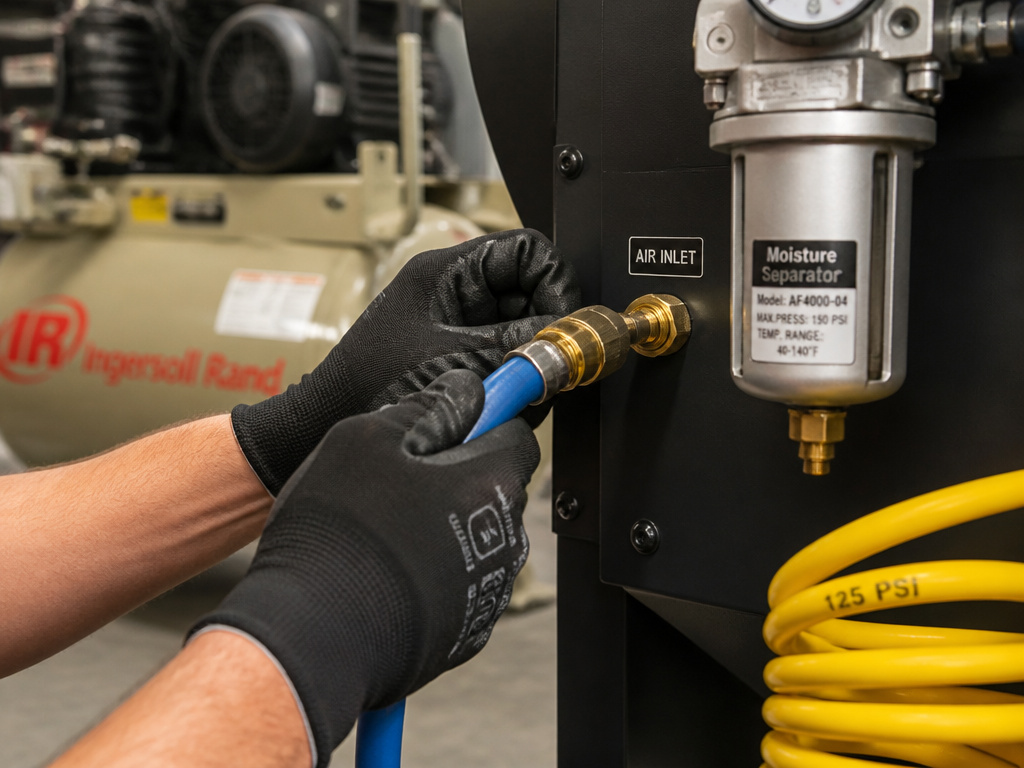
This is where most DIY setups fail. A sandblast cabinet is an air hog. It doesn’t just need high pressure (PSI); it needs high volume (CFM) delivered consistently.
Manufacturer specs give you the hard numbers. The Redline Stands SBC990, for example, has a maximum work pressure of 125 PSI and an air consumption of 24 CFM @ 125 PSI according to its specifications. The JME Sales 41800 needs 15 CFM at 80 PSI with a 7/32” nozzle or 20 CFM at 80 PSI with a 9/32” nozzle. Your compressor’s output must meet or exceed these figures at your chosen operating pressure. Your compressor’s output must meet or exceed your cabinet’s CFM requirement at your chosen operating pressure.
Hose and Line Setup:
- Hose Rating: All hoses should be rated for at least 125 PSI (per Global Industrial and Redline Stands).
- Line Size: Sources specify different minimums: Redline Stands states the I.D. Should be more than 8mm (0.3”), while Titan Abrasive requires a 1-1/4” N.P.T. Minimum supply. Consult your cabinet’s manual.
- Filtration: Install an isolation valve, a moisture separator, and a coalescing filter as close to the cabinet as possible. The supply air must be “dry and clean from oil and other contaminants.” Drain the moisture filter before and after each use, as the Foredom manual instructs.
Where this goes sideways: Using a cheap, underrated hose that kinks. When you press the pedal, the pressure will drop, media feed will stutter, and you’ll spend an hour troubleshooting the gun when the problem is 10 feet back in a pinched air line.
Once your air is plumbed, the final electrical step is often overlooked. The Redline Stands manual specifies that electric extension cords must be “three wire grounded (wire size can not be smaller than 3×1.5MM²).” Don’t plug a 1200W cabinet into a lightweight indoor extension cord.
The 7-Step Setup & Operating Workflow
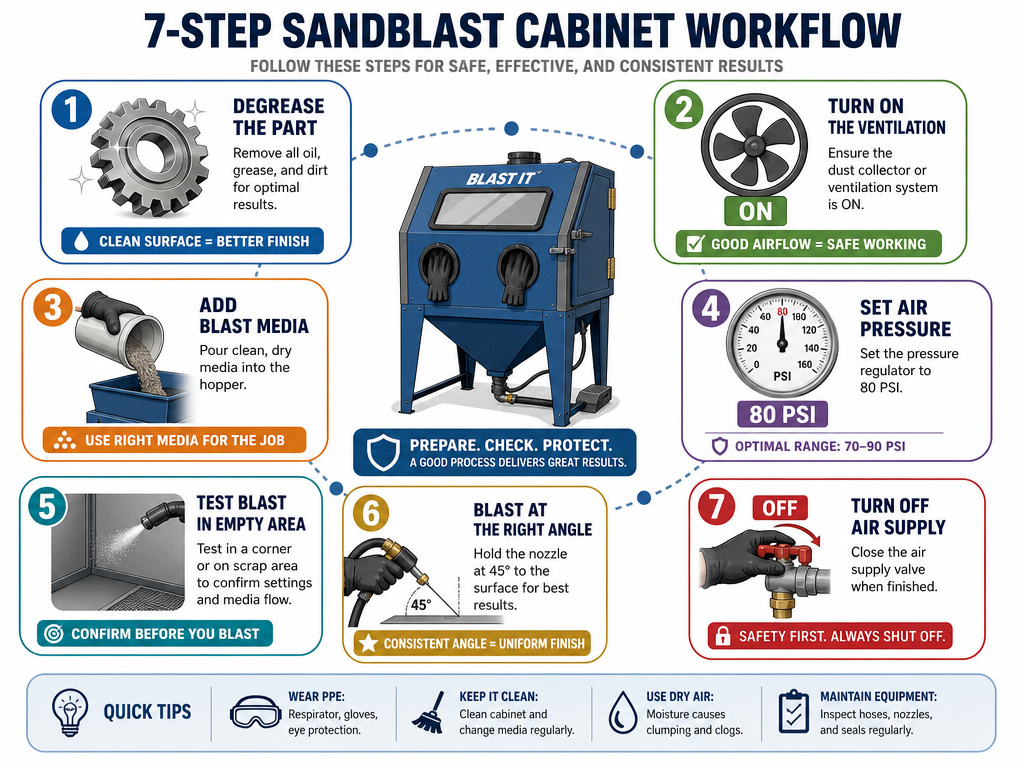
Follow this sequence exactly for your first successful blast. It methodically checks each critical system before you pull the trigger.
- Prepare the Workpiece. Per the JME Sales manual: “All parts processed must be free of oil, grease and moisture.” Degrease and dry parts completely. A wet part introduces moisture to the media bed, guaranteeing a clog.
- Power Up the Dust Collector. Turn on the cabinet’s system switch. Listen for the dust collector fan to start. Never blast without it running.
- Charge the Cabinet with Media. Pour in your dry, screened abrasive. Don’t overfill; leave room in the hopper for the media to flow. Close and seal all doors.
- Open the Air Supply. Open the isolation valve from your compressor. Set your regulator. Start low, 80 PSI is a safe starting point for many jobs, as JME Sales recommends.
- Test Fire (Without a Part). Put on your respirator and safety glasses. Point the gun into an empty corner of the cabinet and press the foot pedal for a second. You should see a solid, consistent stream of media. If it’s weak or pulsing, stop and check for air restrictions or moist media.
- Blast with Correct Technique. Hold the gun nozzle approximately 6 inches from the part, as instructed by Redline Stands and JME Sales. Aim at a 45–60 degree angle. A 90-degree angle causes excessive wear and slows progress. Move the gun in steady, overlapping passes.
- Shutdown Procedure. Release the foot pedal. Turn off the cabinet system switch. Wait 10 seconds (per Foredom). Open the drain valve on your moisture filter. Then, open the cabinet door to retrieve your part.
This workflow forces you to respect the system. Rushing to step 6 is how you fill your cabinet with a cloud of dust you then breathe, or blast a wet part and jam the gun solid. For more on the fundamentals of the equipment, read our sandblasting guide.
Navigating Pressure Settings: What the Manuals Actually Say
Here’s the confusing part: not all cabinets, or media, share one pressure limit. The “correct” PSI depends entirely on your specific model and your media. You must reconcile the numbers.
| Cabinet / Media Source | Stated Pressure Limit or Guideline | Context |
|---|---|---|
| Global Industrial | Working pressure must not exceed 125 PSI. | General component safe limit. |
| Titan Abrasive | NEVER exceed 150 psig. Adjust to 90 psig as typical setting. | Model-specific high limit. |
| Foredom KW-Wolf | Glass Beads: Do not exceed 60 psig. Aluminum Oxide: Do not exceed 87 psig. | Media-specific limits for their cabinet. |
| JME Sales 41800 | Operating pressure: 80 to 110 PSI. Maximum work pressure: 110 PSI. | Model-specific operating range. |
| Clarke SB30 | Set the pressure… not higher than 100 lbf/in². | Model-specific maximum. |
How to use this table: Find your cabinet model first. That’s your absolute ceiling. Then, cross-reference with your media type for a practical working limit. For example, if you own a Foredom cabinet and are using glass beads, your max is 60 PSI, even though the cabinet components could handle more. If you own a JME Sales 41800 and are using aluminum oxide, you could safely work at 85 PSI, staying under the model’s 110 PSI max and the media’s recommended limit.
The JME Sales manual adds a useful tip: “For light gauge steel, aluminum, and other more delicate parts, start at lower pressure and gradually increase.” For light gauge steel, aluminum, and other more delicate parts, start at lower pressure and gradually increase the pressure until the desired finish is achieved.
Common Troubleshooting Issues
Even with perfect setup, things go wrong. Here’s how to diagnose the usual suspects.
Problem: Media isn’t picking up / Blast is weak or pulsing.
- Cause 1: Moisture. This is the number one cause. Wet media clumps and won’t flow through the metering valve. Check your air filter drain, and make sure your media is stored dry.
- Cause 2: Inadequate CFM. Your compressor can’t keep up. The Redline Stands manual says: “If the pressure gauge on the regulator shows an adequate no-load supply… press the foot pedal. If the pressure drops more than a few psi your air supply is restricted or inadequate.”
- Cause 3: Worn or Incorrect Nozzle. A worn nozzle reduces effectiveness. Check it after every 10-12 hours of use. An oversized nozzle requires more CFM than your compressor can provide.
Problem: Poor visibility through the window.
- Cause: The protective film is pitted or the dust collector filter is saturated. Replace the window film. Check and clean or replace the dust collector filter as needed. Check and clean or replace the dust collector filter as needed.
Problem: Media caking in the hopper or valve.
- Cause: Directly from the JME Sales manual: “Media caking is caused by moisture in the air supply from oily and greasy parts.” Install a better moisture trap and always degrease parts first.
Problem: Excessive wear on one side of the nozzle.
- Cause: The nozzle is eroding unevenly. Both Redline Stands and JME Sales state: “If it shows uneven wear it should be turned 1/4 turn every 10 hours of use.” This simple rotation extends nozzle life several times over.
For persistent media flow issues, our article on how to reuse sandblasting abrasive covers filtering systems that remove fine dust and clumps, restoring flow.
Essential Maintenance for Longevity
A cabinet is a simple machine, but it will punish neglect. A ten-minute routine after each session saves hours of repair.
After Each Use:
- Drain the moisture filter (Foredom manual).
- Clean any media spills from around the cabinet, they’re a slipping hazard.
- Vacuum out the cabinet to remove fine dust buildup, which can shorten filter life.
Weekly / Monthly:
- Inspect all hoses and fittings for damage (Global Industrial manual).
- Check the seal on all doors and gloves. A leaky seal blows dust into your shop.
- Clean the dust collector filter. A clogged filter kills visibility and reduces suction efficiency.
Periodic (Every 10-12 Blasting Hours):
- Inspect the ceramic nozzle for wear. Rotate it 1/4 turn if it’s wearing unevenly.
The Global Industrial manual sums it up: “Keep your machine in good repair. Use official parts and do not substitute or modify supplied items.” That means when the gloves tear, replace them with the proper size from the manufacturer. A jerry-rigged seal will leak and undermine your primary safety containment.
Project Examples: Settings in the Real World
Theory is fine, but when do you use what? Here are two common scenarios with concrete settings.
Scenario 1: Rust Removal from a Steel Bracket.
- Goal: Remove all rust and mill scale, leaving a clean, slightly profiled surface for priming.
- Media: Aluminum Oxide, #80 grit. It’s aggressive and angular, perfect for cutting.
- Pressure: Start at 90 PSI (if your cabinet allows, like a Titan model). On a Foredom, respect the 87 PSI limit. On delicate steel, you might drop to 70-80 PSI.
- Technique: 45-degree angle, 6-inch standoff, steady passes until gray metal shows.
- Post-Processing: Blow off parts with clean, dry air immediately to prevent flash rust.
Scenario 2: Satin Finishing a Aluminum Faceplate.
- Goal: Create a uniform, non-directional satin finish without removing significant material.
- Media: Glass Beads, 120 grit or finer. They peen the surface rather than cut it.
- Pressure: 50–60 PSI max. Exceeding this shatters the beads, creating more fine dust and reducing effectiveness.
- Technique: Consistent, lighter passes.
- Note: Ensure the aluminum is perfectly clean and dry. Any grease will contaminate your media bed.
For a dedicated guide on one of the most common applications, see our tutorial on sandblasting to remove rust.
Before You Go
One rule most guides skip: if your media gets wet, don’t try to dry it in the oven and keep using it. Screen it, spread it thin in the sun if you must, but recognize that once moisture has been introduced, that batch is compromised. It will always flow worse and clog easier. Sometimes, starting fresh is cheaper than the hours of frustration.
Your first step this week shouldn’t be buying media or a new gun. It should be auditing your air supply. Check your compressor’s CFM rating at your desired PSI against your cabinet’s manual. Verify your hose ratings and install a moisture separator. Getting the air right solves half your problems before they start.
Everything above assumes you’ve chosen a cabinet to begin with. A poorly sealed, underbuilt unit will fight you every step of the way, leaking dust and wearing out parts prematurely. Do your research on recommended sandblasting equipment before you invest. The right tool for the job matters here more than almost anywhere else in the shop.
How to Set Up a Sandblast Cabinet
Start by ensuring your work area is ready for the cabinet and its power needs. The cabinet must be grounded to avoid shock. Electric extension cords should be three-wire grounded and rated for the amperage of the blaster. Connect your air supply using hoses all rated for at least 125 PSI. Install an isolation valve in the air line so supply air can be turned off for servicing. Before operating, inspect all fittings and hoses for damage. Finally, check the seal on all doors, as you should only operate the blast cabinet with all doors securely closed and the dust collection system running.
Frequently Asked Questions
How do you use a sandblasting cabinet?
You use a sandblasting cabinet by first ensuring all safety precautions are met (respirator, sealed cabinet, running dust collector), loading it with dry abrasive media, connecting a dry air supply that meets the cabinet’s CFM and PSI requirements, and then operating the blast gun at a 45–60 degree angle, 6 inches from the dry, grease-free workpiece. A specific step-by-step workflow is outlined in the section above.
Can you reuse sand in a sandblasting cabinet?
Yes, you can reuse abrasive media in a cabinet, but it must be filtered to remove broken-down particles, dust, and debris. Over time, media breaks down and becomes too fine to be effective. Many cabinets have a built-in reclaim system that screens and returns media to the hopper. You should periodically screen media manually as well and discard the fines. Our guide on reusing abrasive details the process.
How big of an air compressor do I need for a sandblasting cabinet?
You need an air compressor that can deliver the Cubic Feet per Minute (CFM) required by your specific cabinet at your chosen operating Pressure (PSI). For example, the Redline Stands SBC990 needs 24 CFM at 125 PSI. The JME Sales 41800 needs 15–20 CFM at 80 PSI. This typically requires at least a 20–30 gallon, 2–3 HP stationary compressor. A small portable compressor will not suffice.
Why isn’t my cabinet sandblaster picking up sand?
The most common reasons your cabinet isn’t picking up media are: 1) Moisture in the air supply or media causing clumps, 2) an undersized air compressor that can’t provide sufficient CFM to create the siphon vacuum, 3) a clogged or worn nozzle, or 4) a blocked pickup tube in the hopper. Start by checking and draining all moisture filters and ensuring your media is bone dry.
