10 Best Fiber Laser Engravers in 2026
This post contains affiliate links. As an Amazon Associate, we earn from qualifying purchases.
The OMTech 60W MOPA Fiber Laser Marking Machine is a top choice for its ability to produce vibrant color marks on metals and its complete, workshop-ready package. For a dual-laser system, the xTool F2 Ultra 60W MOPA & 40W Diode Laser offers high versatility, while those needing maximum portability should consider the LaserPecker LP5 Dual Laser Engraver.
Choosing a fiber laser means committing to a tool that excels on metals but demands safety and space. You need the right balance of power, work area, and features for your specific projects, whether that’s jewelry, industrial parts, or promotional items. We built this guide by analyzing specifications, manufacturer documentation, expert technical round-ups, and patterns in owner feedback to help you find a machine that fits your shop and your goals.
Top 10 Fiber Laser Engravers in the Market
Certain content that appears on this site comes from Amazon. This content is provided "as is" and is subject to change or removal at any time.
The Best Fiber Laser Engravers, Reviewed
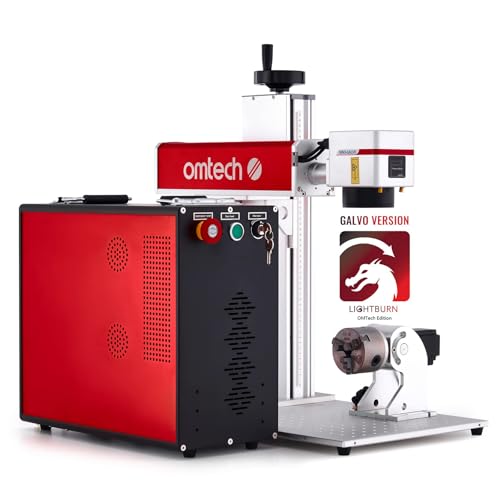
OMTech 60W MOPA Fiber Laser Marking Machine
What We Like
- MOPA laser enables color marking on metals
- Bundled LightBurn software for easy design control
- Includes a plug-and-play rotary axis for rings and cylinders
- High-speed galvanometer for rapid, stable engraving
Trade-offs
- At 73 pounds, it's a substantial, stationary benchtop unit
- Open design requires consistent use of included safety glasses
- Work area is smaller than some 100W industrial models
A 60W MOPA laser source is the key feature here, giving you the unique ability to create permanent color marks on stainless steel and deep black etches on aluminum. That versatility, combined with the included LightBurn software and rotary axis, makes this a complete package for a serious hobbyist or small shop looking to mark jewelry, tools, or custom metal parts. It’s built for the user who needs more than simple etching and wants to explore the full creative and commercial potential of fiber laser marking.
The trade-off for that capability is a dedicated footprint. This isn’t a portable machine you’ll tuck away after each use. It’s a solid 73-pound workhorse that needs a permanent spot on a sturdy bench. For someone focused purely on portable, handheld marking on tiny jewelry items, a compact unit like the MR.CARVE M1 Pro would be a more logical fit. But if your work demands precise, colorful, and fast engraving on a wide range of metals at a fixed station, this OMTech delivers a professional-grade setup right out of the crate.
Product photos
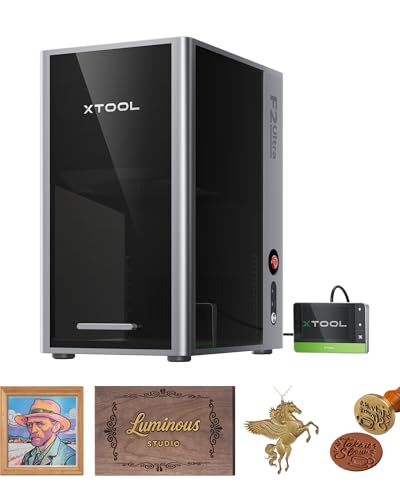
xTool F2 Ultra 60W MOPA & 40W Diode Laser
What We Like
- Dual 60W MOPA and 40W diode lasers for all materials
- Engraves over 100 consistent colors on metals
- AI dual-camera system auto-detects materials and suggests settings
Trade-offs
- Class 4 laser requires serious safety protocols and dedicated space
- At 20.5 inches tall, it needs a sturdy, sizable benchtop
- Conveyor for batch processing is an added accessory, not included
A 60W MOPA fiber laser paired with a 40W diode head is the core of this machine. This dual-laser setup means you can tackle anything from deep metal engraving to cutting wood without needing a second tool. The AI cameras and pre-set color files remove the guesswork, making professional results accessible. This is the right pick for a busy workshop that demands both versatility and industrial-grade speed for mixed materials, especially metals.
Its Class 4 laser classification signals a serious piece of shop equipment, not a casual desktop toy. While the OMTech 60W MOPA is a dedicated metal marker, its larger 17.8 by 22.1-inch base occupies more bench space. For projects that switch between marking stainless steel and cutting acrylic, the dual-laser system’s efficiency can justify the machine’s premium position.
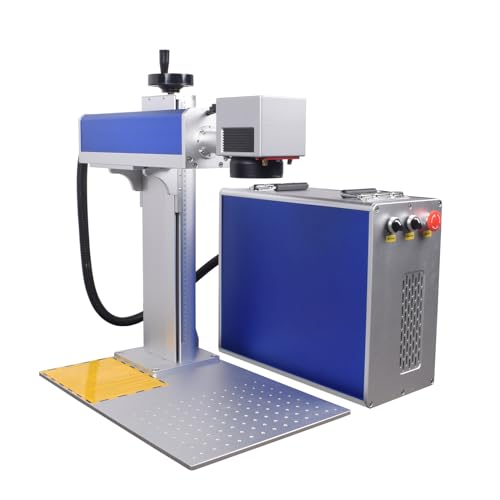
AchiPrin 100W JPT MOPA M7 Fiber Marking Machine
What We Like
- Dual lenses for fine detail or large-area work
- 100W MOPA source enables color marking on metals
- Includes rotary axis for cylindrical objects
- Air-cooled, no external water chiller needed
Trade-offs
- Requires dedicated bench space, not portable
- Software learning curve for parameter adjustment
The inclusion of both a 175mm and a 300mm field lens is the defining feature here. That quick-swap capability means you can go from engraving intricate details on a small jewelry piece in the morning to marking a large industrial mold in the afternoon without changing machines. This, paired with a 100W JPT MOPA laser, gives you the power and frequency control for demanding tasks like stainless steel color marking or deep engraving. It’s built for a workshop that needs to handle a wildly mixed job queue, from medical parts to DIY projects, all from a single station.
With its 100-watt JPT MOPA laser source, this machine delivers industrial-level power for tasks like stainless steel color marking and deep engraving on metals and plastics. It does all this without needing a separate water cooling system. That substantial capability comes in a benchtop-sized unit, so it requires a dedicated workspace rather than casual storage. For shops needing to handle both fine jewelry details and larger items like automotive molds, the included 175mm and 300mm lenses provide that range. Its footprint is larger than portable options like the LaserPecker LP5.
Product photos
LaserPecker LP5 Dual Laser Engraver
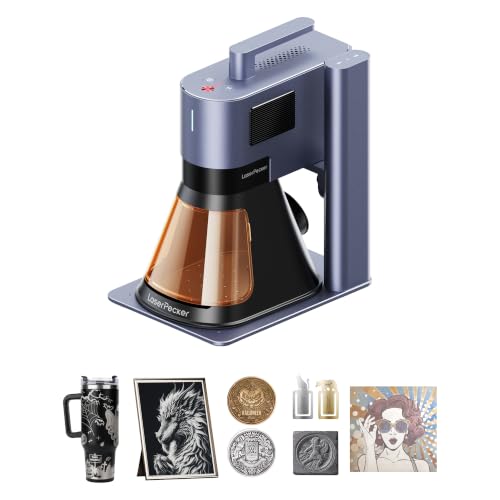
What We Like
- Extremely portable at just over 6 kg
- Pro-grade 3D grayscale for depth-controlled engraving
- Enables instant customization with zero pre-setup
Trade-offs
- Fiber laser cuts only 0.5mm metal, limiting thicker stock
Weighing only 6.02 kg, this engraver transforms a car trunk into a mobile workshop. That portability, paired with a dual 20W laser system, makes it a genuine tool for on-the-spot jobs at craft fairs or mall kiosks. You get the fiber laser’s 0.0027mm precision for fine jewelry metals and the diode’s ability to cut 20mm wood, all in one compact frame. It’s built for the maker who needs to engrave a keychain in fifteen seconds while a customer waits, not for batch processing in a fixed shop.
Such a portable design does limit the material capacity. While it slices through 0.5mm brass, you won’t be marking thick industrial parts like you could with a dedicated benchtop fiber laser. Think of it as a premium, pro-sumer bridge tool. It brings legitimate fiber laser precision to a portable format, but it rightly concedes deep cutting power and large work area to heavier, stationary units. For instant customization on a wide range of materials, its design is remarkably focused.
Cloudray 50W Fiber Laser Engraving Machine
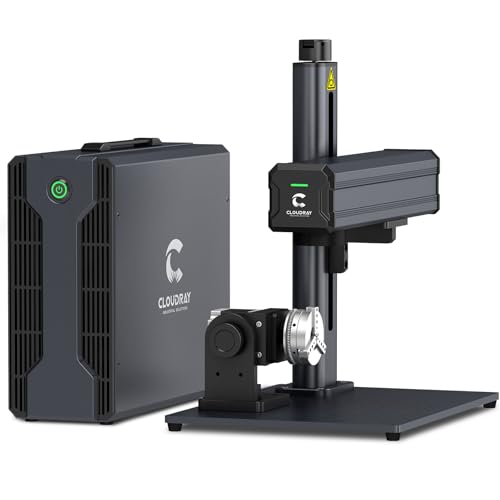
What We Like
- Two standard F-theta lenses for dual work area sizes.
- Includes a 360° rotary attachment for cylindrical objects.
- Compatible with both EzCad2 and LightBurn software.
- Portable 43 lb design with a manual lift column.
Trade-offs
- The 4.3"x4.3" base work area is smaller than many competitors.
- Weighs 43 lbs, requiring a sturdy, dedicated bench space.
- Lacks the MOPA laser source for advanced color marking.
A manual lift column and two included lenses let you switch between a precise 4.3-inch square field and a much more capable 7.9-inch area. That flexibility is the core appeal here, making it a clever choice for a shop that needs to handle both intricate jewelry tags and larger plaques without buying a second machine. The 50W fiber source and 10,000 mm/s speed mean it won’t slow you down on production runs, and full LightBurn support keeps the workflow simple.
The trade-off is that the standard small field lens feels limiting if you only engrave larger items. For dedicated work on bigger pieces, a model like the OMTech 60W MOPA comes with a fixed 7-inch square area out of the box. The Cloudray asks you to physically swap lenses to gain that space, which is a minor hassle for its unique versatility. It’s a pragmatic solution for maximizing capability within a compact, portable footprint.
Product photos
GWEIKE G2 Pro 30W Fiber Laser Engraver
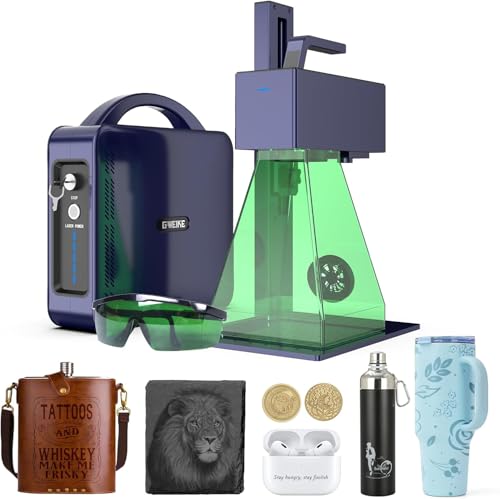
What We Like
- Blazing 15000 mm/s industrial-grade engraving speed
- Exceptional 90+ color marking capability on metals
- High 8K resolution for precise, detailed work
- Detachable design for portable, handheld engraving
Trade-offs
- Class 4 laser requires strict safety protocols and dedicated space
An engraving speed of 15000 mm/s isn’t just a spec sheet number, it’s a production multiplier for anyone marking serial numbers, logos, or decorative patterns in volume. This machine is built for the maker or small shop that values throughput as much as quality. Its real party trick is producing over 90 distinct colors on stainless steel and titanium, turning functional marking into high-value artistry. The 8K resolution and 0.001 mm accuracy mean those colors and details are rendered with crisp, microscopic precision.
Its engraving area measures 150 by 150 millimeters, a size suited for jewelry, pens, or small tool inserts rather than larger industrial plates. For bigger projects, the OMTech 60W MOPA offers a seven by seven inch work area. The G2 Pro’s detachable head provides portable flexibility, but its Class 4 laser rating necessitates a dedicated, enclosed workspace and consistent use of the included safety glasses.
Product photos
xTool F1 Ultra Dual Laser Engraver

What We Like
- Dual lasers handle metals, wood, acrylic, and more
- Fully enclosed cover and smoke extraction for in-store safety
- Large desktop work area for a fiber laser engraver
Trade-offs
- Auto Conveyor is a separate purchase for batch function
- At 43.9 lb, it's a substantial desktop unit, not portable
- Fiber laser cuts only thin sheets of metal
That’s why this machine is perfect for a small shop doing on-demand retail engraving or a maker fulfilling consistent product batches. The dual 20W lasers let you switch from a stainless steel dog tag to a leather keychain without changing machines, and the built-in camera automatically aligns designs. It’s built for throughput.
The machine’s focus is on engraving and versatile customization, not heavy-duty cutting. Its 20W diode laser cuts up to 15mm wood and 12mm black acrylic, while the fiber laser handles thin pieces of metal like 0.3mm stainless steel. For users requiring deeper cuts or marking on thicker industrial parts, a more powerful dedicated laser may be necessary. However, the F1 Ultra’s automation and speed are designed for fast, diverse one-off jobs.
Monport 30W Fiber Laser Engraver
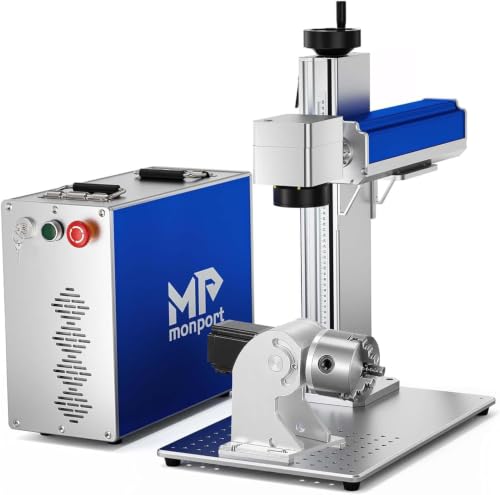
What We Like
- Optional rotary axis for curved surfaces
- Integrated red dot for precise laser guidance
- Long-life 100,000-hour laser source
- Removable positioning bars for accurate placement
Trade-offs
- 5.9-inch work area is smaller than many competitors
- Rotary axis is an optional extra purchase
- Manual focus requires adjustment for each material
A 30W Raycus fiber laser source gives you the core power needed to permanently mark metals like stainless steel, silver, and brass. This machine is a solid entry point for a small workshop or a jeweler looking to add professional engraving without a major investment. The support for an optional rotary axis means you can tackle rings and tubes when you’re ready, and the built-in cooling fans help maintain consistency during longer jobs. It’s a straightforward tool that gets you working on metal quickly.
Priced for accessibility, this laser’s 5.9-inch square work area suits small-scale projects like rings or pendants, but not large plates or batch jobs. For bigger items, you’d need a machine with a larger marking field. Research notes fiber lasers in general excel at deep stone engraving, and the optional rotary axis adds flexibility for curved surfaces later on.
Product photos
MR.CARVE M1 Pro Portable Fiber Laser Marker

What We Like
- Ultra-light 13.2-pound industrial-grade body
- Infrared laser suitable for all metals
- Digital galvanometer for fast marking speed
- Compact footprint for home or factory use
Trade-offs
- Small 2.7-inch square work area limits part size
- Class 4 laser requires strict safety protocols
At just over 13 pounds, the MR.CARVE M1 Pro is the lightest industrial-grade fiber laser in this guide. That portability makes it a genuine hybrid, equally viable for a technician moving between stations on a factory floor and a dedicated hobbyist setting up in a home workshop. Its 1064nm infrared laser and digital galvanometer head deliver the core functionality needed for permanent marking on metals and hard plastics, from serial numbers to creative designs. This machine is for the user who needs industrial capability without a permanent, heavy-duty installation.
The clear trade-off for that portability is the 70mm by 70mm marking area. You won’t be engraving large plates or long tools in one go. For batch marking smaller items like keyboard caps, jewelry, or electronic components, it’s perfectly suited. When your needs outgrow that work area but you still value a relatively compact machine, the Monport 30W Fiber Laser Engraver offers a more spacious 5.9-inch square bed while remaining a desktop unit.
ComMarker B4 20W Fiber Laser Engraver
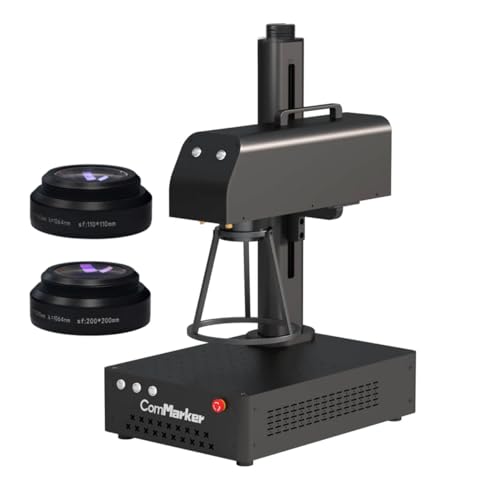
What We Like
- Unique 2-in-1 desktop and handheld design
- Includes two field lenses for different work areas
- Compatible with LightBurn and EzCad2 software
- Certified Class 1 laser product for safety
Trade-offs
- Maximum engraving depth is 0.5mm
- Desktop work area is limited to 200x200mm with the larger lens
- 20W power is modest for deep or high-volume industrial marking
The 2-in-1 desktop and handheld design is the core of this machine’s appeal. It gives you the precision of a fixed galvanometer for detailed work on a bench, and the flexibility to pick it up and mark curved or awkward objects directly. With a 0.01mm minimum line width and speeds up to 15000mm/s, it handles intricate designs on metals and jewelry quickly. This combo is a smart solution for a maker or small shop that needs to mark both prepared items in a jig and finished products in hand, all without buying two separate machines.
This versatility comes with limits in scale and depth. The 20W laser and 200x200mm maximum desktop area mean it’s built for smaller items, not large plates or deep serial numbers. For purely bench-top work on metals where color marking or deeper engraving is the goal, a more powerful dedicated machine offers greater power and a larger standard work area. This model excels by refusing to be pigeonholed, but it won’t replace a high-power industrial marker for heavy-duty production.
How We Evaluated Fiber Laser Engravers
Our evaluation was research-based, focusing on technical specifications from manufacturers and patterns we observed in expert round-ups and owner discussions. We prioritized laser source type and power, work area dimensions, and included features like rotary axes or specific software, as these directly determine what you can engrave and how efficiently you can work. The core criteria were a machine’s material capability, especially its proficiency with different metals, its marking speed and precision, and its overall practicality for a home workshop or small business environment.
We also considered the operational reality of bringing a Class 4 laser into a space, which is why safety features, cooling requirements, and physical footprint were key factors. For instance, an air-cooled system like the one on the AchiPrin 100W JPT MOPA M7 simplifies setup compared to units needing an external water chiller.
A limitation of this approach is that it cannot verify real-world engraving depth, long-term durability, or the exact learning curve of proprietary software. Our related guide on metal fiber laser engravers explores these machines’ core strengths in more detail.
What To Look For In Fiber Laser Engravers
Fiber lasers are the specialists of the laser world, unmatched for marking and engraving metals. Your choice hinges on the materials you work with, your production speed needs, and the space you have available.
Focus on the laser source type (MOPA for color, standard for contrast), the work area size for your typical parts, and whether you need a rotary axis for cylindrical objects. Power (20W to 100W) affects marking speed and depth, not just the materials you can process.
Laser Source & Power
The laser source defines your machine’s capabilities. A MOPA (Master Oscillator Power Amplifier) fiber laser, like the one in our top pick from OMTech, allows for adjustable pulse parameters. This enables advanced techniques like color marking on stainless steel and titanium, offering far more creative potential than a standard galvo fiber laser, which is typically limited to black, white, or etched marks.
Power, measured in watts, influences marking speed and the ability to achieve deeper engraving. A 20W or 30W unit is excellent for detailed jewelry or serial numbers. For batch production, a 60W or 100W machine like the AchiPrin model will mark the same design significantly faster.
Work Area & Practical Design
The engraving field size, listed in inches or millimeters, dictates the maximum dimensions of a single item you can process. Consider if you typically work on small items like rings, where a 2.7-inch square may suffice, or need to mark larger plates or tools. The physical design also matters greatly. A split design with a separate laser source offers flexibility in placement, while a compact, integrated unit like the Cloudray 50W saves space but may have a smaller built-in work area.
Also, assess the cooling method; air-cooled lasers simplify setup, while some higher-power models may require an external water chiller, adding to the footprint and complexity.
Features & Software
Bundled features can transform a basic marker into a versatile production tool. A included rotary axis, like the one with the OMTech, is essential for engraving rings, pens, or bottles without a separate purchase. Software compatibility is equally important; support for user-friendly platforms like LightBurn can shorten the learning curve compared to more industrial-grade programs. For those comparing technologies, our guide on CO2 laser engravers highlights a better choice for organic materials like wood and leather, while a diode laser engraver is a more affordable entry point for non-metals.
- Check if a rotary attachment is included or is a costly extra.
- Verify the software compatibility (e.g., LightBurn, EzCad2).
- Look for safety features like a protective enclosure or included safety glasses.
- Consider the unit’s weight and dimensions to ensure you have adequate, sturdy bench space.
- Confirm the power requirements and whether any special cooling (air vs. Water) is needed.
For most small shop owners, a machine that includes a rotary axis and compatible software represents the best immediate value and capability.
Fiber Laser Engravers Compared
Use the table below to quickly compare the key specifications and features of all ten fiber laser engravers side-by-side.
| Product | Laser Power | Max Speed | Work Area |
|---|---|---|---|
| OMTech 60W MOPA Fiber Laser Marking Machine | 60W JPT MOPA | 7000 mm/s | 7"x7" |
| xTool F2 Ultra 60W MOPA & 40W Diode Laser | 60W MOPA | 15,000mm/s | 8.7" x 8.7" |
| AchiPrin 100W JPT MOPA M7 Fiber Marking Machine | JPT MOPA M7 100W | N/A | 175mm & 300mm |
| LaserPecker LP5 Dual Laser Engraver | 20W Fiber & Diode | 10,000 mm/s | N/A |
| Cloudray 50W Fiber Laser Engraving Machine | 50,000 mW (50W) | 10,000 mm/s | 4.3"x4.3" |
| GWEIKE G2 Pro 30W Fiber Laser Engraver | 30W 1064nm fiber | 15000 mm/s | 150 x 150 mm |
| xTool F1 Ultra Dual Laser Engraver | 20W fiber & diode | 10,000mm/s | 220mm x 220mm |
| Monport 30W Fiber Laser Engraver | 30W Raycus Fiber | N/A | 5.9" x 5.9" |
| MR.CARVE M1 Pro Portable Fiber Laser Marker | 2500 mW | N/A | 70mm x 70mm |
| ComMarker B4 20W Fiber Laser Engraver | 20W max | 0-15000mm/s | 110x110mm & 200x200mm |
Frequently Asked Questions
What is the best fiber laser engraver?
The best fiber laser engraver depends on your primary need. For overall versatility and high-quality color marking on metals, the OMTech 60W MOPA Fiber Laser Marking Machine is an excellent choice. If you need to work on both metals and non-metals like wood, a dual-laser machine such as the xTool F2 Ultra would be more suitable.
What is a good budget fiber laser engraver?
A good budget option prioritizes core functionality for metal marking at a lower cost. The Monport 30W Fiber Laser Engraver offers a solid foundation with a long-life laser source, though its work area is smaller and key features like a rotary axis are optional extras. It’s ideal for those starting out who plan to expand their capabilities later.
Who are the top fiber laser manufacturers in the USA?
Many popular fiber laser engravers sold in the US are manufactured by international companies, but several brands have established strong reputations for quality and support in the North American market. OMTech, Monport, and Cloudray are frequently cited in workshops for providing reliable machines with good customer service networks.
Which fiber laser source is best?
There is no single “best” source; it depends on the desired result. A MOPA fiber laser source is best for applications requiring color marking on metals or extremely fine control over pulse parameters for delicate materials. A standard galvo fiber laser source is often faster and more cost-effective for high-volume, high-contrast black or white marking on metals.
Can a fiber laser engraver cut metal?
Fiber laser engravers are primarily designed for marking and surface engraving, not for cutting through thick metal stock. Some powerful models can cut very thin metal foils or sheets, often up to about 0.5mm, as noted with the LaserPecker LP5. For serious metal cutting, a dedicated CNC fiber laser cutter is the appropriate tool.
The Bottom Line
For most workshops and small businesses ready to invest in professional-grade metal marking, the OMTech 60W MOPA Fiber Laser Marking Machine is the best overall choice. It delivers the coveted ability to create color marks, comes with essential accessories like a rotary axis, and strikes a great balance between power and a manageable footprint.
If your budget is tight but you need to start marking metals, look to the Monport 30W as a solid value pick. For the ultimate in portability to take on the road, the LaserPecker LP5 is in a class of its own. Before you choose, honestly assess your space for a Class 4 laser and match the machine’s work area to the size of items you plan to engrave most often.
