
10 Best Diode Laser Engravers in 2026
This post contains affiliate links. As an Amazon Associate, we earn from qualifying purchases.
The best overall diode laser engraver for most people is the xTool M2 10W Laser Engraver, thanks to its fully enclosed safety and dual cameras that make alignment foolproof. For professional metal marking, the xTool F2 is the best dual-laser pro model, while the Carverall K15 Pro offers the best beginner-friendly kit.
Choosing the right machine means balancing power, safety, and your project materials. We researched specifications, manufacturer features, and patterns in owner feedback to create this list of ten top models. You’ll find a clear pick for every need, from family-safe designs to powerful large-format cutters.
Top 10 Diode Laser Engravers in the Market
Certain content that appears on this site comes from Amazon. This content is provided "as is" and is subject to change or removal at any time.
The Best Diode Laser Engravers, Reviewed
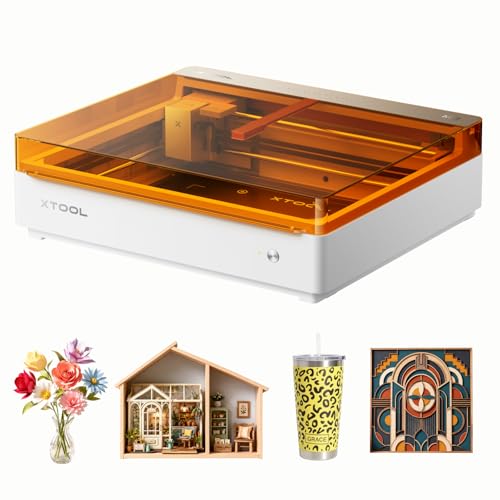
xTool M2 10W Laser Engraver
What We Like
- Class 1 safety with fully enclosed design
- Dual cameras for real-time preview and placement
- Modular design for future inkjet or IR upgrades
- Beginner-friendly software with AI image generator
Trade-offs
- CMYK inkjet and RA3 rotary are sold separately
- 10W diode may cut slower than higher-wattage models
- Focuses on versatility over raw laser power
A built-in dual camera system shows your material and design placement on screen before the laser starts, which eliminates setup guesswork and prevents wasted material. That ‘Place & Go’ accuracy, paired with a fully enclosed Class 1 safety rating, makes it a confident and family-friendly choice for a home workshop. This machine suits crafters who value precision and safety, offering a workflow from hundreds of templates to finished project.
Its core 10W diode laser handles engraving and cutting on materials like wood, leather, and paper. The standard setup focuses on these tasks, with options to add a separate inkjet module for full-color printing or a 3W IR laser for engraving on metal and plastic. This modular approach lets the machine adapt to different creative goals over time.
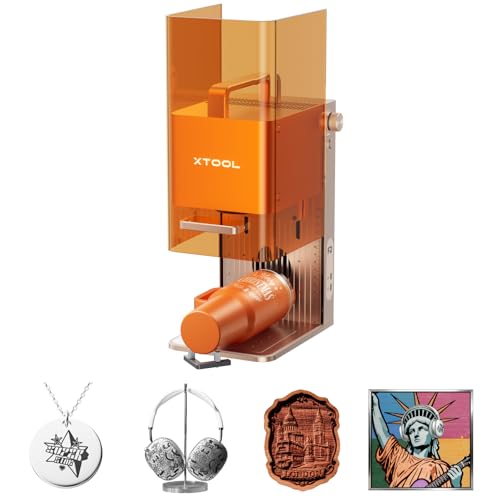
xTool F2 Dual Laser Engraver
What We Like
- Dual-laser handles 300+ materials, including metal marking
- Built-in 50MP camera for precise, waste-free alignment
- Fully enclosed, portable design for safe on-site use
- Comes fully assembled with material presets for quick starts
Trade-offs
- Class 4 laser requires strict safety protocols during operation
- Compact 6.9" x 9.3" base plate limits large single-piece projects
A 15W diode and a 5W IR laser combined in one desktop machine sets this engraver apart. It solves the classic maker’s dilemma of choosing between a machine for non-metals and one for metals. That dual-source versatility, supported by a sharp 50MP camera for alignment, makes it a strong choice for a small custom goods business or a busy workshop. You get professional-grade color marking and 3D embossing without needing two separate, bulky units.
The trade-off for that all-in-one capability is the core work area. At just under seven by nine inches, you’re not engraving large plaques. It’s built for batch processing smaller items like coasters or phone cases, especially with the optional slide extension. For a user whose primary need is a larger, single-pass engraving area on mostly non-metal materials, a machine like the ATOMSTACK A20 PRO V2 offers a more traditional diode laser with a bigger bed. But if your projects constantly hop between metal and everything else, the F2’s dual-laser design eliminates the need for a second machine entirely.
ATOMSTACK A20 PRO V2 Laser Engraver

What We Like
- High 20W power for strong cutting ability
- Fast 400mm/s engraving speed saves time
- Integrated linear guides for quick assembly and precision
- Includes safety features like magnetic cover and tilt alarm
Trade-offs
- 22.8-inch length requires a substantial workbench space
- Lacks a built-in camera for positioning like some enclosed models
- Open-frame design offers less inherent safety than a fully enclosed unit
With a 20000mW laser, this model has the power for high-energy cutting alongside engraving. Engraving speeds can reach up to 400mm/s, which significantly reduces processing times on materials like wood, acrylic, and metal. Its aluminum alloy frame and integrated linear guide structure provide a durable foundation for this work, extending the machine’s lifespan.
The open-frame design requires a dedicated, stable surface, unlike fully enclosed models from other brands. Safety relies on user diligence, including the use of included safety glasses and the machine’s removable magnetic cover. Its 20W diode laser is designed for cutting and engraving, while a product like the AtomStack Atelier Galvo Engraver uses a different system for ultrafast marking.
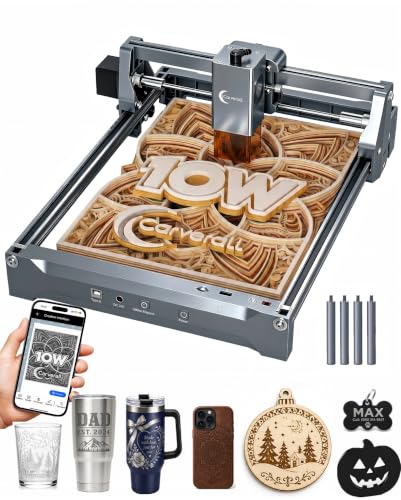
Carverall K15 Pro Laser Engraver
What We Like
- Full starter kit with safety glasses and materials
- Free AI design software and offline TF card control
- Dual-fan module reduces heat buildup by 50%
- Optional IR head for future bare metal engraving
Trade-offs
- A4 work area limits large sheet projects
- 10W diode cannot engrave bare metal without add-on
A three-minute assembly and free software that works from a phone photo make this machine practically unpack-and-play. That focus on immediate usability, backed by a massive creative community and lifetime support, is exactly what a newcomer needs to build confidence without drowning in technical details. The included starter materials let you practice right away, and the compact A4 bed covers most common craft projects without overwhelming a small desk.
This is a focused beginner tool, not an all-in-one machine. Its 10W diode handles coated metals and cleanly cuts 12mm plywood, but engraving stainless steel requires a separate IR laser head. When projects grow to larger panels or need industrial speeds, heavier-duty options like the SCULPFUN S70 MAX become relevant. For a first step, the K15 Pro removes barriers like complex setup and lonely troubleshooting.
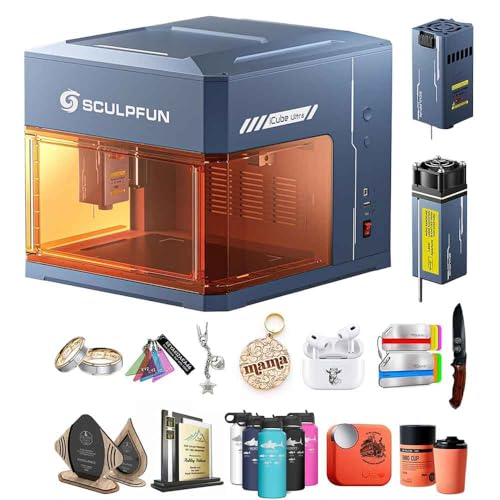
SCULPFUN iCube Ultra Dual Laser Engraver
What We Like
- Fully enclosed Class 1 safety for home use
- Dual laser covers wood, metal, and plastic
- Auto-focus and one-click start for beginners
- Built-in smoke filter reduces odors
Trade-offs
- 80mm max height restricts tall objects
A Class 1 fully enclosed laser means you can run it in a bedroom or classroom without safety goggles, which is the core of its family-safe design. The dual 12W blue and 1.2W infrared lasers handle everything from cutting plywood to marking a metal water bottle, covering most common hobby materials. This makes it a straightforward choice for households or educational settings where safety and material versatility are non-negotiable. Its one-click start and auto-focus get you from unboxing to a finished engraving in minutes, eliminating the technical hurdles that often stall new users.
The SCULPFUN iCube Ultra Dual Laser Engraver is a Class 1 safety-rated device with a full enclosure, so it can be used in a bedroom or classroom without safety goggles. Its 150 by 135 millimeter work area accommodates items like coasters and phone cases. This design prioritizes user safety and contained operation, making it a practical choice for beginners and home use where a larger, open-frame machine would be less suitable.
BlazeX M3 10W Laser Engraver
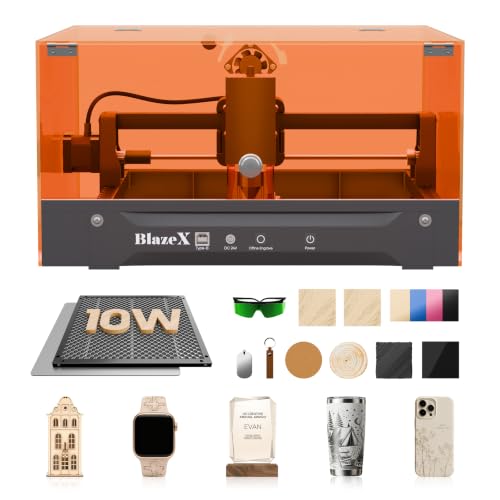
What We Like
- Complete starter kit with enclosure and materials
- Class 1 safety rating with tilt/lid sensors
- Wide software compatibility across platforms
- Supports rotary and air assist add-ons
Trade-offs
- 10W power is modest for thick or fast cutting
- Hobbyist kit lacks built-in camera for alignment
A 10W laser paired with a Class 1 enclosed design means you can start engraving safely on a kitchen table the same day it arrives. That’s the core appeal here. BlazeX bundles everything, protective enclosure, honeycomb bed, even a baker’s dozen of practice materials, so a true beginner can unbox and create without hunting for parts. It’s the logical choice for someone who wants a single purchase to cover their first foray into personalized jewelry and desktop crafts.
The BlazeX M3 is a compact machine, measuring 4.3 by 1.2 by 4.7 inches and weighing eight pounds, so it fits easily on a desktop. This small footprint is a trade-off for the work area, which is best suited for jewelry, personalized trinkets, and other small items. Its 0.01mm ultra-fine precision holds up within that space, allowing for detailed engraving on materials like wood and coated metal.
Product photos
SCULPFUN S70 MAX Laser Engraver
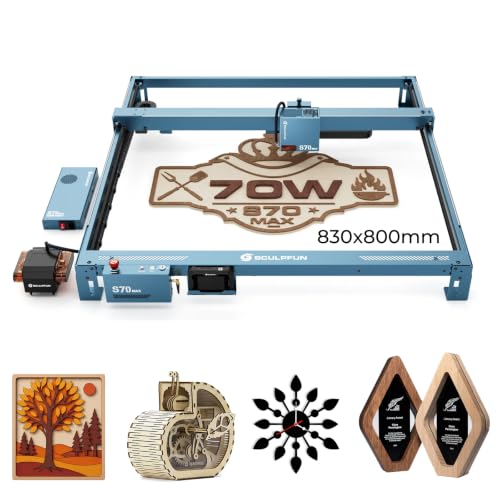
What We Like
- Powerful 70W laser cuts 40mm basswood in one pass
- Ultra-fine 0.01mm focus for crisp, detailed engraving
- Fully enclosed structure with multiple safety features
Trade-offs
- Weighs 41.9 pounds, requiring a dedicated, sturdy workspace
- Large 42-inch length demands significant floor or table space
- Primarily for wood, leather, and acrylic, not industrial metals
A 32.7 by 31.5 inch engraving bed changes the game for anyone needing to handle big sheets or batch jobs. This machine is built for the hobbyist or small shop that has outgrown smaller desktop engravers. Its genuine 70W laser module provides the muscle to cut through thick wood and acrylic efficiently, turning what would be a multi-pass chore on lesser machines into a single operation. The fully enclosed Class 1 design means you can run it with confidence, containing smoke and noise while the built-in safety features watch for trouble.
That capability comes with a real footprint. At over 40 pounds and needing a table over three feet long, this isn’t a tool you tuck away in a closet. It claims a permanent spot in your workshop. For intricate, high-detail work on smaller items like phone cases or coated metals, a faster, more specialized machine like the xTool F2 with its dual lasers might be a better fit. But if your projects are measured in feet, not inches, and demand serious cutting power, the S70 MAX delivers a workshop-scale tool without stepping into complex industrial systems.
Product photos
AtomStack Atelier Galvo Engraver
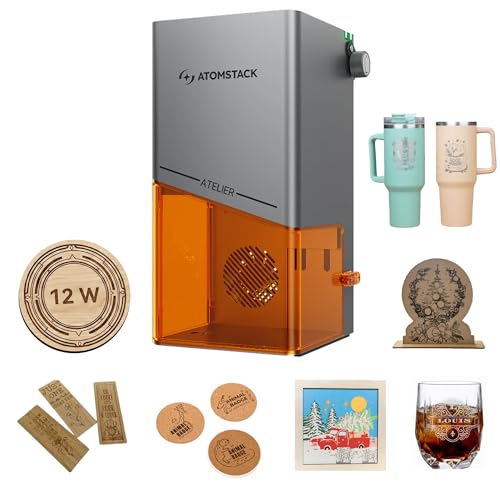
What We Like
- Fully enclosed Class 1 safety design
- AI camera for automatic batch alignment
- Ultrafast 4000mm/s galvo engraving speed
- Portable, pre-assembled at 7.7 lbs
Trade-offs
- Small 8×8 inch enclosure limits workpiece size
- 12W power is for engraving, not deep cutting
An engraving speed of 4000 millimeters per second turns what used to be a waiting game into nearly instant customization. That’s the core of the AtomStack Atelier. It’s a galvo laser, so the mirror moves the beam, not the whole head. This makes it blisteringly fast and perfectly suited for someone who needs to personalize dozens of small items, think keychains, dog tags, or jewelry patches, on the spot at a market or event. The integrated AI camera is the other half of the equation, letting you lay out a batch of items and have the machine automatically align and repeat the design without manual fuss. At just 7.7 pounds and fully enclosed for safety, you can genuinely set it up anywhere there’s an outlet.
Speed and portability come with a limited work area. The engraving space fits within an 8.0 by 8.0 inch footprint, which is ideal for small items like keychains or dog tags but not for large plaques. Compared to a larger gantry-style machine, this galvo system trades bed size for its ultrafast 4000mm/s motion and batch processing. If your work involves high-volume personalization of small objects and you need to easily move your setup, the Atelier’s enclosed design and AI camera make repetitive, aligned tasks straightforward.
Product photos
ORTUR Laser Master 2 S2 Engraver

What We Like
- 10W optical power for serious cutting and engraving
- Large 390x410mm work area for bigger projects
- Built-in safety G-sensor and auto-stop features
- Modular, all-metal design for easy assembly and repair
Trade-offs
- Class 4 laser requires strict safety protocols and an enclosure
- No built-in camera for positioning or batch processing
A true 10W optical diode laser gives you the muscle to cut through 20mm wood and 30mm acrylic, moving it beyond simple engraving into legitimate light-duty fabrication. That power, paired with a generous 390x410mm bed, makes this a foundational tool for a budget-conscious workshop. The industrial-grade metal frame provides a stable platform for consistent results, and the modular design means you can fix or upgrade components down the line without replacing the whole machine. It’s built for the maker who needs reliable, repeatable performance without a premium price tag.
Operating as a Class 4 laser, it requires a dedicated, ventilated space and serious safety practices, not casual desktop use. The open-frame design lacks a positioning camera, so setup and alignment are manual processes. This differs from enclosed models like the xTool M2, which integrate more features for user convenience.
Product photos
KoveYzao P1 Diode Laser Engraver
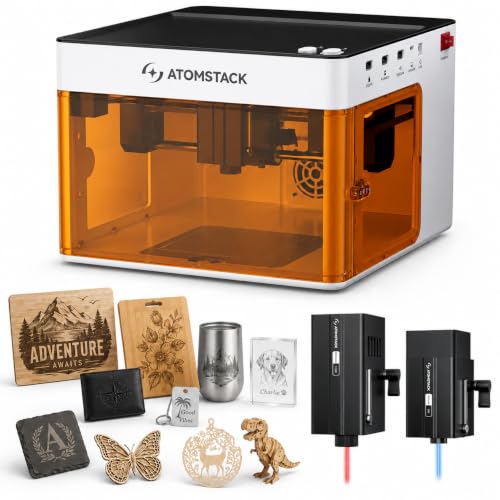
What We Like
- True dual-laser capability for metal and wood
- Fully enclosed Class 1 safety with multiple sensors
- Compact, pre-assembled design for easy setup
- Compatible with popular software like LightBurn
Trade-offs
- 110mm work area limits project size
- Only 3mm basswood cut depth with the diode laser
A 5000mW diode laser paired with a 1200mW infrared module means you can switch from engraving wood to marking metal without buying a second machine. That dual capability in a pre-assembled, Class 1 enclosed package makes the KoveYzao P1 a remarkably straightforward choice for a hobbyist wanting to experiment with different materials. It’s the machine you pull out of a cabinet, plug in, and start personalizing small items like keychains, coasters, or jewelry. The compact 110mm square work area and 6.7-pound weight are clear trade-offs for that plug-and-play convenience.
The defined workspace and dual lasers prioritize material versatility over large-scale work. You can cut 3mm basswood or mark metals, but not handle bigger items like plaques some other models engrave. For projects that fit within its business-card-sized area, this setup delivers two functions in one machine’s footprint. That efficiency is useful where bench space is limited.
Product photos
How We Evaluated Diode Laser Engravers
Our evaluation focused on comparing critical specifications from manufacturers and understanding real-world performance through expert round-ups and owner feedback patterns. We prioritized three key criteria: laser power and type for material compatibility, work area size and machine design for safety and project scope, and the overall user experience, including software and setup.
The first major factor was laser capability. We compared optical wattage to gauge cutting depth and speed, and noted which machines offer dual-laser systems for handling metals. Next, we assessed the physical design, favoring fully enclosed Class 1 safety models for home use while noting the larger work areas of open-frame designs. Finally, we evaluated the user journey, from assembly and included accessories to software compatibility and learning resources.
This is a research-led evaluation, not a hands-on test. We cannot verify individual claims about cut quality or long-term durability. Our goal is to arm you with a clear comparison so you can match a machine’s documented strengths to your specific workshop goals and safety requirements.
What To Look For In Diode Laser Engravers
Diode lasers are a fantastic, budget-friendly entry point into laser engraving and cutting. To pick the right one, you need to look beyond the advertised wattage and consider your workspace, materials, and safety.
Focus on laser type and power for your materials, enclosure for safety, work area for project size, and included software for ease of use. A complete starter kit can save beginners time and money.
Laser Type and Power
The laser’s output determines what you can do. Optical wattage (not electrical input) indicates cutting ability; a 10W diode can cut thin wood and acrylic, while a 20W model like the ATOMSTACK A20 PRO V2 handles thicker materials much faster. For engraving bare metals like stainless steel, you need an infrared (IR) or fiber laser module. Many modern machines, such as the SCULPFUN iCube Ultra, combine a blue diode and an IR laser in one dual-laser system for maximum material versatility, from wood to metal.
Enclosure and Safety
Safety is the most critical consideration for home use. A fully enclosed laser with a Class 1 safety rating, like the xTool M2, contains all light and fumes. This design makes it safe for family rooms or classrooms. Open-frame Class 4 lasers are more powerful and offer larger work areas, but they require you to build or buy a separate enclosure. You must also wear safety glasses and follow strict protocols. Always check for built-in safety features like lid sensors, tilt alarms, and fire detection systems.
Work Area and Design
Your project size is limited by the machine’s engraving area. Compact, enclosed models like the KoveYzao P1 are great for small crafts but can’t handle a full sheet of plywood. For large panels, you need a machine like the SCULPFUN S70 MAX, though its 42-inch length demands dedicated space. Also consider portability; fully assembled portable laser engravers like the AtomStack Atelier Galvo are ideal for mobile makers. The machine’s design also affects setup, some require assembly, while others are plug-and-play.
Software and User Experience
Beginners should prioritize machines with intuitive, first-party software. Many kits, including the Carverall K15 Pro, offer free design software with AI tools and offline control. Compatibility with industry-standard programs like LightBurn is a major plus for advanced users. Also, look at what’s included. A beginner laser engraver kit with safety glasses, materials, and a rotary attachment provides tremendous value and lets you start immediately, which is why we value complete kits for newcomers.
- Check if the software is free or requires a subscription.
- Look for features like camera alignment for precise placement.
- Verify offline operation capabilities if you lack a constant computer connection.
- Research community and manufacturer support for troubleshooting.
- Consider future upgrade paths, like adding an IR laser head.
For your first laser, a fully enclosed Class 1 machine or a complete starter kit reduces risk and lets you focus on creating.
Diode Laser Engravers Compared
The comparison table below highlights the key differences between our top picks at a glance.
| Product | Laser Power | Safety Class | Max Engraving Speed |
|---|---|---|---|
| xTool M2 10W Laser Engraver | 10W diode laser | Class 1 enclosed | N/A |
| xTool F2 Dual Laser Engraver | 15W Diode & 5W IR | Class 4 | 6000mm/s |
| ATOMSTACK A20 PRO V2 Laser Engraver | 20000mW (20W) | N/A | 400mm/s |
| Carverall K15 Pro Laser Engraver | 10.36-10.58W output | Class 1 | 15,000mm/min |
| SCULPFUN iCube Ultra Dual Laser Engraver | 12W diode & 1.2W IR dual | Class 1 | 10000 mm/min |
| BlazeX M3 10W Laser Engraver | 10W | Class 1 | N/A |
| SCULPFUN S70 MAX Laser Engraver | 70W (70000mW) diode | Class 1 certified | N/A |
| AtomStack Atelier Galvo Engraver | 12W Diode Galvo | N/A | 4000 mm/s |
| ORTUR Laser Master 2 S2 Engraver | 10000mW (10W optical) | Class 4 | N/A |
| KoveYzao P1 Diode Laser Engraver | 5000mW diode & 1200mW IR | Class 1 | 10000 mm/min |
Frequently Asked Questions
What is the best diode laser engraver?
The best model depends on your primary need. For a safe, versatile, and easy-to-use machine suitable for most home crafters, the xTool M2 10W is an excellent overall choice. For cutting thick materials quickly, a high-power model like the ATOMSTACK A20 PRO V2 is better, while those needing to mark metal should look at dual-laser systems like the xTool F2.
What is the strongest diode laser?
In our selection, the SCULPFUN S70 MAX offers the highest power at 70W, capable of cutting through 40mm of basswood in a single pass. This makes it a powerhouse for wood engraving for workshop-based projects. For more general heavy-duty cutting among standard diode models, 20W options like the ATOMSTACK A20 PRO V2 provide strong performance.
Are diode lasers any good?
Yes, diode lasers are excellent for engraving and cutting a wide range of hobbyist materials like wood, leather, acrylic, and coated metals. They offer a cost-effective way to achieve stunning craftsmanship at a fraction of the cost of CO2 lasers or fiber lasers. Their affordability and ease of use make them perfect for beginners and small businesses.
What can a diode laser engraver cut?
Diode lasers can cut materials that absorb their blue light wavelength well. This includes woods like basswood and plywood (up to their rated depth), acrylic, leather, paper, and some plastics. They typically cannot cut clear acrylic or bare, uncoated metals. For those materials, you would need a different laser technology.
Is a diode or CO2 laser better?
Your choice depends on the materials you plan to use. Diode lasers are more affordable and energy-efficient, which makes them great for beginners working with wood, leather, and dark acrylic. CO2 laser engravers are generally more powerful and can cut any color of acrylic and thicker wood faster. However, they are larger and more expensive. For home laser engravers, a diode is often the best starting point.
The Bottom Line
For most home crafters and DIY makers starting out, the xTool M2 10W Laser Engraver is the best overall choice. Its fully enclosed Class 1 safety, dual-camera guidance, and modular design provide a safe, accurate, and future-friendly foundation for personalized projects.
If you’re on a tight budget but need a large work area, the ORTUR Laser Master 2 S2 is a capable workhorse, though you must plan for safety. First-time buyers should strongly consider a complete kit like the Carverall K15 Pro or BlazeX M3, which include everything needed to start engraving immediately.
No matter which model you choose, prioritize safety above all. A fully enclosed Class 1 laser is the single most important factor for a worry-free experience in a home or shared workspace, letting you focus on creation without constant concern.
