10 Best Dual Laser Engravers in 2026
This post contains affiliate links. As an Amazon Associate, we earn from qualifying purchases.
For the best dual laser engraver overall, we chose the xTool F1 Ultra Dual Laser Engraver for its powerful dual 20W lasers that handle both metals and non-metals at high speed. The LaserPecker LP5 is our top pick for portability, while the xTool F2 Ultra wins the award for Best For Industrial Power.
Choosing a dual laser means finding one machine for both metal engraving and wood or acrylic projects. This often involves balancing laser power, workspace size, and safety features. Our guide is based on manufacturer specifications, expert round-ups, and patterns in owner feedback.
We’ll help you understand the key trade-offs to find the right machine for your workshop.
Top 10 Dual Laser Engravers in the Market
Certain content that appears on this site comes from Amazon. This content is provided "as is" and is subject to change or removal at any time.
The Best Dual Laser Engravers, Reviewed
xTool F1 Ultra Dual Laser Engraver

What We Like
- Dual 20W lasers handle metals and non-metals with ease
- High-speed engraving suitable for in-store customization
- Large, expandable work area for a desktop fiber laser
- Integrated 16MP camera enables automated batch processing
Trade-offs
- At 43.9 lb, it's a substantial desktop unit, not portable
- Fiber laser cuts only thin sheet metal (e.g., 0.3mm stainless)
- Auto Conveyor for full production streamlining is a separate purchase
A 20W fiber laser and a 20W diode laser in one machine let you switch from engraving a stainless steel water bottle to cutting a wooden sign without needing a second tool. Its speed hits 10,000mm/s, which is fast enough for walk-in customer jobs right on the counter. This makes it the right pick for a small shop owner or serious maker who needs a single, versatile workhorse for both metal and everyday materials. It also offers the bonus of automated batch engraving via its smart camera system.
Weighing 43.9 pounds, the xTool F1 Ultra requires a dedicated workbench rather than being moved around. Its fiber laser engraves all metals in seconds, but can only cut thin sheets like 0.3mm stainless steel. For a user needing a more compact dual-laser machine, the LaserPecker LP5 has smaller dimensions, but the F1 Ultra’s 220mm x 220mm desktop working area is the largest for a machine in its category.
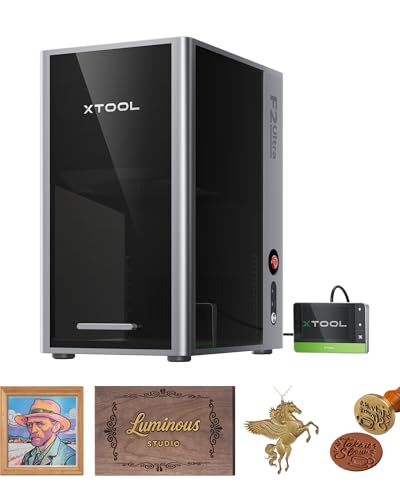
xTool F2 Ultra Dual Laser Engraver
What We Like
- 60W MOPA fiber laser enables color engraving on metals
- Industrial 15,000 mm/s speed drastically reduces job times
- AI cameras auto-detect materials and suggest settings
- Expandable work area supports automated batch processing
Trade-offs
- Class 4 laser requires serious safety protocols and ventilation
- Large 20.5-inch height demands significant bench space
- Industrial power and complexity suit pros, not casual hobbyists
Combining a 60-watt MOPA fiber laser with a 40-watt diode brings industrial-level work to a desktop, letting you cut 2mm metal and engrave over a hundred colors on materials like stainless steel or titanium. This dual-system handles everything from leather to brass, so a professional shop can manage high-volume custom orders without needing two separate machines. AI cameras and pre-set color files remove guesswork, shifting focus from test runs to production.
That industrial capability requires a dedicated, well-ventilated space because it is a Class 4 laser, not a machine for a kitchen table. Its 20.5-inch height needs a solid bench, though the 8.7-inch square base provides a generous desktop working area. For makers who frequently switch between metal and non-metal projects and want a single compact machine, research mentions the xTool F1 Ultra as another ideal option. But for turning a profit on metal, the F2 Ultra’s speed and power are hard to match.
LaserPecker LP5 Smart Dual Laser Engraver

What We Like
- Dual 20W system for metal cutting and color engraving
- Compact, handheld-ready design for on-site work
- Bundle includes essential production accessories
- Mobile app control for simple, click-and-go operation
Trade-offs
- Workspace is smaller than many desktop competitors
- Modular design requires setup for different job types
A 20W fiber laser paired with a 20W diode laser lets you cut thin metal and engrave color on plastics right out of the box, which is serious capability for a portable unit. That’s the core appeal of the LaserPecker LP5. It’s built for someone who needs to take the shop to the customer, not the other way around. The included slide extension, rotary module, and air purifier mean you can start engraving mugs or cutting wood for storefront production immediately. For mobile customization jobs where space is tight but professional results are required, this setup hits a unique sweet spot.
The trade-off for that portability is workspace size. Research also suggests the workflow, while promoted as simple, may have a steeper learning curve compared to some dedicated desktop units. If your work stays in the garage, a machine like the xTool F1 Ultra offers a similar dual-laser setup in a larger, more stationary footprint that some users find more intuitive for consistent shop use.
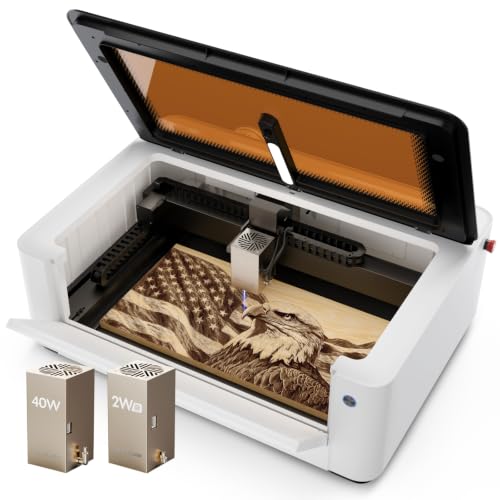
LaserPecker LX2 Dual Laser Engraver
What We Like
- Tool-free quick-swap dual-laser system.
- Exceptional 1000 mm/s speed for batch work.
- Fully enclosed Class 1 safety system.
- Large integrated work area saves space.
Trade-offs
- LaserPecker software can be less intuitive than competitors'.
- Enclosed design limits overhead material height.
A 1000 mm/s engraving speed fundamentally changes production pacing, letting you complete large batches in a fraction of the usual time. This makes the LX2 a serious contender for small shops needing to ramp up output. Its enclosed Class 1 safety system and tool-free laser swapping mean you can run it confidently in a busy workspace, jumping between deep 40W cuts and fine 2W IR marks on metals without breaking stride. The zero-loss alignment guarantees your material stays put for perfect single-pass jobs.
The LaserPecker LX2’s 1000 mm/s speed and Class 1 active safety system deliver fast, protected batch processing, but its workflow involves a trade-off. Research indicates the LaserPecker software isn’t as streamlined as some alternatives; the xTool F1 is reported to be much easier to use. You’re getting raw performance and pro-grade safety here, not the most polished user experience.
GWEIKE G3 Basic Dual Laser Engraver

What We Like
- Dual 20W lasers for metal and non-metal
- High-resolution 16MP camera for visual positioning
- Fully enclosed, Class 4 safety-compliant design
- Compact desktop footprint at 13" x 8.7"
Trade-offs
- 6.7-inch square work area is small for large projects
- Lower combined laser power than the xTool F2 Ultra
A 16MP smart camera with autofocus and preview turns setup from a guessing game into a precise, fast operation. This is the core advantage of the GWEIKE G3 Basic, making it ideal for anyone who frequently works with pre-positioned items or needs perfect alignment on every piece. The dual 20W lasers handle both metal marking and non-metal cutting in one compact, fully enclosed machine, which is a serious space-saver for a desktop workshop. It’s built for the maker or small shop that values repeatable accuracy and a streamlined workflow over a massive working bed.
That small 6.7-inch square work area is the trade-off for its compact size. You won’t be engraving large plaques or cutting big sheet goods. For larger projects, you’d need to look at a model like the OMTech Dual-Laser Engraver with its 10-inch work area. But if your projects fit within that footprint and you demand foolproof positioning, the G3 Basic’s camera system is a significant efficiency upgrade that minimizes material waste and frustration.
Product photos
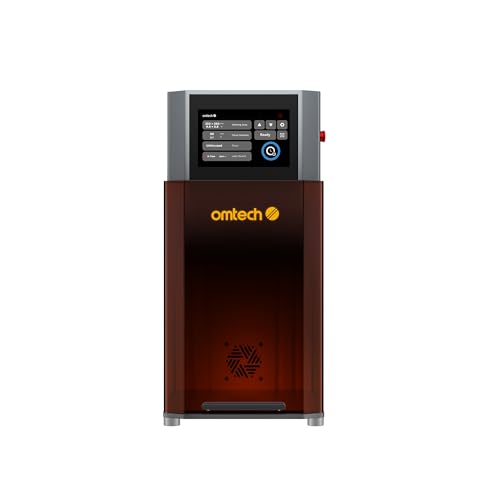
OMTech Dual-Laser Engraving Machine
What We Like
- Autofocus ensures precise calibration with one button.
- High-speed 10,000 mm/s engraving boosts productivity.
- 16 MP camera captures multiple targets for batch jobs.
- Fully enclosed, Class 2 laser design for safe operation.
Trade-offs
- Laser Class 2 with 0.874 mW output power
- Requires managing two separate laser systems
A 16 MP camera paired with two distinct work areas lets you load and capture multiple items in a single scan, turning what could be a full day of manual setup into a one-click operation. For a maker running a side-hustle or small shop, that’s the difference between fulfilling five custom orders and twenty. The 30W fiber and 20W diode combo covers virtually any material that walks in the door, from wedding rings to leather journals, without needing a machine swap. This is built for the craftsperson who needs to move from a prototype to a production run overnight.
The trade-off is a dedicated bench-top unit with a fully enclosed design, not a portable tool. While autofocus and a touchscreen simplify operation, you manage two different laser types and their settings. For users who require extreme portability, a more compact unit like the LaserPecker LP5 exists, but the OMTech system creates a contained workstation for consistent batch production.
Product photos
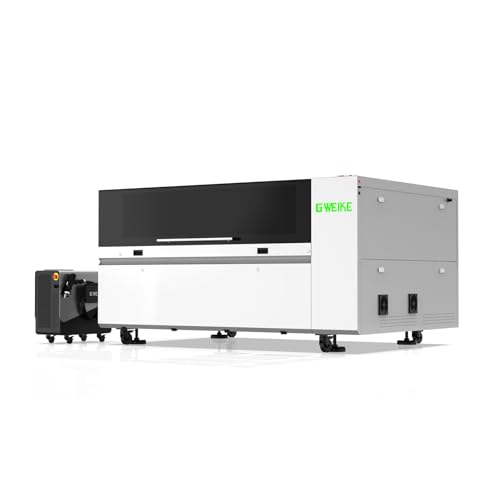
GWEIKE M3 Ultra Laser System
What We Like
- 6-in-1 system replaces multiple industrial machines
- Dual-laser handles metal and non-metal materials
- Industrial CNC gantry for large-sheet processing
Trade-offs
- Industrial scale and complexity exceed hobbyist needs
A 1200W fiber laser paired with a 130W CO₂ source means this isn’t just an engraver, it’s a full-scale fabrication center. That power lets you weld 5mm steel, cut 10mm carbon steel, and clean surfaces, all while the CO₂ side handles wood and acrylic. It’s built for a workshop that needs to move from prototype to production run without switching machines. The ±0.01mm repeatability and 54 by 36 inch work area are for someone processing full sheets and detailed parts daily, where time saved on setup pays for the machine.
The trade-off is its sheer physical presence. At over seven feet long and needing serious safety containment for its Class 4 lasers, this is a permanent shop installation. For a user comparing it to a typical desktop unit, the GWEIKE M3 Ultra operates in a completely different league. It streamlines an entire metal and non-metal workflow, but it demands the space, power, and industrial mindset to match. This is the machine you buy when your business outgrows single-function tools.
Product photos
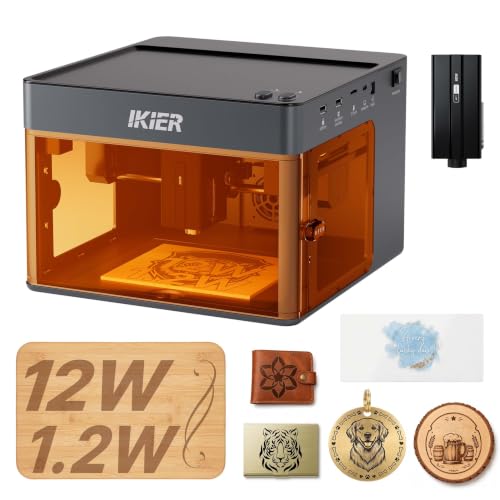
IKIER Flex Dual Laser Engraver
What We Like
- Fully enclosed Class 1 safety, no goggles needed
- Handles over 300 materials, including metals
- Intelligent software with 1,000+ material presets
- Compact 10-inch cube footprint for small shops
Trade-offs
- Smaller 10×10 inch area limits project size
- Infrared laser is 1.2W, suited for marking not deep engraving
Its Class 1 certified enclosure is the real draw, letting you run it on a kitchen table without safety glasses. That’s a major confidence booster for a first-time user or anyone working in a shared space. The compact 10-inch cube footprint and Core XY setup that hits 10,000mm/min make it a tidy, surprisingly quick machine for smaller items like coasters and phone cases. It’s a solid pick for a cautious beginner who wants to safely explore over 300 materials, from leather to stainless steel, with software that works right out of the box.
The trade-off for that safety and simplicity is in scale and speed. The work area is half the size of many other desktop engravers, so you’re not engraving large plaques. The 12W diode and 1.2W infrared lasers are effective, but they’ll take longer on dense materials than the more powerful dual lasers in this guide. Think of the Flex as your workshop’s reliable drill press, safe, capable for most tasks, and easy to learn on, before you graduate to the industrial-grade CNC machines.
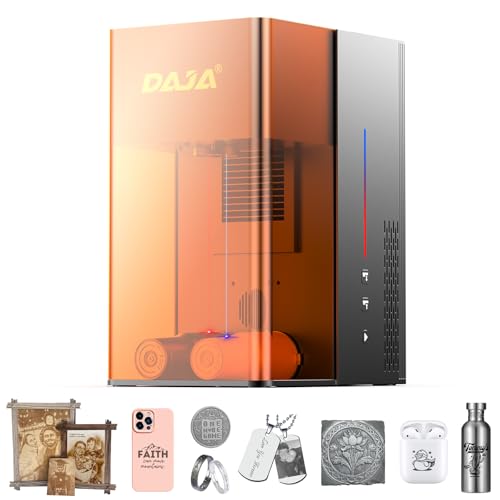
DAJA M6 All-in-One Dual Laser Engraver
What We Like
- All-in-one, plug-and-play design needs no assembly.
- Dual red-light focusing system simplifies setup.
- Effective on all metals and many non-metals.
- High-quality components promise long operational lifespan.
Trade-offs
- Its 30W fiber laser is less powerful than some 60W MOPA competitors.
A truly plug-and-play design means you can unbox it and start engraving without wrestling with assembly. That integrated, all-in-one form factor bundles the laser source and controls into a single unit, saving you the bench space that separate modules consume. This makes the DAJA M6 a straightforward choice for a home studio or a small business that needs to start marking jewelry, tools, or promotional items quickly, not troubleshoot a complicated setup. The dual red-light focus system reinforces this practicality, letting you dial in the perfect height in seconds to reduce material waste.
The DAJA M6’s all-in-one design integrates the laser and controls into a single cabinet, so it requires no complex assembly and saves space compared to separate component systems. This plug-and-play approach prioritizes a compact, ready-to-use setup for home studios or small shops where floor space is limited. You will need to verify your workbench has enough height for its 25.6-inch cabinet.
Product photos
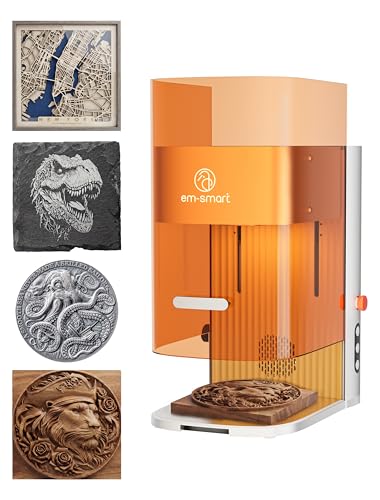
EM-Smart Dual SE Dual Laser
What We Like
- Dual lasers handle all metals and non-metals
- Extremely fast 15,000mm/s engraving speed
- Enables 3D embossing and deep engraving
- Fully enclosed Class 1 safety for retail use
Trade-offs
- Large 15.7" x 23.0" footprint requires ample bench space
- No integrated camera for alignment mentioned
An engraving speed of 15,000mm/s is the headline here, turning what used to be a lengthy job into a quick task. That blistering pace combines with a true 20W fiber laser for metals and a 20W diode for everything else. This makes it a serious production machine for a maker or small shop that needs to push out high-detail, multi-material work fast, like custom jewelry or promotional items. They will also value the safety of a fully enclosed Class 1 system for operating around customers.
This dual-laser engraver combines industrial speed with a fully enclosed Class 1 safety rating, so it’s built for a permanent, safe station in a workshop or retail space. Its 220mm square work area accommodates most common project sizes without needing lens swaps. While portable options like the LaserPecker LP5 exist for on-site work, the EM-Smart Dual SE is anchored by its protective enclosure and integrated safety systems.
Product photos
How We Evaluated Dual Laser Engravers
Our evaluation started with a deep dive into manufacturer specifications and documentation for each machine. We compared core capabilities like laser type, power, work area dimensions, and safety classifications. We also studied expert round-ups and technical analyses from industry publications to understand performance benchmarks and common user experiences.
The most important criteria were the machine’s dual-laser composition and its effective power on target materials. We also considered the physical workspace size and whether it could be expanded. Finally, we looked at integrated safety and convenience features like enclosures or camera systems. The goal was to find machines that genuinely offered a “two-in-one” solution without major compromises on either laser’s capability.
A key limit of our research-based method is that we cannot verify real-world cutting depth or engraving speed claims firsthand. We rely on documented specs and consistent patterns in professional and owner reports to gauge performance.
What To Look For In Dual Laser Engravers
Dual laser systems combine two different laser types, typically a blue-light diode for non-metals and an infrared or fiber laser for metals, in one machine. Your choice depends on which materials you use most and how you work.
Look for a machine whose combined laser powers match your primary materials, a workspace large enough for your typical projects, and safety features appropriate for your workshop environment.
Laser Composition and Power
The core of a dual system is its two lasers. A common setup pairs a ~10W-20W blue diode laser for wood, leather, and plastics with a 1W-60W infrared or fiber laser for marking and engraving metals. Higher wattage on the metal laser, like the 60W MOPA fiber in the xTool F2 Ultra, enables faster engraving, deeper marks, and even color marking on stainless steel.
For a broader look at machines specialized for metal, our guide on metal laser engravers covers key considerations. Conversely, if your work is mostly wood, our resource on laser engravers for wood is a better starting point. Ensure the machine’s advertised power is the optical output, not the electrical input, for an accurate comparison.
Workspace and Footprint
The available work area dictates your maximum project size. Compact, portable units like the LaserPecker LP5 have small areas suited for jewelry or phone cases, while desktop models like the xTool F1 Ultra offer larger, sometimes expandable, beds. Consider both the engraving area’s dimensions and the machine’s overall physical footprint on your bench. An industrial-scale machine like the GWEIKE M3 Ultra requires a permanent, sizable workshop installation. If space is a premium, a portable laser engraver might be the right fit.
Safety and Operational Features
Laser class is a critical safety indicator. A fully enclosed Class 1 laser, like the IKIER Flex, can operate safely without goggles in a shared space. Open-frame or Class 4 lasers require strict safety protocols, dedicated ventilation, and protective eyewear. Integrated features like a high-resolution camera (found on the GWEIKE G3 Basic) simplify alignment and batch processing, while autofocus systems maintain precision across varied material thicknesses. For those prioritizing safety in a home setting, exploring home laser engravers with enclosed designs is wise.
.#### Quick Workshop Checklist
- Ventilation: Does the machine require an external fume extractor, or is one integrated?
- Software: Is the control software known to be user-friendly, or does it have a steep learning curve?
- Accessories: Are rotary attachments for cylindrical objects or conveyor belts for batch processing available or included?
- Support: Does the manufacturer have a reputation for accessible customer service and clear documentation?
Always verify the laser safety class and ensure your workspace meets its requirements before purchasing.
Dual Laser Engravers Compared
The table below lets you directly compare the key specifications of our top picks at a glance.
| Product | Laser Types & Power | Max Engraving Speed | Standard Work Area |
|---|---|---|---|
| xTool F1 Ultra Dual Laser Engraver | 20W Fiber & 20W Diode | 10,000mm/s | 220mm x 220mm |
| xTool F2 Ultra Dual Laser Engraver | 60W MOPA fiber & 40W diode | 15,000 mm/s | 8.7" x 8.7" desktop |
| LaserPecker LP5 Smart Dual Laser Engraver | 20W Fiber + 20W Diode | Up to 10,000mm/s | N/A |
| LaserPecker LX2 Dual Laser Engraver | 40W Diode & 2W IR | 1000 mm/s | N/A |
| GWEIKE G3 Basic Dual Laser Engraver | 20W fiber laser and 20W diode laser | 15000 mm/s | 6.7" x 6.7" |
| OMTech Dual-Laser Engraving Machine | 30W Fiber & 20W Diode | 10,000 mm/s | 10"x10" & 6"x6" |
| GWEIKE M3 Ultra Laser System | 1200W fiber laser and 130W CO₂ laser | N/A | 1380 x 920 mm |
| IKIER Flex Dual Laser Engraver | 12W Diode, 1.2W Infrared Laser | 10,000mm/min | 10.0 x 10.0 inches |
| DAJA M6 All-in-One Dual Laser Engraver | 20W Diode & 30W Fiber | N/A | N/A |
| EM-Smart Dual SE Dual Laser | 20W fiber + 20W diode | 15,000 mm/s | 220mm x 220mm |
Frequently Asked Questions
What is the best dual laser engraver?
The best dual laser engraver for most users is the xTool F1 Ultra, which we named Best Overall. It provides a strong balance of dual 20W laser power for both metals and non-metals, a large and expandable work area, and high-speed operation suitable for small business production. For a wider look at all laser types, our comprehensive laser engraver guide offers more context.
What are the top 5 laser engravers?
Our top ten picks in this category are the xTool F1 Ultra (Best Overall), xTool F2 Ultra (Best For Industrial Power), and LaserPecker LP5 (Best Portable Dual Laser). The list also includes the LaserPecker LX2 (Best High-Speed Enclosed Design) and the GWEIKE G3 Basic (Best Smart Camera System). Each excels in different areas like raw power, portability, or integrated features.
Which is better, xTool or LaserPecker?
The better brand depends on your needs. XTool models like the F1 Ultra and F2 Ultra generally offer larger work areas and higher power, catering to shop-based users and small-scale production. LaserPecker models like the LP5 and LX2 prioritize compact, portable designs and fully enclosed safety, making them strong for mobile work or shared home workshops.
What is the best laser engraver for hobbyists?
For hobbyists new to dual lasers, the IKIER Flex Dual Laser Engraver is an excellent choice. Its fully enclosed Class 1 safety means no goggles are needed, it handles over 300 materials, and its intelligent software with material presets simplifies the learning curve. Its compact footprint is also ideal for a home shop.
Can one laser engraver do everything?
No single laser engraver can do everything perfectly. Dual laser machines bridge the gap between metals and non-metals but still have limits. For instance, a dual system’s fiber laser typically only cuts thin sheet metal, while its diode laser may not cut clear acrylic efficiently. For heavy-duty cutting of wood and acrylic, a dedicated CO2 laser engraver is often best.
The Bottom Line
The xTool F1 Ultra Dual Laser Engraver is our best overall pick because it delivers powerful, fast performance on both metals and non-metals in a capable desktop package. It’s ideal for a small business owner or dedicated maker who needs a single, versatile machine for in-store customization or production work.
If your budget is tighter or your primary concern is safety in a shared home space, look to the IKIER Flex. For professionals needing industrial-speed metal marking, the xTool F2 Ultra is unmatched. Mobile entrepreneurs should consider the LaserPecker LP5.
Ultimately, matching the machine’s dual-laser composition and power to your most-used materials is the single most important factor. A machine that excels on both fronts will serve you well for years.
